How To Automate TDS Computation In Compiere ERP?

Tax Deducted at Source (TDS) is a system introduced by Income Tax Department, where a person responsible for making specified payments such as salary, commission, professional fees, interest, rent, etc. is liable to deduct a certain percentage of tax before making payment in full to the receiver of the payment.
Instead of receiving tax on your income from you at a later date, the govt wants the payers to deduct tax beforehand and deposit it with the govt
The government has a 4-tier tax structure for all goods and services under the slabs- 5%, 12%, 18% and 28%.
For Services like Consultancy Charges, audits, HR Advisory, Taxation, the Tax Deducted at Source as per Indian Income Tax Act 1961 will also be applicable
Let us see How To Automate TDS Computation In Compiere ERP.
- In TDS & RCM Combination, the rate defined @ Summary Level has to be RCM Rate only)
- Create TDS & RCM ( 10% & 18%) – New at Summary Level
- Tax Category to be selected as GST – TDS – RCM
- Summary Level check box to be checked
- Rate to be given as 18
- A Valid from Date to be given & saved
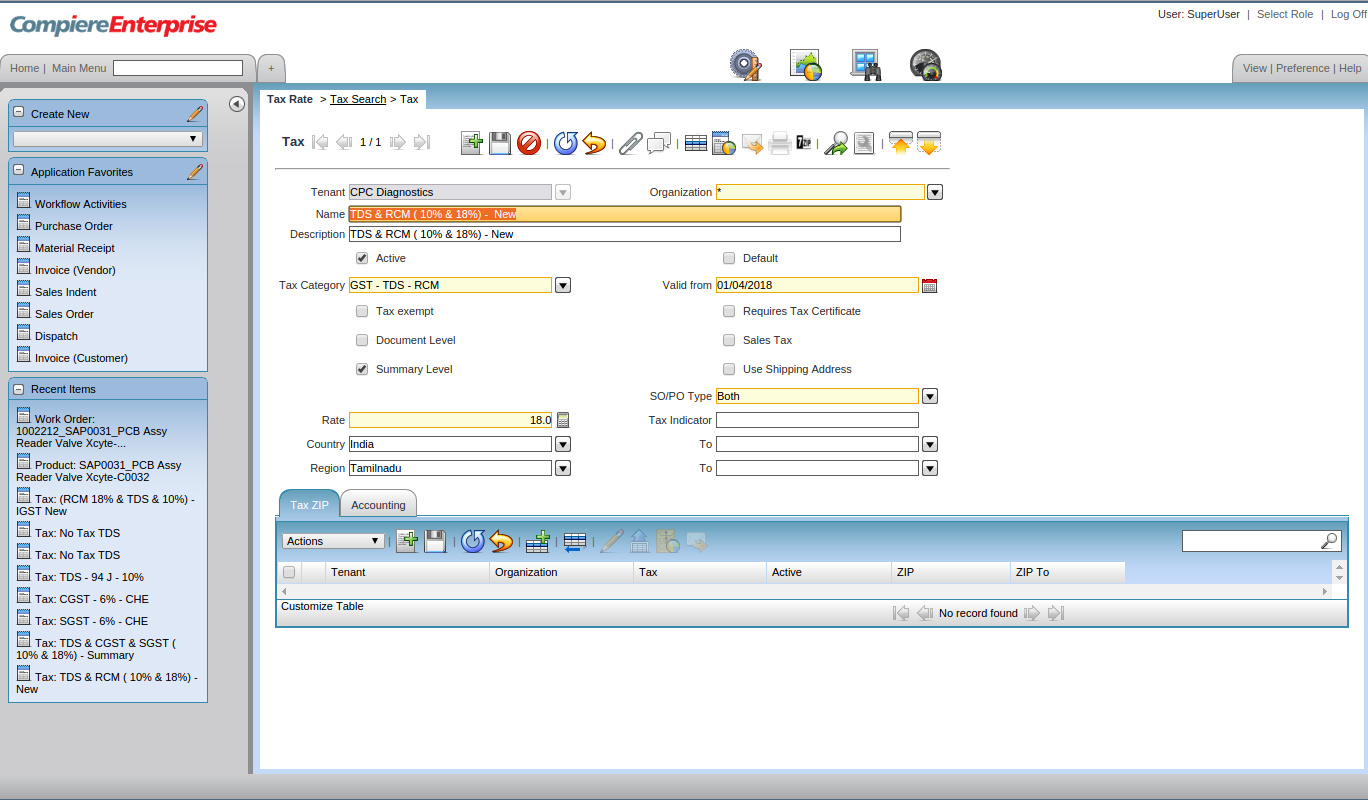
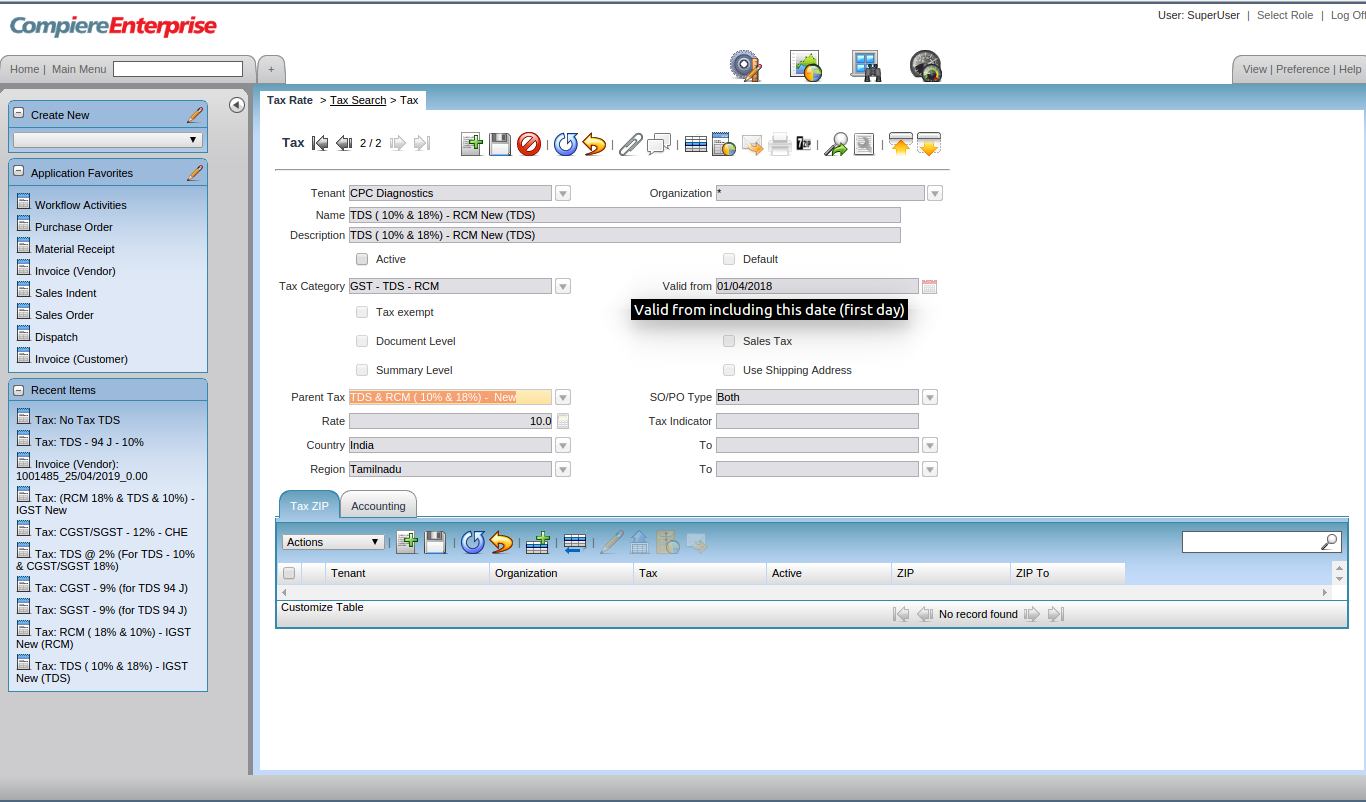
- TDS ( 10% & 18%) – RCM New (TDS) to be created as normal tax (TDS should be starting word and no extra words like GST & RCM to appear)
- Tax Category to be selected as GST – TDS – RCM
- A Valid from Date to be given
- Parent Tax to be TDS & RCM ( 10% & 18%) – New
- Rate to be given as 10%
- The accounting ledgers to be mapped to correct Account element

- Only the TDS section payable amount to be mapped in Tax liability & Tax credit & Tax due ledgers
- Click on the zoom button
- It will take to the search key window
- Remove the Organization mapped in Combination tab
- In the search key, if the account code is known, then it can be given and entry button press to get the account code
- If account code not known, then in the name tab mention TDS
- This will throw all the TDS related taxes and from them the correct tax can be selected
- Then once again the select has to be clicked in order to map the Organisation correctly by double-clicking
- RCM ( 18% & 10%) – (RCM)to be created as normal tax (RCM to be starting word and no other words like GST & TDS to appear)
- Tax Category to be selected as GST – TDS – RCM
- A Valid from Date to be given
- Parent Tax to be TDS & RCM ( 10% & 18%) – New
- Rate to be given as 18%
- The accounting ledgers to be mapped to correct Account element


- Only the RCM section payable amount to be mapped in Tax liability & Tax credit ledgers
- Click on the zoom button
- It will take to the search key window
- Remove the Organisation mapped in Combination tab
- In the search key, if the account code is known, then it can be given and entry button pressed to get the account code
- If account code not known, then in the name tab mention %RCM
- This will throw all the RCM related taxes and from them the correct tax can be selected
- Then once again the select has to be clicked in order to map the Organisation correctly by double-clicking
Accounting entry for Services with RCM & TDS
Example 1: Lorry service providers or UDS house cleaning providing GST related consultancy service based out of Chennai. This service has an RCM Rate of 18% TDS Deduction of 10% under Section 194 J of Income Tax Act, 1961 for INR 100000
| Particular | Debit | Credit |
| Housekeeping Acc Dr | 1,00,000 | |
| RCM Input – 18% | 18,000 | |
| RCM Liability – 18% | 18,000 | |
| To TDS – 94 J | 10,000 | |
| To Party | 90,000 | |
| Total | 1,18,000 | 1,18,000 |
Note: IF the vendor is based in Tamil Nadu & Client also in Tamil Nadu, then only RCM Local are applicable. If vendor is based out of Tamil Nadu, then RCM – IGST is applicable
