Multi-Warehouse Inventory Management with iDempiere for Distribution Companies
Track stock across every location. See how iDempiere ERP unifies multi-warehouse inventory for total supply chain visibility.
For distribution companies, inventory is rarely stored in a single location.
As a distributor grows, it may operate a central warehouse, regional distribution centers, branch warehouses, and smaller storage locations. Products may move between these locations depending on customer demand, stock availability, delivery requirements, and regional sales patterns.
Managing this inventory manually can become difficult. Distribution teams need to know not only how much stock they have, but also where that stock is located, which warehouse should fulfill an order, when inventory needs replenishment, and how stock should be transferred between locations.
This is where an ERP system such as iDempiere can help.
By managing warehouses, products, inventory transactions, purchasing, sales, and shipments within an integrated ERP environment, iDempiere can help distribution companies improve inventory visibility and control across multiple locations.
What Is Multi-Warehouse Inventory Management?
Multi-warehouse inventory management is the process of managing inventory across multiple warehouses from a coordinated system.
For a distribution company, this could include:
- Central distribution warehouse
- Regional warehouses
- Branch warehouses
- Transit locations
- Returns locations
- Spare-parts warehouses
- Customer-specific stock locations
Each warehouse may have different inventory levels and serve different customer regions.
For example:
| Warehouse | Region | Product A |
|---|---|---|
| Chennai | South India | 1,000 |
| Bangalore | South India | 400 |
| Hyderabad | South India | 250 |
| Mumbai | West India | 750 |
The company needs to know both the stock available at each warehouse and the total stock available across the distribution network.
With iDempiere, businesses can structure inventory operations around warehouses and storage locations while connecting inventory movements with other business processes.
Why Distribution Companies Need Multi-Warehouse Inventory Management
Distribution businesses typically handle large numbers of products and transactions.
Inventory can enter the business through suppliers, move between warehouses, and eventually be shipped to customers.
A typical distribution flow looks like:
Supplier → Central Warehouse → Regional Warehouse → Customer
At every stage, inventory information needs to remain accurate.
Without centralized inventory management, distribution companies may experience:
- Incorrect stock quantities
- Difficulty locating products
- Unnecessary purchases
- Overstock in some warehouses
- Stockouts in other warehouses
- Delayed order fulfillment
- Manual stock reconciliation
- Duplicate data entry
- Poor visibility across warehouses
An ERP-based approach can help connect these activities.
How iDempiere Supports Distribution Inventory Management
iDempiere provides an integrated ERP environment for managing core business processes such as sales, purchasing, inventory, and accounting.
For distribution companies, inventory can be managed across multiple warehouses and storage locations while transactions are connected to related business processes.
A simplified structure is:
Organization → Warehouse → Storage Location → Product → Inventory Transaction
This provides a framework for tracking inventory throughout the distribution process.
1. Manage Multiple Distribution Warehouses
A distribution company can organize its warehouse network according to its operational structure.
For example:
- WH-CHN – Chennai Central Warehouse
- WH-BLR – Bangalore Distribution Center
- WH-HYD – Hyderabad Distribution Center
- WH-MUM – Mumbai Distribution Center
Each location can be managed as part of the company’s overall inventory structure.
This allows inventory transactions to be associated with the appropriate warehouse instead of maintaining separate, disconnected inventory records.
2. Track Inventory by Warehouse
One of the most important requirements for distributors is knowing exactly where products are available.
Consider a distributor selling electronic components:
| Product | Chennai | Bangalore | Hyderabad | Mumbai | Total |
|---|---|---|---|---|---|
| Product A | 1,000 | 400 | 250 | 750 | 2,400 |
| Product B | 500 | 200 | 100 | 300 | 1,100 |
| Product C | 300 | 600 | 150 | 200 | 1,250 |
The distributor can use warehouse-level inventory information to make better decisions about order fulfillment, stock transfers, and purchasing.
Instead of asking several warehouse teams for their current stock position, management can work from centralized ERP information.
3. Improve Order Fulfillment
Distribution companies often receive customer orders from different regions.
A customer in Hyderabad may place an order while the nearest warehouse is almost out of stock. Another warehouse may have sufficient inventory.
Without visibility across warehouses, the company may unnecessarily delay the order or purchase additional stock.
With centralized inventory information, the business can determine which warehouse is best positioned to fulfill the order.
For example:
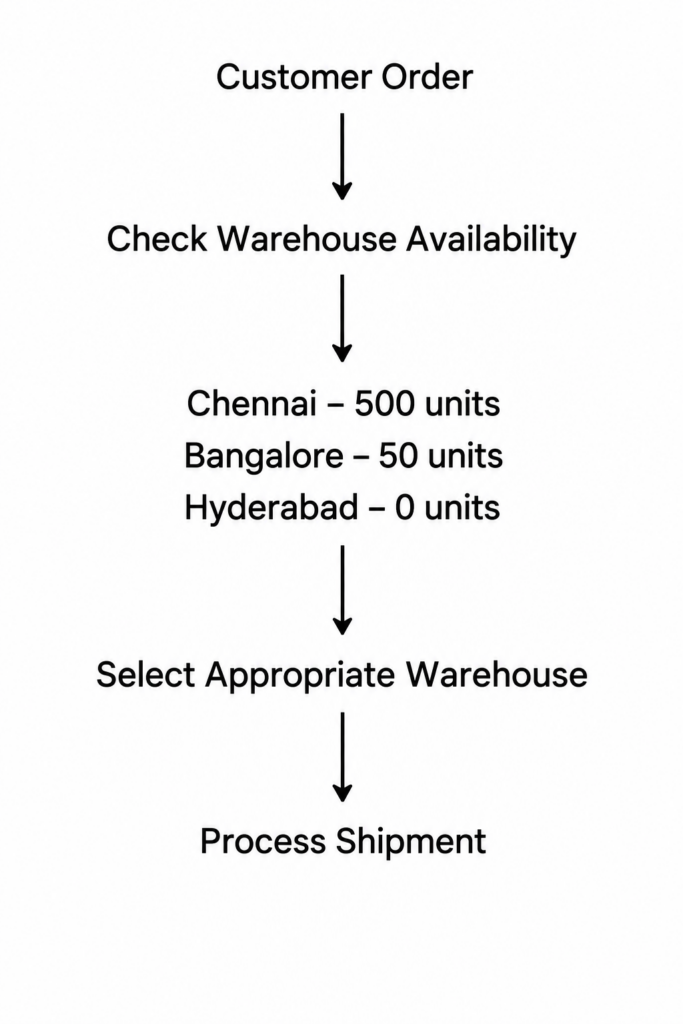
This can help distributors improve fulfillment decisions while making better use of available inventory.
4. Transfer Stock Between Warehouses
Stock transfers are common in distribution businesses.
Demand may change from one region to another. One warehouse may have excess stock while another has a shortage.
For example:
Bangalore Warehouse
Available stock: 1,000 units
Demand: 400 units
Hyderabad Warehouse
Available stock: 150 units
Demand: 500 units
The distributor may decide to transfer inventory from Bangalore to Hyderabad.
The movement can be represented as:
Source Warehouse → Inventory Transfer → Destination Warehouse
The source inventory should decrease while the destination inventory increases as the transfer is completed and recorded.
Maintaining these movements in the ERP helps preserve an accurate inventory trail.
5. Reduce Overstock and Stockouts
Two common problems for distributors are:
Overstock: Too much inventory is held at one location.
Stockout: A warehouse does not have enough inventory to meet demand.
These problems can occur simultaneously.
For example, a distributor may have:
- 2,000 units in Chennai
- 100 units in Hyderabad
If Hyderabad has significantly higher demand, the business may experience a stockout even though the company has sufficient inventory overall.
Multi-warehouse visibility helps management identify this imbalance.
The company can then consider transferring inventory before placing another purchase order.
6. Support Warehouse Replenishment
Each distribution warehouse may have different demand patterns.
A central warehouse may hold large quantities, while regional warehouses may require frequent replenishment.
This approach can help distributors use their existing inventory more effectively.
The replenishment strategy can be based on business rules such as minimum stock levels, demand, lead times, and warehouse requirements.
7. Connect Purchasing with Inventory
Distribution companies purchase large quantities of products from suppliers.
Purchasing decisions should consider inventory across the entire warehouse network.
Suppose the Mumbai warehouse has low stock of a product. Before placing a new purchase order, the purchasing team can determine whether the same product is available at another company warehouse.
If sufficient stock exists elsewhere, an internal transfer may be more appropriate than purchasing additional inventory.
If stock is low across all locations, purchasing can proceed based on demand and replenishment requirements.
This creates a more connected process:
Inventory Visibility → Demand Assessment → Transfer or Purchase → Warehouse Receipt
8. Manage Goods Receipts
When products arrive from suppliers, they need to be received into the correct warehouse.
Accurate receiving is essential because inventory availability depends on the quantities actually received.
For distributors handling high volumes of inbound products, connecting purchasing and inventory processes can reduce manual reconciliation.
9. Manage Customer Shipments
Inventory decreases when products are shipped to customers.
Maintaining this process within an integrated ERP environment helps connect the customer order with the warehouse transaction.
This provides better visibility into what has been ordered, what has been shipped, and what remains available.
10. Manage Returns
Customer returns are another important inventory process for distributors.
Returned products may need to be:
- Returned to available inventory
- Sent for inspection
- Repaired
- Repacked
- Returned to the supplier
- Placed in a damaged or quarantine location
A centralized ERP process can help distributors record the return and ensure that inventory is placed in the appropriate location.
This prevents returned products from being incorrectly counted as immediately available stock.
11. Track Inventory Movements
Inventory continuously moves throughout a distribution network.
Typical movements include:
- Supplier receipts
- Customer shipments
- Warehouse transfers
- Customer returns
- Inventory adjustments
- Damaged stock movements
- Repackaging
- Other internal inventory transactions
Tracking these transactions helps distributors understand why inventory quantities changed.
If the system shows that 500 units were available yesterday but only 400 are available today, transaction history can help identify the movement that caused the change.
12. Improve Inventory Accuracy
Inventory accuracy is critical for distribution companies.
If the ERP shows 1,000 units but the warehouse physically contains only 850, sales teams may promise products that are not actually available.
Regular inventory counting and accurate transaction recording can help identify discrepancies.
When a difference is discovered, the business can investigate possible causes such as:
- Receiving errors
- Shipment errors
- Incorrect transfers
- Damaged inventory
- Unrecorded movements
- Data-entry mistakes
This helps maintain reliable inventory information.
13. Support Distribution Across Multiple Regions
A major advantage of multi-warehouse management is the ability to support regional distribution.
Each regional warehouse can serve its surrounding market while management maintains an overall view of inventory.
This can help distributors balance centralized inventory control with decentralized fulfillment.
Example: Multi-Warehouse Distribution with iDempiere
Consider a distributor operating four warehouses across India.
The company imports products into its central warehouse and distributes them to regional warehouses.
Initial Stock
| Product | Chennai | Bangalore | Hyderabad | Mumbai |
|---|---|---|---|---|
| Product A | 5,000 | 1,000 | 750 | 1,500 |
| Product B | 3,000 | 800 | 400 | 1,000 |
Customer demand increases significantly in Hyderabad.
The Hyderabad warehouse now has only 100 units of Product A available.
However, the Chennai warehouse has 3,500 units remaining.
Instead of immediately purchasing additional Product A, the company can evaluate an internal transfer.
Transfer
Chennai → Hyderabad
Quantity: 1,000 units
After the transfer:
| Product | Chennai | Hyderabad |
|---|---|---|
| Product A | 2,500 | 1,100 |
The distributor can now fulfill additional Hyderabad orders without waiting for a new supplier shipment.
This illustrates how visibility across warehouses can improve inventory utilization.
Multi-Warehouse Distribution Workflow in iDempiere
A distribution company can organize its overall process around the following flow:
Step 1: Purchase Products
Create purchase orders for suppliers based on inventory and demand.
Step 2: Receive Products
Receive supplier shipments into the appropriate warehouse.
Step 3: Store Inventory
Place products into the appropriate storage locations.
Step 4: Monitor Inventory
Review stock levels across warehouses.
Step 5: Receive Customer Orders
Process sales orders from customers.
Step 6: Select Fulfillment Warehouse
Determine the appropriate warehouse based on inventory and business requirements.
Step 7: Pick and Ship Products
Process the warehouse shipment.
Step 8: Transfer Stock When Required
Move inventory between warehouses to balance availability.
Step 9: Process Returns
Receive and appropriately classify returned products.
Step 10: Review Inventory
Analyze stock levels, movements, shortages, and excess inventory.
This creates a connected distribution process:
Purchase → Receive → Store → Transfer → Sell → Ship → Replenish
Benefits of Multi-Warehouse Inventory Management with iDempiere
1. Centralized Inventory Visibility
Distribution managers can gain a consolidated view of inventory across multiple warehouse locations.
2. Better Stock Allocation
Products can be allocated based on available inventory and distribution requirements.
3. Faster Order Fulfillment
Knowing where inventory is available can help businesses select an appropriate fulfillment location.
4. Better Warehouse Coordination
Central and regional warehouses can operate as part of a connected inventory network.
5. Reduced Unnecessary Purchasing
Before purchasing new stock, businesses can check whether inventory is available at another warehouse.
6. Better Inventory Utilization
Excess inventory at one location can potentially be transferred to another location where demand is higher.
7. Improved Inventory Accuracy
Recording receipts, shipments, transfers, and adjustments in the ERP helps maintain more consistent inventory records.
8. Reduced Manual Reconciliation
Centralized inventory information can reduce the need to consolidate multiple warehouse spreadsheets manually.
9. Better Purchasing Decisions
Purchasing teams can consider stock across the distribution network when planning new orders.
10. Scalable Distribution Operations
As the company adds warehouses and expands into new regions, a centralized ERP structure can provide a foundation for managing the growing operation.
Best Practices for Multi-Warehouse Distribution
Implementing multiple warehouses in an ERP is only part of the solution. Distribution companies should also establish consistent operational processes.
Standardize Product Information
Use consistent product codes, descriptions, units of measure, and product classifications across warehouses.
Define Warehouse Responsibilities
Clearly define which warehouses are responsible for receiving, storing, transferring, and shipping products.
Establish Transfer Procedures
Create clear procedures for requesting, shipping, receiving, and confirming internal stock transfers.
Record Transactions Promptly
Delayed recording of receipts, shipments, or transfers can result in inaccurate inventory information.
Monitor Slow-Moving Inventory
Review inventory that remains in warehouses for long periods and determine whether it should be redistributed.
Set Replenishment Policies
Define appropriate minimum and maximum inventory levels for different warehouses based on demand and lead time.
Perform Regular Inventory Counts
Periodic physical inventory counts can help identify differences between system inventory and actual stock.
Why iDempiere Can Be a Practical Choice for Distributors
Distribution companies often need an ERP that can adapt to their operational structure.
An open-source ERP such as iDempiere provides a flexible platform for managing business processes while allowing organizations to configure and extend the system according to their requirements.
For distributors, the value comes from connecting multiple processes rather than managing inventory in isolation.
This creates a more connected view of the distribution operation.
Conclusion
Multi-warehouse inventory management is a critical requirement for distribution companies operating across multiple regions.
As the number of warehouses, products, suppliers, and customer orders increases, managing inventory through spreadsheets and disconnected systems becomes increasingly difficult.
iDempiere can help distribution companies centralize inventory management across multiple warehouses while connecting inventory with purchasing, sales, shipment, and accounting processes.
With better visibility into stock by warehouse, businesses can make more informed decisions about order fulfillment, replenishment, internal transfers, and purchasing.
The goal of multi-warehouse inventory management is not simply to know how much inventory the company owns.
It is to know:
What do we have?
Where is it?
Which warehouse needs it?
Which customer needs it?
Should we transfer it or purchase more?
By answering these questions through a connected ERP process, distribution companies can improve inventory control, reduce unnecessary stock, and build a more efficient and scalable distribution operation with iDempiere.