Pentaho Data Visualization Google Calendar Chart Usage Limitations
Data Visualization : Google Calendar Chart Integration
Calendar charts are data visualizations used to show activity over long time spans, such as months or years. Pentaho 10.2 Business Analytics (PBA) enables Google Calendar Charts integration, which are ideal for illustrating how quantities vary by day of the week or trend over time, making them perfect for analyzing patterns in time-series data. Built on Java 17, Pentaho 10.2 provides enhanced performance and seamless integration with Google Charts API.
Learn about Pentaho Business Analytics or explore Pentaho data visualization for comprehensive analytics solutions.
- Time-based analysis: Visualize data patterns across days, weeks, months, and years in Pentaho 10.2 Business Analytics
- Enhanced performance: Java 17 provides 2-3x faster rendering for calendar charts
- Self-service capabilities: Business users can create calendar visualizations without technical expertise
- Flexible customization: Control cell colors, borders, labels, and spacing for calendar charts
- Department-wise analysis: Analyze employee attendance and metrics by department using calendar charts
Days
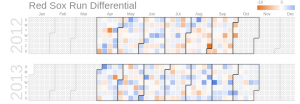
Each square in a calendar chart represents a day. Currently, the color of the data cells can’t be customized, although that will change in the next release of Google Charts.
If the data values are all positive, the colors will range from white to blue, with the deepest blues indicating the highest values.
If there are negative data values, they will appear orange
You can change the size of the days (“cells”) with the calendar.cellSize option
Days with no data values can be customized with the noDataPattern option
You can control the cell border color, border width, and opacity with calendar.cellColor option
Weeks
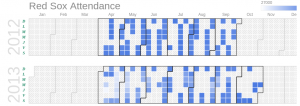
By default, the days of the week are labeled with the first letters of Sunday through Saturday. You can’t change the ordering of the days, but you can change what letters are used with the calendar.daysOfWeek option.
Also, you can control the padding between the days of the week and the chart with calendar.dayOfWeekRightSpace and you can customize the text style with calendar.dayOfWeekLabel
Months
By default, months are identified by dark grey lines. You can use the calendar.monthOutlineColor option to control the borders, the calendar.monthLabel to customize the label font, and calendar.underMonthSpace to adjust the label padding

Years
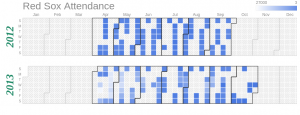
The years in calendar charts are always on the left edge of the chart, and can be customized with calendar.yearLabel and calendar.underYearSpace
We set the year font to a dark green 32pt Times-Roman bold italic, and add ten pixels between the year labels and the bottom of the chart
Finally call these calendar source code from google calendar charts to Pentaho 10.2 query component to get viewed in browser.
By using calendar charts, we can analyze the employee attendance by days, weeks,months and compare yearly attendance. Also, it is used to analyze the employees attendance with department wise.
Frequently Asked Questions
What are Google Calendar Charts in Pentaho?
Google Calendar Charts are data visualizations integrated into Pentaho 10.2 Business Analytics (PBA) that show activity over long time spans (months or years). Calendar charts are ideal for illustrating how quantities vary by day of the week or trend over time, making them perfect for analyzing patterns in time-series data.
What are the benefits of Google Calendar Charts?
Key benefits include visual pattern analysis (activity across days, weeks, months), time-series data visualization (trends over time), customizable features (cell size, borders, opacity, labels), tooltips on hover, brightness indicating values, and seamless integration with Pentaho 10.2 Business Analytics.
How do Calendar Charts help with data analysis?
Calendar Charts help with data analysis by identifying daily patterns (day of week trends), weekly patterns (weekly activity analysis), monthly trends (monthly activity identification), yearly comparisons (year-over-year analysis), employee attendance analysis, and department-wise analysis.
What use cases do Calendar Charts support?
Calendar Charts support use cases including employee attendance tracking, department activity analysis, sales activity visualization, project timeline visualization, activity pattern identification, and time-series trend analysis across days, weeks, months, and years.
How does Pentaho 10.2 integrate Google Calendar Charts?
Pentaho 10.2 integrates Google Calendar Charts through seamless integration with Google Charts API, enhanced performance with Java 17, Docker containerization for easy deployment, and customizable chart features (cell size, borders, opacity, labels).
Can Calendar Charts be customized?
Yes. Calendar Charts can be customized with adjustable cell size, borders, opacity, day/week/month/year labels, tooltips on hover, and brightness indicating values, enabling organizations to tailor visualizations to their specific needs.
How does Pentaho 10.2 improve Calendar Chart performance?
Pentaho 10.2 improves Calendar Chart performance through Java 17 (2-3x faster rendering), intelligent query caching (faster data loading), enhanced integration with Google Charts API, and optimized data processing for time-series data.
🎯 Ready to visualize time-series data with Calendar Charts?
Google Calendar Charts enable visual pattern analysis across days, weeks, and months, making them perfect for analyzing time-series data. Learn how Pentaho 10.2 can help you visualize activity patterns and trends over time.
Contact TenthPlanet for expert Pentaho data visualization and Calendar Chart integration services.
Note: This guide provides a comprehensive overview of Google Calendar Chart integration with Pentaho 10.2. Actual implementations may vary based on your specific data sources, visualization requirements, and analytical needs.
Related Resources:
