Pentaho+ utility to make CRON expressions human readable
CRON Expressions : Human Readable Format
Reading CRON expressions is difficult. Converting them into human-readable format is necessary for creating and managing schedules in Pentaho 10.2 (built on Java 17) Data Integration (PDI). Pentaho 10.2 provides a utility that converts CRON expressions into readable text, simplifying schedule creation and management.
Learn about Pentaho server configuration or explore Pentaho API commands for comprehensive administration solutions.
About CRON Expressions
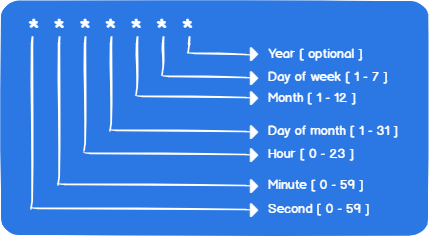
A CRON expression is a string consisting of six or seven sub-expressions (fields) that describe individual details of the schedule. These fields, separated by white space, contain allowed values with various combinations of characters for that field.
CRON Expression Conversion in Pentaho
CRON Expression Format
- Field 1: Seconds (0-59)
- Field 2: Minutes (0-59)
- Field 3: Hours (0-23)
- Field 4: Day of month (1-31)
- Field 5: Month (1-12)
- Field 6: Day of week (0-7, where 0 and 7 are Sunday)
- Field 7 (optional): Year (1970-2099)
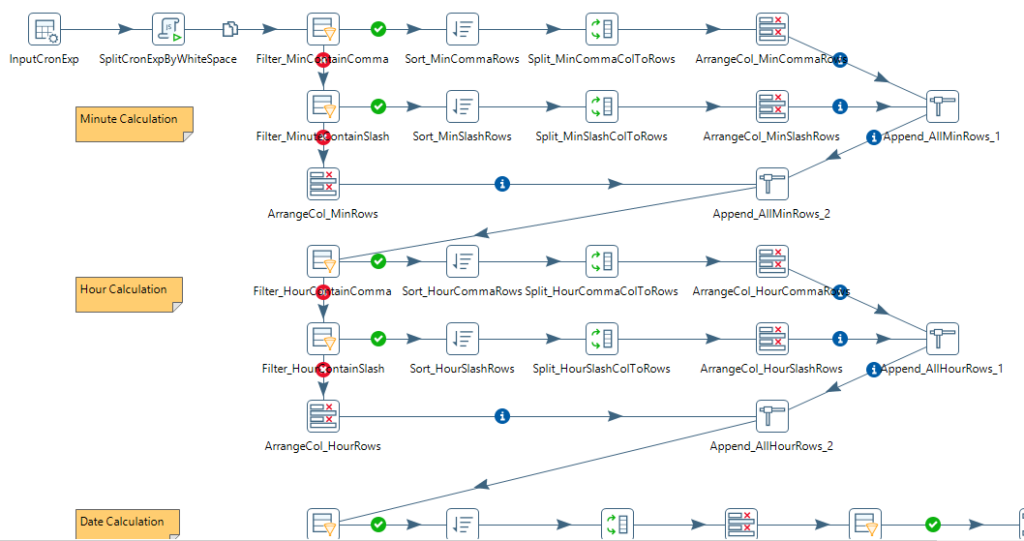
Pentaho 10.2 CRON Utility Features
Enhanced Parsing and Validation
- Improved parsing: Handles complex CRON expressions with accurate interpretation
- Validation: Ensures CRON expressions are valid before scheduling
- Error reporting: Provides clear error messages for invalid expressions
Integration with Pentaho 10.2 Platform
- PDI Integration: Seamlessly integrates with Pentaho Data Integration for ETL job scheduling
- Orchestration: Automated schedule management through platform orchestration capabilities
- Plugin-based architecture: Easy updates without full platform restarts
Deployment and Management
- Docker containerization: Simplifies deployment of scheduled jobs in containerized environments
- Scalable scheduling: Handles multiple schedules across distributed environments
- Centralized management: Manage all schedules from a single interface
Benefits
- Time savings: Reduces time spent interpreting CRON expressions
- Error reduction: Validates expressions before scheduling, preventing job failures
- Better visibility: Human-readable format improves understanding of schedule timing
- Easier maintenance: Clear schedule descriptions simplify ongoing management
Use Cases
- ETL job scheduling: Schedule Pentaho Data Integration transformations and jobs
- Report generation: Automate report generation at specific times
- Data synchronization: Schedule data sync operations between systems
- Maintenance windows: Plan maintenance activities during off-peak hours
Frequently Asked Questions
What is the Pentaho CRON expression utility?
Pentaho 10.2 provides a utility that converts CRON expressions into human-readable format, simplifying schedule creation and management in Pentaho Data Integration (PDI). The utility makes it easier to understand and manage job schedules without manually interpreting CRON syntax.
Why do I need to convert CRON expressions to human-readable format?
Reading CRON expressions is difficult due to their complex syntax. Converting them into human-readable format is necessary for creating and managing schedules effectively, reducing errors, and improving understanding of schedule timing in Pentaho 10.2 Data Integration.
How does the Pentaho CRON utility work?
The Pentaho CRON utility converts CRON expressions (like “0 0 * * *”) into readable text (like “Every day at midnight”), making it easier to understand schedule timing, validate expressions before scheduling, and manage schedules without interpreting complex CRON syntax.
What are the benefits of human-readable CRON expressions?
Key benefits include time savings (reduces time spent interpreting CRON expressions), error reduction (validates expressions before scheduling, preventing job failures), better visibility (human-readable format improves understanding of schedule timing), and easier maintenance (clear schedule descriptions simplify ongoing management).
What use cases does the CRON utility support?
The CRON utility supports use cases including ETL job scheduling (schedule Pentaho Data Integration transformations and jobs), report generation (automate report generation at specific times), data synchronization (schedule data sync operations between systems), and maintenance windows (plan maintenance activities during off-peak hours).
How do I use the Pentaho CRON utility?
Use the Pentaho CRON utility by entering CRON expressions into the utility, which converts them into human-readable format. The utility validates expressions before scheduling, preventing job failures, and provides clear schedule descriptions for easier management.
Can the CRON utility prevent scheduling errors?
Yes. The CRON utility validates expressions before scheduling, preventing job failures. The utility helps identify invalid CRON expressions and provides human-readable format for verification, reducing scheduling errors and improving schedule management.
🎯 Ready to simplify CRON expression management?
Reading CRON expressions is difficult, but Pentaho 10.2 provides a utility that converts them into human-readable format, simplifying schedule creation and management. Learn how to use the Pentaho CRON utility for better schedule management.
Contact TenthPlanet for expert Pentaho administration and scheduling services.
Note: This guide provides a comprehensive overview of Pentaho CRON expression utility. Actual usage may vary based on your specific scheduling requirements and Pentaho configuration.
Related Resources:
