How to view Loyalty Transaction Product Report in Adempiere Retail
A Loyalty Transaction Product Report is a document that tracks the products purchased by customers using a loyalty program.
User Access
Who Can Access
- Admin
- Cashier
- Sales Manager
- Manager
What User Can Do
- View Purchase History
- Track Loyalty Points
- Generate Reports
- Check Discounts/Rewards
- Track Rewards Usage
Pre-Requisite Activities
- Customer Enrollment
- Transaction Data Integration
- Customer Communication
Business Rules
- Points Calculation
- Reward Application
- Product Tracking
- Time Period
User Interface
Step 1 : Select ‘Loyalty Transaction Detail by Product’ in Menu -> Sales reports > Manager report > Loyalty Transaction Detail by Product or Search Loyalty Transaction Detail by Product .

Step 2 : Select the date range and Customer to open the Loyalty Transaction Detail by Product Report.
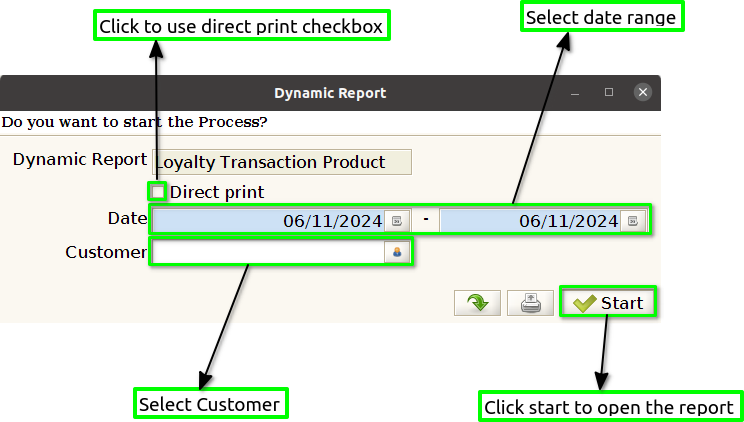
Step 3 : To view a preview of the Loyalty Transaction Detail by Product Report .

Date invoice : Showing the Date Invoice in a Loyalty Transaction Product Report is important for several reasons, as it helps provide a clear timeline of customer transactions, loyalty points accumulation, and the redemption process.
Card Number : The card number acts as a unique identifier for each customer within the loyalty program. By associating transactions and loyalty points with a specific card number, businesses can track and manage individual customer activity, ensuring that points are correctly assigned and redeemed for the right person.
Name : Showing the Customer Name in a Loyalty Transaction Product Report is important for several reasons related to customer identification, personalized service, and reporting.
Mobile No : The mobile number is a widely used and easily accessible method for identifying and contacting customers. Including it in the report allows businesses to quickly and accurately reach out to customers about their loyalty account, upcoming promotions, or changes to the program
Reward Point : Many loyalty programs have rules about when points can be redeemed, how they can be used, and when they may expire. By showing reward points in the report, businesses can track both earned and redeemed points and ensure customers are notified when their points are nearing expiration.
Points redeemed : The points redeemed field helps businesses track how many loyalty points have been exchanged for rewards, discounts, or other benefits.
Bill No : Showing the bill number (or invoice number) in a Loyalty Transaction Product Report is important for several reasons related to transaction tracking, program accuracy, customer service, and auditing.
Grand Total : The grand total represents the total value of a transaction, including any loyalty points earned, redeemed, or spent. Displaying this amount provides clarity for both the business and the customer, offering a transparent summary of the overall cost or value associated with a specific transaction.
Product Code : Product codes help businesses identify which specific products are generating loyalty points. Many loyalty programs award points based on the type of products purchased or specific categories. By showing the product code in the report, businesses can verify that points are being allocated to the correct items and ensure the accuracy of the loyalty points awarded.
Product Name : Product names make the transaction data more understandable for both businesses and customers. By showing the exact name of the product purchased, customers can easily verify the products associated with their loyalty points or rewards.
Quantity : Including the quantity in a Loyalty Transaction Product Report serves several important functions related to transaction accuracy, loyalty point allocation, inventory management, and customer insights.
Line Net Amount : The line net amount represents the value of a particular product or group of products in a transaction after applicable discounts, promotions, or taxes have been applied. In many loyalty programs, points are awarded based on the net value of a product or purchase rather than the gross amount.