How to view Customer Wise Sales Report in Adempiere Retail
A Customer Wise Sales Report shows the total sales made to each customer over a selected period, listing customer names along with their purchase amounts, quantities, and sales details.
User Access
Who Can Access
- Admin
- Back Office
- Purchase Manager
- Manager
What User Can Do
- Analyse Customer Purchases
- Identify Top Customers
- Monitor Credit or Payment Status
- Export and Share
Pre-Requisite Activities
- Maintain Customer Master Data
- Accurate Sales Recording
- Reporting Period
- Update Customer Status
- User Access Control
Business Rules
- Include Only Valid Sales
- Date Range Filtering
- Unique Customer Identification
- User Authorization
- Export Data Integrity
User Interface
STEP 1: To select a Customer Wise Sales Report.

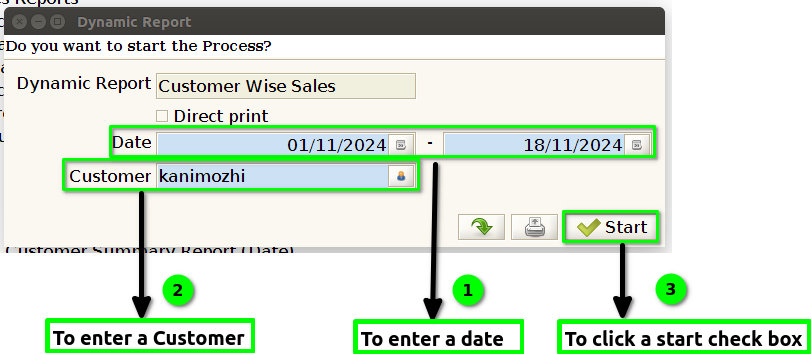
STEP 2: To enter a Date and to enter a Customer in this fields are mandatory.Then to click the start check box to run the process.
STEP 3: Once to complete the process to show the report based on the given data.

STEP 4: Bill date – is the date on which a bill or invoice is issued to a customer or client. It is essentially the official date that the billing cycle starts and is typically used to track when payment is due or when a service was provided.
Bill number – (often abbreviated as bill no) is a unique identifier assigned to a specific bill or invoice. It helps both the issuer and the recipient track and reference individual transactions, especially when managing multiple bills or invoices.
Customer name – refers to the name of an individual or business that is purchasing goods or services from a company or organization.
Sales amount – refers to the total value of the goods or services sold in a transaction, typically expressed in monetary terms. It represents the revenue a business generates from a sale before any deductions (like discounts, taxes, or returns) are applied.
Running total – is a continuously updated sum or cumulative total that is calculated by adding each new number to the sum of all previous numbers in a series. It’s often used in financial reporting, budgeting, and data analysis to keep track of a total as it evolves over time.