How easy to upgrade the Pentaho Server With Chimney
Pentaho Server Audit : Chimney Upgrade Tool
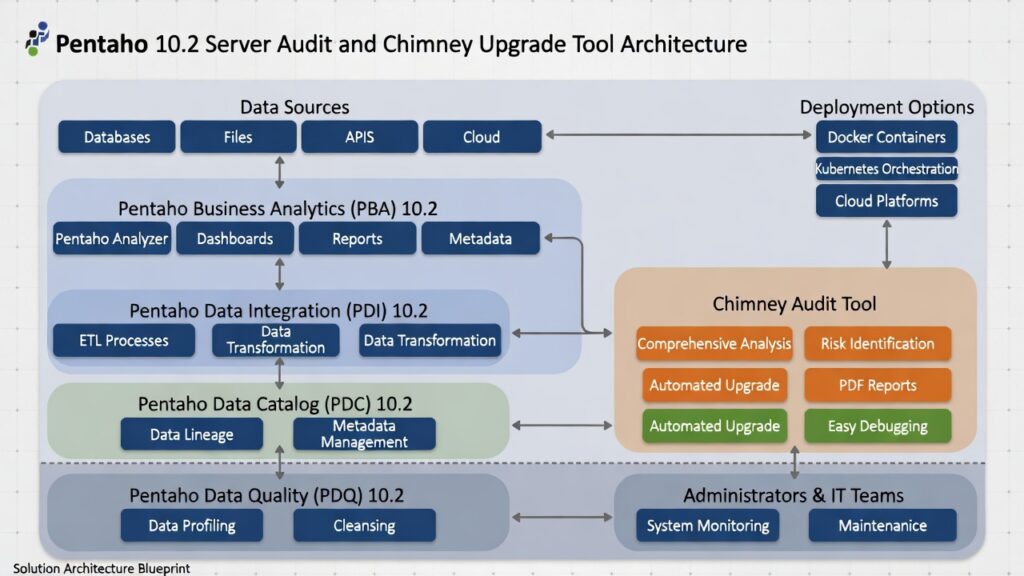
Chimney is a Pentaho server audit report tool developed by TenthPlanet Technologies that provides comprehensive analysis of existing Pentaho systems and identifies upgrade requirements. The audit and upgrade process covers all aspects of Pentaho Server Architecture, ensuring smooth transitions to Pentaho 10.2 Business Analytics (PBA) and Data Integration (PDI).
Learn about Pentaho upgrade services or explore why upgrade Pentaho for comprehensive upgrade information.
- Automated upgrade: Streamlined upgrade process with minimal manual intervention
- Risk identification: Identify challenges and risks before upgrading
- PDF reports: Export audit results to PDF for reference
- Easy debugging: Detailed error reporting with causes and solutions
What is Chimney?
Chimney is the Pentaho server audit report tool that provides a score of the existing Pentaho system and identifies upgrade needs. The audit and upgrade process covers all aspects of the Pentaho Server Architecture. To learn more about Chimney and see a sample report, click this blog link.
Easy Pentaho 10.2 Audit & Upgrade
The Chimney will audit the Pentaho Server to the core of Infrastructure, Security, Other tools used and any customization deployed. Also, it exports the result of the audit to PDF format for a clear reference. So now we are enough aware of the challenges and risks while upgrading the server.
Upgrade Process is the automated process where we should give a few inputs related to the physical path of the Pentaho Server Installation and upgrade path. All the libraries, plugins, repository, etc. will be migrated to the upgraded version of the Pentaho 10.2 Server.
Chimney now supports auditing Pentaho 10.2 deployments, including Docker containerized environments. The audit process identifies Java 17 compatibility, Docker configurations, and modern security features. The upgrade process handles plugin-based architecture updates and containerized deployments.
Pentaho 10.2 BA and DI Server
Most of the organization maintains separate Pentaho BA servers and Pentaho DI servers. It means the Pentaho BA Solution tools with repository and Pentaho DI repository with Client tools will be maintained in the separate instance or clustered.
BA Server and DI Server of Version from 4.8 to the Latest Pentaho 10.2 Server can be upgraded and migrated easily. Chimney will navigate the step-by-step process of migration and upgrade of the server.
Docker containerization simplifies separate BA and DI server deployments. Kubernetes orchestration enables easy clustering and scaling. The platform’s orchestration capabilities automate server migration and upgrade processes.
Easy Debugging
As Chimney is the automated tool for Audit of the existing Pentaho server, it takes care of each step and process. In case of any issue/error, it throws the error, causes, and fix/solutions.
Enhanced error reporting provides detailed diagnostics for Java 17, Docker, and modern architecture issues. The audit process identifies compatibility issues with plugin-based architecture. Automated fix suggestions help resolve common upgrade challenges.
Frequently Asked Questions
What is Chimney upgrade tool?
Chimney is a Pentaho server audit report tool developed by TenthPlanet Technologies that provides comprehensive analysis of existing Pentaho systems and identifies upgrade requirements. The tool audits infrastructure, security, tools, and customizations, then automates the upgrade process with minimal manual intervention.
How does Chimney audit Pentaho servers?
Chimney audits Pentaho servers by analyzing infrastructure, security configurations, tools used, and customizations deployed. The audit process covers all aspects of Pentaho Server Architecture and exports results to PDF format for clear reference, identifying challenges and risks before upgrading.
What versions of Pentaho can Chimney upgrade?
Chimney supports upgrading Pentaho BA Server and DI Server from version 4.8 to the latest Pentaho 10.2 Server. The tool handles both separate BA and DI server deployments and clustered environments, navigating the step-by-step process of migration and upgrade.
How does Chimney automate the upgrade process?
Chimney automates the upgrade process by requiring only a few inputs related to the physical path of Pentaho Server installation and upgrade path. The tool automatically migrates all libraries, plugins, repository, and configurations to the upgraded Pentaho 10.2 Server version.
Does Chimney support Docker and Kubernetes deployments?
Yes. Chimney now supports auditing Pentaho 10.2 deployments including Docker containerized environments. The audit process identifies Java 17 compatibility, Docker configurations, modern security features, and handles plugin-based architecture updates and containerized deployments.
How does Chimney help with debugging upgrade issues?
Chimney provides easy debugging through detailed error reporting with causes and solutions. As an automated audit tool, it takes care of each step and process, throwing errors, causes, and fix/solutions when issues occur, helping resolve common upgrade challenges.
What are the benefits of using Chimney for upgrades?
Key benefits include comprehensive audit (infrastructure, security, tools, customizations), automated upgrade process with minimal manual intervention, risk identification before upgrading, PDF report export for reference, easy debugging with detailed error reporting, and support for modern deployments (Docker, Kubernetes).
🎯 Ready to use Chimney for Pentaho upgrade?
Chimney provides comprehensive analysis of existing Pentaho systems and automates the upgrade process, ensuring smooth transitions to Pentaho 10.2. Learn how Chimney can streamline your Pentaho server audit and upgrade.
Contact TenthPlanet for expert Chimney upgrade tool services and Pentaho upgrade assistance.
Note: This guide provides a comprehensive overview of Chimney upgrade tool capabilities. Actual audit and upgrade processes may vary based on your specific Pentaho server configuration, version, and deployment environment.
Related Resources:
