Pentaho Web Spoon Deployment Challenges
Web Spoon Deployment : Challenges and Solutions
Web Spoon deployment in Pentaho 10.2 (built on Java 17) Business Analytics (PBA) and Data Integration (PDI) may encounter various challenges related to authentication, scheduling, and repository integration. This guide addresses common deployment issues and provides solutions to ensure successful Web Spoon implementation.
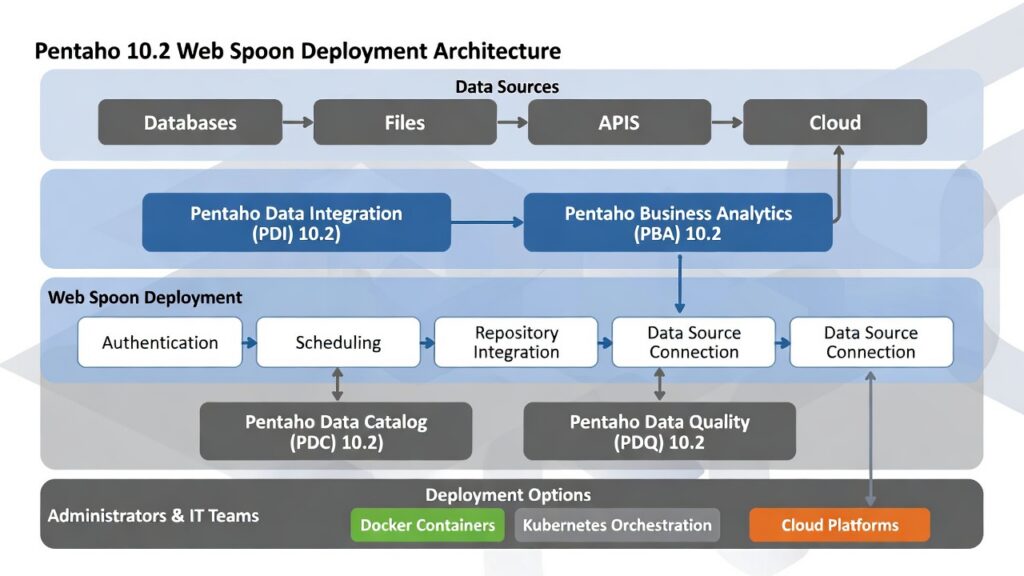
Learn about Pentaho server configuration or explore Pentaho upgrade services for comprehensive deployment solutions.
- Authentication fixes: Resolve user authentication validation problems
- Schedule management: Fix CRON schedule and job scheduling issues
- Repository integration: Resolve repository connection and locking issues
- Deployment success: Ensure smooth Web Spoon deployment
Common Deployment Challenges and Solutions
User Authentication Cannot Be Validated
Issue:
- After Pentaho 10.2 Web spoon is deployed user login screen is not configured.
Tracking:
- Once Pentaho 10.2 Web spoon is configured, access in browser. No login screen occurs.
Solution:
- Connect Pentaho 10.2 Web spoon with a repository and enable Launch connection on startup. Every time browser is reloaded, login credentials in asked.
Improved repository integration simplifies Web Spoon authentication setup. Enhanced security features support modern identity providers (OAuth2, SAML). Docker containerization provides consistent deployment environments. The platform’s orchestration capabilities enable automated repository connection configuration.
Login page issue
Issue:
- Login page does not work after giving user credentials.
Tracking:
- In the Web browser, after giving user credentials, the login page becomes empty.
Solution:
- Reload the browser and close the browser completely and again open spoon in a new browser. Now give the user credentials.
Schedule cannot be created:
Issue:
- Pentaho 10.2 Web spoon schedule feature does not work.
Tracking:
- In the browser, there will not be any schedule key in Pentaho 10.2 Web spoon.
Solution:
- Create a schedule in cron tab, or if repository is been used, open the Pentaho 10.2 in browser and create schedules.
Enhanced schedule management with improved CRON expression support. The platform’s orchestration capabilities enable automated schedule creation and management. Repository-based scheduling provides better reliability and audit trails.
Pentaho 10.2 Transformation cannot be locked to a single user:
Issue:
- A same transformation can be used by several users at a same time.
Tracking:
- Open a transformation in a particular user, lock the transformation. Now open the transformation in another user credential. The transformation can be accessed.
Solution:
- Create a directory for each user, and each users must access the files inside the assigned directory for them.
Improved repository-based locking mechanisms provide better transformation access control. Enhanced security features support fine-grained permissions. The platform’s orchestration capabilities enable automated user directory management.
Data source connection is not shared across web:
Issue:
- Data source connection created in one system is not shared to another system.
Tracking:
- Create a data source connection, open web spoon in another system. The data source connection will not be available in other system.
Solution:
- Rather than using Pentaho 10.2 web spoon stand alone, connect Pentaho 10.2 web spoon with a repository, by which user authentication and data source connection does not occur.
Repository-based connection management ensures data source connections are shared across all Web Spoon instances. Enhanced connection pooling improves performance. Docker containerization provides consistent connection configurations across environments. The platform’s orchestration capabilities enable automated connection management.
Frequently Asked Questions
What are common Web Spoon deployment challenges?
Common Web Spoon deployment challenges include authentication issues (user access and permissions), scheduling problems (job execution and timing), repository integration (connection management and data source sharing), and configuration inconsistencies across environments.
How do I resolve Web Spoon authentication issues?
Resolve Web Spoon authentication issues by connecting Web Spoon with a repository, which ensures user authentication and data source connections are properly managed. Repository-based authentication provides consistent access control across all Web Spoon instances.
How do I fix Web Spoon data source connection issues?
Fix Web Spoon data source connection issues by using repository-based connection management instead of standalone Web Spoon. Repository-based connections ensure data source connections are shared across all Web Spoon instances, preventing connection availability issues.
Does Web Spoon support repository integration?
Yes. Web Spoon supports repository integration, which ensures user authentication and data source connections are properly managed. Repository-based deployment provides consistent configuration across all Web Spoon instances and environments.
How does Docker help with Web Spoon deployment?
Docker containerization provides consistent Web Spoon connection configurations across environments, ensuring Web Spoon runs identically in development, testing, and production. Docker simplifies deployment and reduces configuration-related issues.
What are the benefits of repository-based Web Spoon deployment?
Key benefits include shared data source connections across all Web Spoon instances, consistent user authentication, enhanced connection pooling improving performance, automated connection management, and reduced deployment issues.
Can I get help with Web Spoon deployment?
Yes. TenthPlanet provides expert Web Spoon deployment services including troubleshooting common issues, repository integration setup, Docker containerization, configuration management, and ensuring successful Web Spoon implementation.
🎯 Ready to resolve Web Spoon deployment challenges?
Web Spoon deployment challenges can be resolved with proper configuration and repository integration. Learn how to ensure successful Web Spoon implementation with troubleshooting solutions and best practices.
Contact TenthPlanet for expert Web Spoon deployment services and troubleshooting support.
Note: This guide addresses common Web Spoon deployment challenges and provides solutions. Actual deployment issues may vary based on your specific configuration, environment, and requirements.
Related Resources:
