From Purchase Requisition to Supplier Payment: The Complete Procurement Cycle in iDempiere
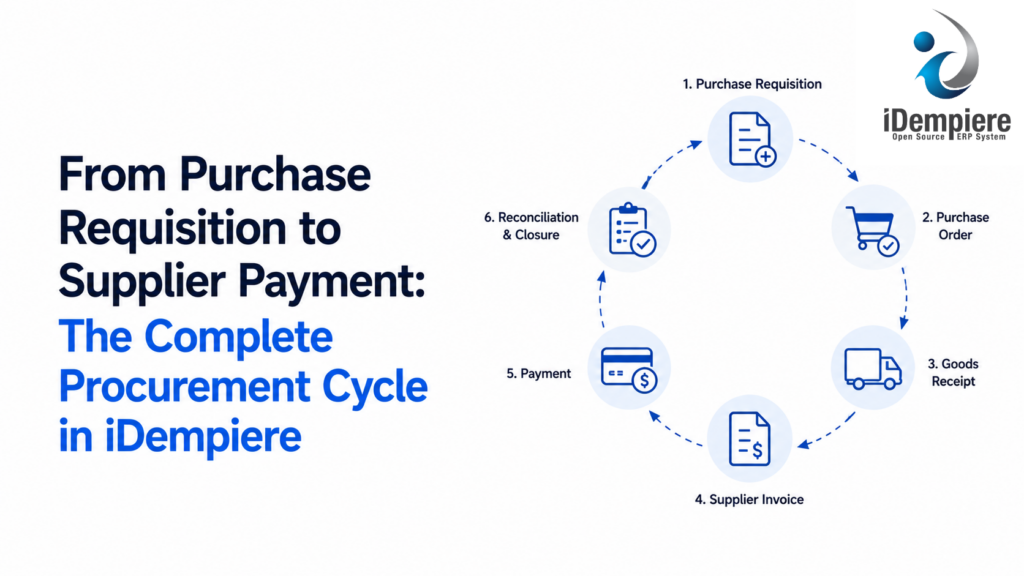
Automate your purchase-to-pay workflow. See how iDempiere ERP uses three-way matching to secure procurement and stop duplicate payments.
Most legacy ERP systems treat procurement as a series of disconnected forms — a requisition here, a purchase order there, an invoice buried in someone’s email. iDempiere handles procurement as one continuous, auditable chain, so every purchase is traceable from the first request to the final payment, without the manual reconciliation that eats up your finance team’s week.
If you’re evaluating a move away from your current ERP, procurement is one of the fastest places to see the difference. Here’s how the full cycle works, and why it matters for your business.
The Procurement Cycle, Step by Step
1. Purchase Requisition An employee or department identifies a need — new laptops, raw materials, office supplies — and raises a requisition. This is simply a formal, recorded request: what’s needed, how much, and why. Instead of an email or a verbal ask, it becomes a document the system tracks from day one.
2. Approval Workflow The requisition routes automatically to the right approver based on rules you define — department head, budget owner, or finance controller, depending on the amount and category. No more chasing sign-offs over email or losing track of who approved what.
3. Request for Quotation (RFQ) — Optional but Powerful For larger purchases, you can send the requisition out to multiple vendors as a formal quote request. Their responses come back into the same system, side by side, so you’re comparing real numbers instead of scattered PDFs and phone calls.
4. Purchase Order (PO) Once a vendor is selected, the requisition converts directly into a Purchase Order — no retyping, no copy-paste errors. The PO carries the agreed price, quantity, delivery terms, and vendor details forward automatically.
5. Goods or Service Receipt When the shipment arrives (or the service is delivered), it’s recorded against the original PO. The system checks what was ordered against what actually showed up — flagging shortages, damages, or over-deliveries immediately, rather than discovering the discrepancy weeks later during a stock count.
6. Vendor Invoice Matching This is where most companies lose money without realizing it. iDempiere performs what’s called a “three-way match” — comparing the Purchase Order, the Goods Receipt, and the Vendor Invoice. If all three agree, the invoice is cleared for payment automatically. If they don’t agree, it’s held for review instead of being paid blindly.
7. Supplier Payment Once matched and approved, the invoice moves into the payment queue, tied to your defined payment terms (Net 30, Net 60, early-payment discounts, etc.). Finance sees exactly what’s due, when, and why — with the entire history behind it just one click away.
Why This Matters to Your Bottom Line
- No more duplicate payments. The three-way match alone eliminates one of the most common (and expensive) accounts payable errors.
- Full audit trail. Every step — request, approval, order, receipt, invoice, payment — is logged with who did what and when. This is a serious advantage during financial audits or compliance reviews.
- Faster close cycles. Finance teams spend less time hunting down paperwork and more time on actual analysis.
- Better vendor negotiating power. With clean historical data on pricing, delivery performance, and payment timing, you walk into vendor renewals with facts instead of guesses.
Where Procurement Migrations Actually Fail
Having guided many organizations through this exact transition, the failure pattern is almost always the same — and it’s rarely about the software itself.
- Skipping the “as-is” mapping. Companies rush to configure the new system the way they want to work, without first documenting how procurement actually happens today — including the informal workarounds nobody talks about. Those workarounds resurface post go-live and cause chaos.
- Underestimating master data cleanup. Vendor records, item catalogs, and pricing agreements carried over from a legacy system are often duplicated, outdated, or inconsistent. Garbage in, garbage out — no ERP fixes bad data automatically.
- Approval rules copied blindly from the old system. Many legacy approval chains exist for historical reasons that no longer apply. A migration is the right moment to simplify, not just replicate.
- No parallel run before cutover. Businesses that skip a short parallel period — running old and new side-by-side for a few purchase cycles — are the ones that discover data or process gaps only after the old system is switched off, when it’s hardest to fix.
Getting these four things right before go-live is the difference between a smooth transition and a painful one.
Thinking About Making the Move?
If your current ERP has your procurement process held together by spreadsheets, email chains, and manual invoice checking, it’s worth a conversation. We’ve helped organizations move off legacy and open-source ERP platforms into iDempiere without disrupting day-to-day operations.
Talk to a senior architect for a no-pressure system audit — we’ll map your current procurement process, flag the risks before they become problems, and give you a clear, honest picture of what a migration would actually involve.