Odoo Contacts vs Mailing Lists: Stop Duplicate Emails Guide

The problem in one sentence
If you run Odoo and your customers receive the same marketing email twice, or your newsletter signups never make it into your customer database, you’re not doing anything wrong — Odoo stores contacts in two separate tables that don’t talk to each other by default. This guide shows you exactly how to fix that, end the duplicates, and set up your Contacts, Mailing Lists, and Campaigns the way Odoo intended.
The Five-Minute Answer
- Odoo has two completely separate contact tables: res.partner (Contacts) and mailing.contact (Email Marketing). They are not automatically linked.
- Use res.partner as your single source of truth. Target it directly in Email Marketing by setting Recipients = Contact instead of Mailing List.
- Reserve mailing.contact only for anonymous newsletter subscribers who haven’t yet become customers — or skip it entirely and capture sign-ups as CRM leads.
- Set “Unicity based on = Email” on every Marketing Automation campaign to prevent duplicate enrollments.
- Use the global blacklist for unsubscribes and per-list opt-out for topic preferences. Transactional emails (orders, invoices, tickets) still go through.
Also Read Version 2
1. Why Odoo Has Two Contact Tables (And Why It Confuses Everyone)
Almost every Odoo user discovers this the hard way: they create a beautiful customer record in the Contacts app, build a campaign in Email Marketing, hit send, and then realise the customer never got the email — because the campaign was sent to a Mailing List that the customer was never added to.
This isn’t a bug. It’s how Odoo’s data model is structured. Once you understand why it’s structured that way, the fix becomes obvious.
The Two Tables Explained
res.partner is Odoo’s master contact table. Every customer, vendor, employee, lead, and child address lives here. It’s the central record used by Sales, Invoicing, CRM, Field Service, Purchase, Inventory, Helpdesk, and the Website. When you create a sales order, the customer on that order is a res.partner.
mailing.contact is a completely separate table that exists only inside the Email Marketing module. It has its own name, email, and subscription preferences. It has no foreign key to res. partner. The same human being can exist in both tables simultaneously, and Odoo will treat them as two different people.

Why Odoo Designed It This Way
The separation made historical sense. Newsletter subscribers from a public website don’t need a billing address, a tax ID, or a customer rank — they just need an email and a few preferences. Forcing every random visitor into the main customer table would bloat res.partner with thousands of low-value records.
The problem is that Odoo never built an automatic bridge between the two for when a subscriber later becomes a customer. That bridge is what you need to build (or sidestep) yourself.
2. Operational Emails vs Marketing Emails: Know the Difference
Before you fix anything, you need to classify every email your business sends into one of two buckets. Treating them the same is the second-most-common mistake (after not realising the two tables are separate).
Operational Emails (Transactional)
These are triggered by business events — a sale, an invoice, a delivery, a support ticket. The customer expects them. They have a legal basis under “contract performance” or “legitimate interest” (GDPR Art. 6(1)(b) and (f)). They are sent via Odoo’s mail.message / mail.mail pipeline and ignore the marketing blacklist.
Typical examples in any business:
- Order confirmation (Sales)
- Invoice notification (Accounting)
- Payment receipt (Accounting)
- Delivery / shipping notification (Inventory)
- Appointment confirmation & reminder (Appointments)
- Field Service / installation scheduled & completed
- Support ticket acknowledged & resolved (Helpdesk)
- Overdue payment reminder (Follow-up levels)
- Portal account invitation
- Quotation sent
Marketing Emails
These exist to nurture, sell, or re-engage. They require active consent (GDPR Art. 6(1)(a)). They are sent through the Email Marketing or Marketing Automation modules and respect the blacklist and per-list opt-outs.
Typical examples:
- Welcome email after first purchase
- Post-purchase drip series (educational tips)
- Feedback & review requests
- Cross-sell & upsell campaigns
- Abandoned cart recovery
- Win-back for inactive customers
- Monthly newsletter
- Promotional & seasonal offers
- Referral program invitations
- Anniversary & loyalty messages

Problem A: Duplicate res.partner Records With the Same Email
Odoo does not enforce a unique email on contacts. The same address can legitimately end up on multiple res.partner rows because of:
- Child address records: a customer’s separate billing or delivery address is its own partner row, often inheriting the parent’s email.
- Website checkout creating a new contact instead of matching an existing one.
- CSV imports not merging on email.
- Manual re-creation by staff who didn’t search before adding.
When you send a mailing targeted at “Contact”, each row counts as a separate recipient — so the same person gets emailed multiple times.
Problem B: The Same Person Lives in Both Tables
A typical flow:
- Visitor signs up for the newsletter on your website → a mailing.contact is created.
- Six months later, the same visitor buys something → a res.partner is created.
- Now they exist in both tables with no link.
- Your monthly newsletter goes to the mailing list (hits them once). Your “thank you for being a customer” campaign goes to res.partner (hits them again).
Problem C: One Person Subscribed to Multiple Lists or Mailings
This one is more nuanced. Odoo actually does deduplicate inside a single mailing — if a person is on List A and List B and both are selected in one mailing, they only get the email once. But if you send three separate mailings on Monday, Tuesday, and Wednesday, each to a different list, the same person gets all three.
GDPR Compliance Matrix
| Email Type | GDPR Basis | Consent Required | Opt-Out Required | Recommended Odoo Mechanism |
| Operational | Contract — Art. 6(1)(b) (or legitimate interest 6(1)(f)) | No | No | Mail Templates + Automated Actions → res.partner |
| Service Reminder (pure) | Legitimate interest — Art. 6(1)(f) | No | Recommended (good practice + Art. 21 objection) | Scheduled Actions + Templates → res.partner |
| Service + Offer (mixed) | Consent / ePrivacy soft opt-in | Yes (or soft opt-in) | Yes — unsubscribe mandatory | Email Marketing / Automation → Contact |
| Promotional | Consent — Art. 6(1)(a) + ePrivacy Reg.13 | Yes (or soft opt-in) | Yes — unsubscribe mandatory | Email Marketing / Automation → Contact / mailing list |
4. The Right Way to Set Up Contacts, Lists & Campaigns
Here is the architecture that works for 95% of businesses. It avoids all three duplicate problems by design rather than patching them after they occur.
Step 1: Designate res.partner as Your Single Source of Truth
Every paying customer, every CRM lead, every contact form submission, every appointment booking — all of these live in res.partner. This is non-negotiable.
For marketing, when you create a new mailing in Email Marketing, change the Recipients dropdown from “Mailing List” to “Contact”. This targets res.partner directly with full filter power.

Step 2: Apply Filters to Exclude Sub-Address Duplicates
Most duplicate sends come from child address records (delivery addresses, invoice addresses) that share the parent’s email. Always filter them out:
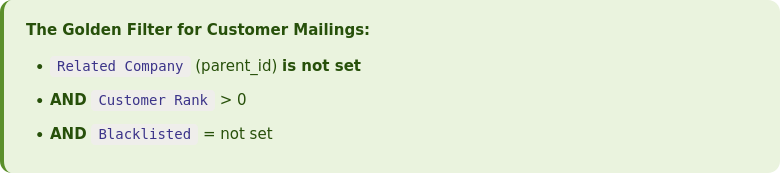
This single filter eliminates the most common cause of “why did Jane get the email twice?” because the duplicate was almost always a child record under her main contact.
Step 3: Use Marketing Automation for Lifecycle Campaigns
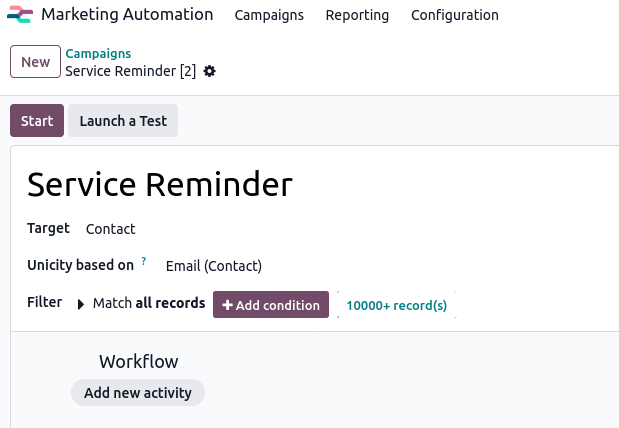
For any automated email sequence (welcome series, post-purchase drip, win-back, cross-sell), use Marketing Automation — not regular Email Marketing. It has a feature that Email Marketing lacks:
Set “Unicity based on = Email” on every Marketing Automation campaign. This ensures that even if a customer has two res.partner records, they only enter the campaign once.
Step 4: Decide How You Handle Anonymous Newsletter Subscribers
You have two valid options. Pick one:
Option A (Recommended): Skip mailing.contact entirely
Replace the website Newsletter snippet with a Form building block that creates a CRM Lead/Opportunity instead of a mailing.contact. Now every signup is a first-class record from day one. Market to them via Email Marketing with Recipients = Lead/Opportunity.
Why this is better: no mailing.contact records are ever created, so Problem B literally cannot occur.
Option B: Keep mailing.contact, opt them out on conversion
If you keep the Newsletter snippet, create an Automation Rule that opts the matching mailing.contact out of its lists whenever a corresponding res.partner is created.
Automation Rule — Settings → Technical → Automation Rules Model: Contact (res.partner)
Trigger: On Creation
Action: Execute Code
# Opt out matching mailing.contact when a new partner is created
for partner in records:
    if not partner.email:
        continue
    norm = partner.email.strip().lower()
    mcontacts = env['mailing.contact'].search([('email', '=ilike', norm)])
    for mc in mcontacts:
        # Verify the subscription field name in Settings → Technical → Models
        for sub in mc.subscription_ids:
            sub.opt_out = True
Step 5: Configure Two SMTP Servers
This is one of the highest-impact configurations most Odoo users skip. Marketing campaigns occasionally trigger spam complaints; if they go through the same server as your invoices and order confirmations, your transactional deliverability suffers.
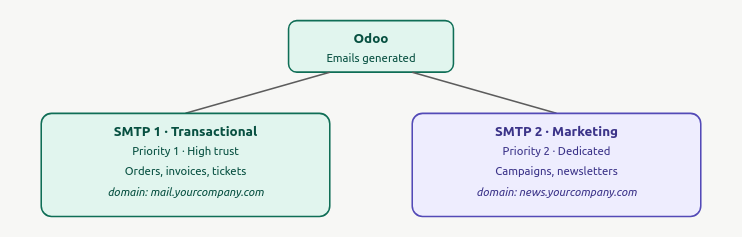
Configure both in Settings → Technical → Outgoing Mail Servers. Set the transactional server to Priority 1 (lower number wins) and the marketing server to Priority 2. Then enable the dedicated marketing server in Email Marketing → Configuration → Settings → Dedicated Server.
5. A Customer Onboarding Workflow That Doesn’t Create Duplicates
Here is the eight-stage flow we recommend for any service-or-product business running Odoo. Every stage maps to a specific module and produces clean, non-duplicated records.

The Critical Step: Capture Data at Service/Installation Time
Step 6 is where most businesses lose the chance to automate their lifecycle marketing. When a service is completed or a product installed, your technician or fulfillment team must set custom fields on the res.partner record. These fields then power every downstream automation:
| Custom Field | Type | Used By |
|---|---|---|
| x_install_date | Date | Anniversary email, annual service reminder, warranty expiry, post-install drip timing |
| x_next_service_date | Date | Maintenance reminder, reorder prompts |
| x_warranty_end | Date | Warranty expiry notification, upgrade campaigns |
| x_product_type | Many2many tags | Cross-sell segmentation, product-specific tips |
| x_account_type | Selection | B2B vs B2C messaging, tone, channel |
Add these fields via Odoo Studio or Settings → Technical → Fields (developer mode required for the latter).
6. Unsubscribe & Blacklist: Keep Marketing Compliant, Keep Ops Flowing
The most common misconception: “If a customer unsubscribes, will they stop getting their invoices?” No. Odoo handles this correctly out of the box. Here’s exactly how it works.
The Two Levels of Unsubscribe
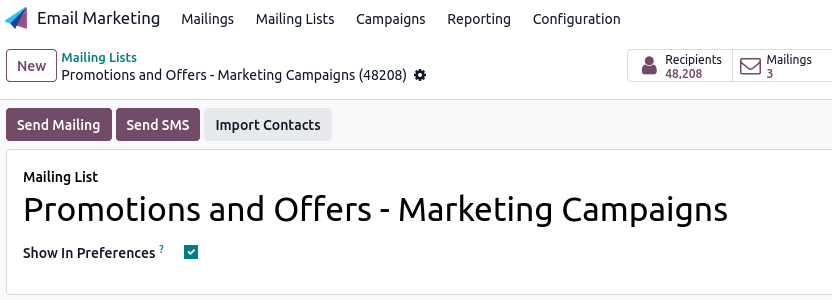
Level 1 — Per-list Opt-Out (preferred for topic preferences)
When you create a mailing list, enable the “Show in Preferences” toggle. This makes the list visible on your unsubscribe page. Customers can then toggle individual lists on or off without leaving everything.
Level 2 — Global Blacklist (the nuclear option)
If the customer clicks “Unsubscribe from all marketing”, their email goes into mail.blacklist. From that point on, every marketing email across every mailing list and every Marketing Automation campaign is blocked at delivery — but transactional emails still go through.
Enable this option in Email Marketing → Configuration → Settings → Blacklist Option when Unsubscribing.
The Recommended Mailing List Structure
Almost every business should have these four lists (regardless of industry):
| List Name | Purpose | Show in Preferences |
|---|---|---|
| Newsletter | Monthly updates, blog roundups, education | ✓ |
| Promotions & Offers | Seasonal deals, discounts, sales | ✓ |
| Product Tips & Care | How-to content, maintenance, best practices | ✓ |
| Service Reminders | Renewal, maintenance, reorder prompts | ✓ (clearly labelled) |

The Grey Zone: Service-Critical Reminders
Some emails sit awkwardly between operational and marketing. A filter replacement reminder is technically a marketing email under Odoo’s default routing, but most customers consider it part of the service they paid for.
The fix: for service-critical reminders, use a Scheduled Action with a server-action email template (not Marketing Automation). Scheduled actions send via the transactional pipeline and bypass the blacklist, so even an opted-out customer gets their service reminder.
7. Monthly Health Check: Keep Your Database Clean
Even with perfect setup, duplicates creep in. Run this 15-minute audit on the first Monday of every month.
The Five-Point Monthly Checklist
- Run the Deduplicate Contacts wizard. Go to Contacts → list view → Action menu → Merge Contacts. Odoo groups potential duplicates by email and lets you merge in bulk.
- Review the blacklist. Check Email Marketing → Configuration → Blacklisted Email Addresses for any false positives (e.g., someone who clicked unsubscribe by mistake and now wants back in).
- Check bounce rates per campaign. High bounces usually point to imported lists with stale emails — flag them for cleanup.
- Audit mailing list growth vs customer growth. If your newsletter list grew faster than your customer base, you’re either capturing well — or you’re forgetting to convert subscribers to customers (Problem B).
- Spot-check Marketing Automation campaign logs. Look for “skipped — duplicate” events. If they’re frequent, your Unicity settings are working. If they’re zero across the board, something might be misconfigured.
Final Thoughts
Odoo’s contact system is more powerful than most users realise — it just hides that power behind a confusing two-table architecture and a default setup that doesn’t connect the pieces. Once you understand that res.partner is your master record and mailing.contact is an optional satellite, every setup decision becomes clearer.
The three rules that prevent 95% of all duplicate-email problems:
- Target res.partner directly in Email Marketing — set Recipients = Contact, not Mailing List.
- Set Unicity = Email on every Marketing Automation campaign.
- Either skip mailing.contact entirely (capture signups as CRM leads) or auto-opt-out on conversion.
Add the filter for child address records, set up two SMTP servers, and run the dedup wizard monthly — and your Odoo email marketing setup will be cleaner than most enterprise CRM deployments.
Need help implementing this in your Odoo instance?
TenthPlanet’s Odoo experts can audit your current Contacts, CRM, and Email Marketing setup and deploy the duplicate-prevention rules tailored to your business workflow.
