Pentaho API Commands : Directory Service and User Administration
Automate Administrative Tasks and Manage Pentaho Resources Programmatically
Pentaho 10.2 provides comprehensive REST API commands for directory service operations, user administration, and repository management. These API commands enable automation of administrative tasks, integration with external systems, and programmatic management of Pentaho resources.
Solution Architecture Overview
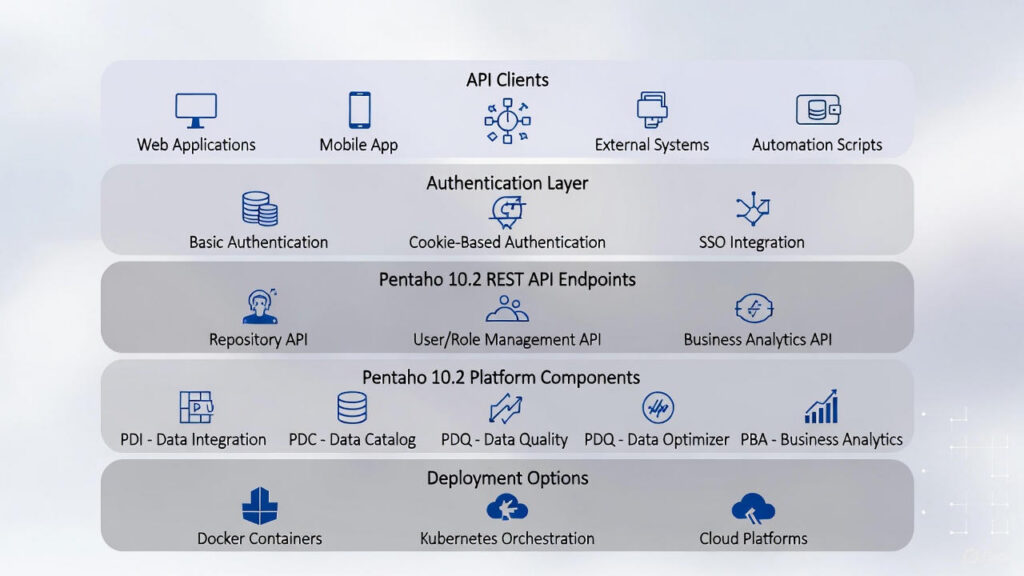
Learn about Pentaho server configuration or explore Pentaho platform for comprehensive management solutions.
- Integration: Integrate Pentaho with external systems and scripts
- User management: Programmatically create, update, and manage users
- Repository operations: Manage files, folders, and permissions via API
- Access control: Configure ACLs and permissions programmatically
- Enables comprehensive data management capabilities
- Provides enhanced performance and reliability
Note: All API commands should use HTTPS in production environments.
Following are the Pentaho 10.2 API commands that can be used in terminal for various operations.
Repository File Operations
Command for displaying all folders and files under Pentaho user console home folder:
curl -u admin:password -X GET https://localhost:8080/pentaho/api/repo/files/:home/tree?showHidden=trueCommand for displaying all folders and files under Pentaho user console public folder:
curl -u admin:password -X GET https://localhost:8080/pentaho/api/repo/files/:public/tree?showHidden=trueCommand for displaying specific folders and files Pentaho user console:
curl -u admin:password -X GET https://localhost:8080/pentaho/api/repo/files/pathofthefile/tree?showHidden=trueCommand for Creating a new file:
curl -u admin:password -X PUT https://localhost:8080/pentaho/api/repo/files/:home:pentaho:tenthplanet:stark:ex.xmlCommand for Creating a new folder:
curl -u admin:password -X PUT https://localhost:8080/pentaho/api/repo/files/:home:pentaho:tenthplanet:flash/createDirCommand for Deleting file/folder:
curl -u admin:password -X PUT -d'folderid/fileid' https://localhost:8080/pentaho/api/repo/files/deleteAccess Control List (ACL) Operations
Command for displaying ACL of Folders:
curl -u admin:password -X GET https://localhost:8080/pentaho/api/repo/files/:home:pentaho:tenthplanet:flash/aclCommand for displaying ACL of Files:
curl -u admin:password -X GET https://localhost:8080/pentaho/api/repo/files/:home:pentaho:tenthplanet:flash:ex.xml/aclCommand for updating ACL of Folders:
curl -u admin:password -H "Accept: application/xml" -H "Content-Type: application/xml" -X PUT -d'<?xml version="1.0" encoding="UTF-8" standalone="yes"?><repositoryFileAclDto><entriesInheriting>false</entriesInheriting><id>49393b98-b232-4d9c-8524-7911d9ce7b1c</id><owner>admin</owner><ownerType>0</ownerType></repositoryFileAclDto>' https://localhost:8080/pentaho/api/repo/files/:home:pentaho:tenthplanet:flash/aclCommand for updating ACL of Files:
curl -u admin:password -H "Accept: application/xml" -H "Content-Type: application/xml" -X PUT -d'<?xml version="1.0" encoding="UTF-8" standalone="yes"?><repositoryFileAclDto><entriesInheriting>false</entriesInheriting><id>3d8470a0-3ffb-4fbc-82a2-74ebce0a322e</id><owner>admin</owner><ownerType>0</ownerType></repositoryFileAclDto>' https://localhost:8080/pentaho/api/repo/files/:home:pentaho:tenthplanet:flash:ex.xml/aclUser and Role Management Operations
Command for creating users:
curl -u admin:password -H "Accept: application/xml" -H "Content-Type: application/xml" -X PUT -d'<user><userName>john</userName><password>password</password></user>' https://localhost:8080/pentaho/api/userroledao/createUserCommand for Deleting users:
curl -u admin:password -X PUT https://localhost:8080/pentaho/api/userroledao/deleteUsers?userNames=johnCommand for Creating roles:
curl -u admin:password -X PUT https://localhost:8080/pentaho/api/userroledao/createRole?roleName=reportCommand for Deleting roles:
curl -u admin:password -X PUT https://localhost:8080/pentaho/api/userroledao/deleteRoles?roleNames=reportCommand for Assigning roles to users:
curl -u admin:password -X PUT https://localhost:8080/pentaho/api/userroledao/assignRoleToUser?userName=john&roleNames=reportCommand for Removing roles of a users:
curl -u admin:password -X PUT https://localhost:8080/pentaho/api/userroledao/removeRoleFromUser?userName=john&roleNames=reportPentaho 10.2 Enhanced API Capabilities
Authentication Methods
Pentaho 10.2 REST API supports two primary authentication methods:
- Basic Authentication (shown in examples above)
- Username and password sent with each request
- Suitable for single service calls or clients that don’t support cookies
- Cookie-Based Authentication (recommended for multiple calls)
- Authenticate once and receive a session cookie
- Use the cookie for subsequent requests
- More efficient for clients making multiple service calls
Example Cookie-Based Authentication:
# Step 1: Authenticate and get session cookie
curl -u admin:password -c cookies.txt -X POST https://localhost:8080/pentaho/api/user/authenticate

# Step 2: Use cookie for subsequent requests
curl -b cookies.txt -X GET https://localhost:8080/pentaho/api/repo/files/:home/tree
Note: System administrators can configure additional authentication options such as Single Sign-On (SSO) solutions like CAS for web-based access, but the REST API primarily uses Basic or Cookie-based authentication.
Security Best Practices
- Use HTTPS – Always use HTTPS in production (replace
http://withhttps://) - Secure Credentials – Never hardcode passwords; use environment variables or secure credential stores
- Cookie-Based Auth – Use cookie-based authentication for multiple API calls to reduce authentication overhead
- Session Management – Properly manage session cookies and implement session timeout
- Access Control – Implement proper access controls and permissions for API endpoints
Performance Improvements
Pentaho 10.2 API Performance:
- 2-3x faster response times with Java 17
- Improved connection pooling for better throughput
- Enhanced caching for frequently accessed resources
- Async operations for long-running tasks
Key Benefits of Pentaho 10.2 API
- Improved Performance: 2-3x faster response times with Java 17
- Modern Authentication: Cookie-based authentication for efficient multi-call scenarios
- Secure Access: HTTPS support and secure credential management
- Scalability: Docker and Kubernetes support for auto-scaling
- Comprehensive Management: Repository, user, role, and ACL management via API
- Integration Ready: RESTful design enables integration with external systems
Frequently Asked Questions
What are Pentaho API commands used for?
Pentaho API commands enable automation of administrative tasks, integration with external systems, and programmatic management of Pentaho resources including directory service operations, user administration, role management, repository management, and ACL (Access Control List) management.
How do I authenticate with Pentaho API?
Pentaho 10.2 API uses cookie-based authentication for efficient multi-call scenarios. Authentication requires valid credentials and supports HTTPS for secure access. API commands should be executed with appropriate security measures including secure credential management and proper access controls.
What administrative tasks can be automated with Pentaho API?
Pentaho API enables automation of directory service operations (user creation, role assignment), user administration (user management, password reset), repository management (file operations, folder management), and ACL management (permission assignment, access control).
Does Pentaho API support integration with external systems?
Yes. Pentaho 10.2 API uses RESTful design enabling integration with external systems. The API supports standard HTTP methods (GET, POST, PUT, DELETE) and JSON responses, making it easy to integrate with automation tools, CI/CD pipelines, and external management systems.
What are the benefits of Pentaho 10.2 API?
Key benefits include improved performance (2-3x faster with Java 17), modern authentication (cookie-based), secure access (HTTPS support), scalability (Docker and Kubernetes support), comprehensive management (repository, user, role, ACL), and integration readiness (RESTful design).
How does Pentaho API ensure security?
Pentaho API ensures security through HTTPS support, secure credential management, proper access controls, authentication requirements, and secure session management. All API commands should be executed with appropriate security measures in production environments.
Can Pentaho API be used for repository management?
Yes. Pentaho API provides comprehensive repository management capabilities including file operations (create, read, update, delete), folder management, repository navigation, and content management. API commands enable programmatic repository operations for automation and integration.
🎯 Ready to automate Pentaho administrative tasks?
Pentaho 10.2 API commands enable automation of administrative tasks, integration with external systems, and programmatic management of Pentaho resources. Learn how to use Pentaho API for directory service operations, user administration, and repository management.
Contact TenthPlanet for expert Pentaho API integration and automation services.
Note: All API commands should be executed with appropriate security measures. In production environments, use HTTPS, secure credential management, and implement proper access controls. Pentaho 10.2 provides improved performance with Java 17 and supports modern deployment options including Docker and Kubernetes.
Related Resources:
