Pentaho Docker: Integration
Deploy Your Complete Pentaho Data Platform Anywhere Docker Runs
Most organizations using Docker have containerization infrastructure but struggle to deploy data platforms consistently across environments. Pentaho’s six core components integrate seamlessly with Docker volumes, networks, and images, transforming your existing Docker infrastructure into a consistent data platform deployment without requiring infrastructure changes—empowering smarter deployments without disruption.
Solution Architecture Overview
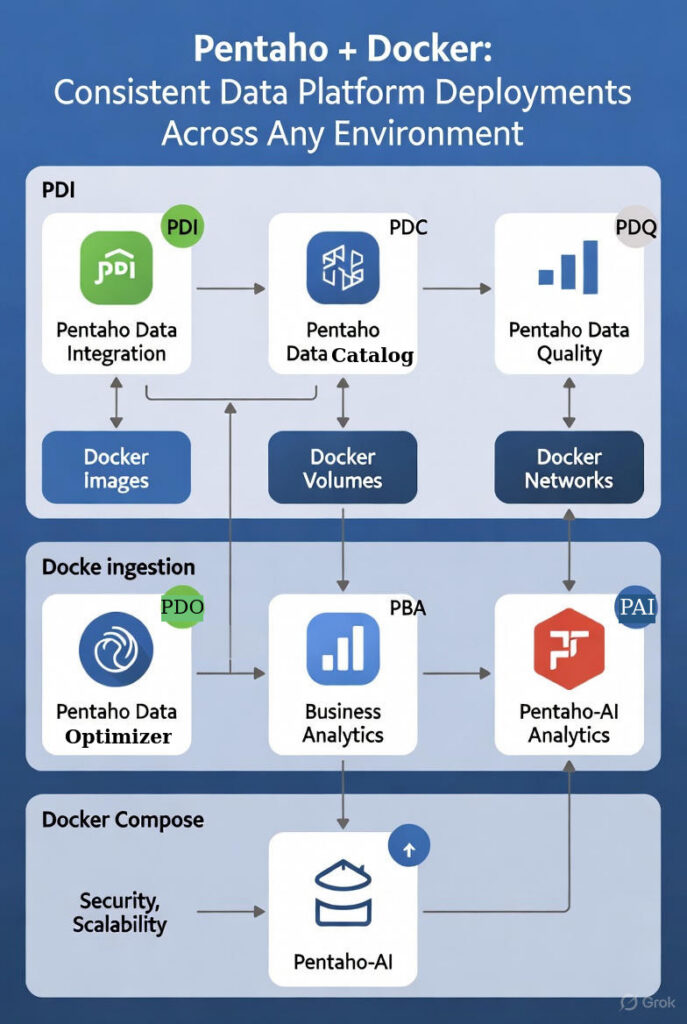
Pentaho Docker Consistent Data Platform Deployments Across Any Environment:
Pentaho integrates with Docker for consistent deployments—Docker volumes enable Pentaho to persist data and configurations across environments. Docker networking enables Pentaho to connect to databases, cloud services, and APIs. Docker images ensure Pentaho runs identically in development, testing, and production. Deploy your complete Pentaho data platform anywhere Docker runs with consistency.
Learn how to integrate Pentaho with Kubernetes for container orchestration options.
Most organizations using Docker have containerization infrastructure but struggle to deploy data platforms consistently across environments. Rising deployment complexity, environment inconsistencies, and configuration management gaps are straining operations. Pentaho helps organizations strengthen their Docker data capabilities through native integration that unifies consistent deployment, data persistence, networking, and portability—empowering smarter deployments without infrastructure disruption.
Deploy Pentaho with Docker by using Docker volumes for data and configuration persistence, Docker networks for connecting to data sources, Docker images for consistent deployments, and Docker Compose for multi-component coordination—all while leveraging your existing Docker investment.
⚡ Zero Custom Code: Native Docker Integration That Works Immediately
Pentaho components integrate directly with Docker containerization features—no custom integration code required. Data flows efficiently between Pentaho components using Docker volumes and networks, whether you’re deploying containers, persisting data, or connecting to data sources.
Docker Volumes → Enable Pentaho to persist data and configurations across container restarts and deployments, store PDI transformation definitions and job schedules so ETL pipelines survive container updates, store PDC metadata catalogs ensuring data discovery and lineage information persists, store PBA report definitions and dashboard configurations so analytics remain available after container restarts, enable data sharing between Pentaho components through shared volumes, and use Docker bind mounts enabling Pentaho to access data from host system without copying files into containers.
Docker Networking → Enables Pentaho containers to connect to databases, cloud services, and APIs securely, connects PDI to databases through Docker networks using JDBC connections working the same way whether database is on host, in another container, or in cloud, enables PDC to discover data sources over Docker networks scanning databases and file systems accessible through network connections, enables Pentaho containers to communicate with each other so PDI can trigger PDC discovery and PDQ can validate data from PDI pipelines, and uses Docker’s host networking mode enabling Pentaho to access services running on host machine when needed.
Docker Images → Ensure Pentaho runs identically across different environments, include Java runtime, Pentaho components, and all dependencies so Pentaho behaves the same way in development, testing, and production, enable image versioning so you can track Pentaho deployments and roll back to previous versions if needed, use Docker image layers enabling efficient updates (only changed layers downloaded reducing update time and bandwidth), and enable Docker image registries so you can share Pentaho deployments across teams ensuring everyone uses identical Pentaho configurations.
Docker Compose → Enables you to deploy multiple Pentaho components together with a single command, defines PDI, PDC, PDQ, PDO, and PBA containers with their volumes, networks, and dependencies so you can start entire Pentaho platform with one command, enables you to define shared volumes and networks so Pentaho components automatically share data and can communicate, enables environment-specific configurations so you can use same Compose file with different environment variables for development, testing, and production, and simplifies deployment ensuring components are configured correctly.
🚀 6 Ways This Accelerates Your Data Platform Deployment
- Faster Deployment: Native Docker integration eliminates custom deployment code—reduce timelines without infrastructure changes. No integration layers needed—Pentaho integrates natively.
- Consistent Deployments: Docker images ensure Pentaho runs identically across development, testing, and production eliminating “works on my machine” problems. Image versioning enables deployment tracking and rollback.
- Persistent Operations: Docker volumes ensure Pentaho data and configurations persist across container restarts and deployments. Bind mounts enable access to host data without copying files.
- Complete Networking: Docker networks enable Pentaho containers to connect to databases, cloud services, and APIs securely. Bridge networks enable inter-component communication.
- Seamless Coordination: Docker Compose enables multi-component deployment with a single command. Shared volumes and networks enable automatic component coordination.
- Portable Infrastructure: Docker images enable Pentaho to run anywhere Docker runs. Image registries enable deployment sharing across teams and environments.
🔄 How It Works: 4 Stages from Containerization to Deployment
Stage 1: Containerization → Pentaho components packaged as Docker images including Java runtime, Pentaho components, and all dependencies. Docker images ensure Pentaho runs identically across different environments. Image versioning enables deployment tracking and rollback.
Stage 2: Persistence & Networking → Docker volumes store transformation definitions, metadata catalogs, and report configurations persisting across container restarts. Docker networks enable Pentaho containers to connect to databases, cloud services, and APIs securely. Bridge networks enable inter-component communication.
Stage 3: Coordination & Deployment → Docker Compose defines multiple Pentaho components with their volumes, networks, and dependencies enabling deployment with a single command. Shared volumes and networks enable automatic component coordination. Environment-specific configurations enable same Compose file across environments.
Stage 4: Operations & Management → Docker images enable consistent deployments across development, testing, and production. Docker volumes ensure data and configurations persist. Docker networks enable secure connectivity. Image registries enable deployment sharing across teams.
All Pentaho components run as Docker containers, using Docker volumes, networks, images, and Compose. Infrastructure deploys consistently across any environment where Docker runs.
💼 Real-World Results: How Organizations Use Pentaho with Docker
Consistent Multi-Environment Deployment: Organizations deploying across multiple environments use Docker images to ensure Pentaho runs identically in development, testing, and production, Docker Compose enables deployment with a single command across environments, Docker volumes ensure data and configurations persist across environments, and Docker networks enable consistent connectivity across environments. This approach uses Docker for consistency, with Pentaho components handling data operations.
Portable Data Platform: Organizations needing portable data platforms use Docker images to package Pentaho components enabling deployment anywhere Docker runs, Docker volumes enable data persistence across deployments, Docker networks enable connectivity to various data sources, and Docker image registries enable deployment sharing across teams. This approach uses Docker for portability, with Pentaho components handling data operations.
Development-to-Production Pipeline: Organizations using CI/CD pipelines use Docker images to ensure Pentaho tested in development works identically in production, Docker Compose enables environment-specific configurations using same deployment definition, Docker volumes enable data persistence across pipeline stages, and Docker image versioning enables rollback if needed. This approach uses Docker for pipeline consistency, with Pentaho components handling data operations.
Frequently Asked Questions
How does Pentaho integrate with Docker?
Pentaho integrates with Docker using Docker volumes for data and configuration persistence, Docker networks for connecting to databases and services, Docker images for consistent deployments across environments, and Docker Compose for multi-component coordination. All Pentaho components run as Docker containers with native integration.
What Docker features does Pentaho support?
Pentaho supports Docker volumes for data persistence, Docker networks for service connectivity, Docker images for consistent deployments, Docker Compose for multi-component orchestration, and Docker image versioning for rollback capabilities. All Pentaho components are containerized and run identically across environments.
How to set up Pentaho on Docker?
Deploy Pentaho on Docker by creating Docker images for each Pentaho component, configuring Docker volumes for data and configuration persistence, setting up Docker networks for database and service connectivity, using Docker Compose for multi-component coordination, and ensuring consistent deployments across development, testing, and production environments.
Does Pentaho require custom Docker configuration?
Pentaho components run as standard Docker containers with standard configurations. Docker volumes, networks, and images use standard Docker resources. Custom configurations are only needed for specific deployment requirements, not for basic functionality.
What are the benefits of Pentaho on Docker?
Key benefits include consistent deployments (same image across environments), data persistence (Docker volumes), service connectivity (Docker networks), portability (runs anywhere Docker runs), version control (Docker image versioning), and multi-component coordination (Docker Compose).
Can Pentaho run consistently across environments with Docker?
Yes. Docker images ensure Pentaho runs identically in development, testing, and production. Docker volumes persist data and configurations across container restarts, and Docker Compose enables environment-specific configurations using the same deployment definition.
How does Docker ensure data persistence for Pentaho?
Docker volumes enable Pentaho to persist data and configurations across container restarts. Volumes can be named volumes, bind mounts, or tmpfs mounts, ensuring data survives container lifecycle while maintaining portability and consistency across environments.
🎯 Ready to deploy your Pentaho data platform consistently?
Pentaho integrates natively with your existing Docker infrastructure—no infrastructure changes required. Use Docker volumes for data and configuration persistence, Docker networks for connecting to data sources, Docker images for consistent deployments, and Docker Compose for multi-component coordination—all while leveraging your existing Docker investment.
Contact TenthPlanet for expert Pentaho Docker deployment services and implementation support.
Note:
This blueprint provides a comprehensive guide for implementing Pentaho with Docker. Actual implementations may vary based on specific requirements, deployment patterns, compliance needs, and budget constraints.
