How to Connect ERP, CRM, eCommerce and Accounting Systems with iDempiere
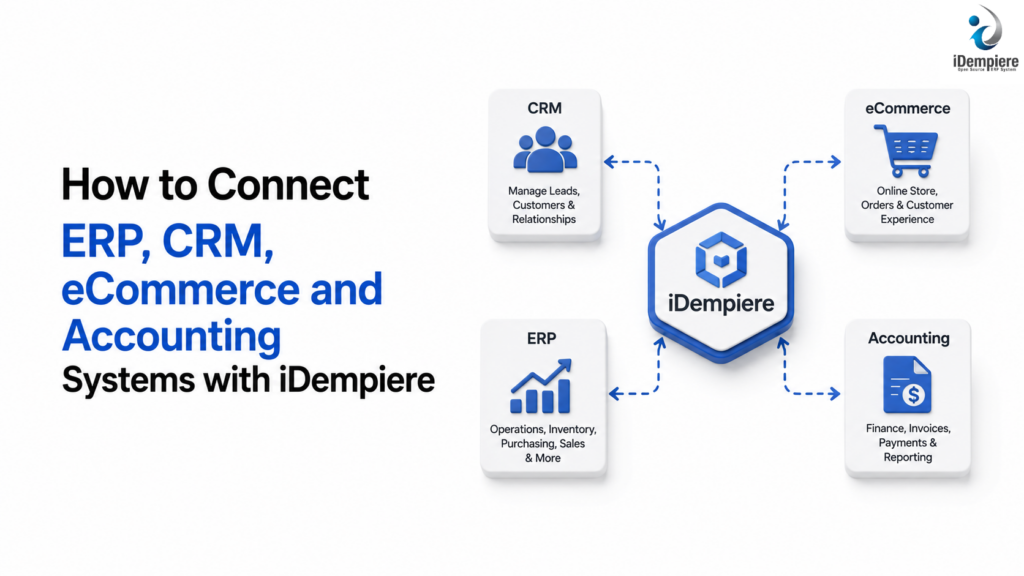
iDempiere integrates ERP with CRM, eCommerce, and accounting to sync data, eliminate duplication, and automate fulfillment.
Modern businesses often use different software systems to manage different areas of their operations. A CRM system manages customer relationships and sales activities, an eCommerce platform handles online sales, an ERP system manages business operations and resources, and accounting software manages financial transactions and reporting.
iDempiere can provide the ERP foundation for a connected business environment. Businesses can implement integrations between iDempiere and external CRM, eCommerce, accounting, payment, shipping, and other business applications.
What Does ERP Integration Mean?
ERP integration means connecting iDempiere with other business applications so that relevant information can be exchanged between systems.
For example:
CRM → eCommerce → iDempiere → Accounting
A customer created through a CRM or eCommerce platform can be transferred to iDempiere. An online order can be sent to iDempiere for processing, inventory can be updated, shipments can be managed, and invoice and financial information can be processed within the ERP.
Instead of treating each application as an isolated system, integration creates a connected flow of information across the business.
Why Integrate ERP, CRM, eCommerce and Accounting?
1. Reduce Duplicate Data Entry
Without integration, employees may need to enter the same customer, product, order, or invoice information into multiple applications.
For example:
- A customer places an online order.
- The order is recorded in the eCommerce platform.
- An employee manually creates the customer and order in the ERP.
- Finance manually records the corresponding financial information.
This creates unnecessary work and increases the possibility of errors.
With an appropriate integration, information can be transferred automatically between systems.
2. Maintain Consistent Business Data
Different systems can contain different versions of the same information.
For example:
- The CRM may contain one customer address.
- The ERP may contain another address.
- The eCommerce platform may contain an outdated phone number.
- The accounting system may contain a different billing address.
An integration architecture can define which system is responsible for each type of master data and synchronize relevant changes between systems.
This helps establish a consistent flow of customer, product, inventory, order, and financial information.
3. Improve Online Order Processing
An eCommerce platform can be connected with iDempiere so that online orders can enter the ERP automatically.
A possible process is:
Online Order → Sales Order → Inventory Check → Fulfillment → Shipment → Invoice → Accounting
This allows sales, warehouse, and finance teams to work with the same transaction information.
4. Improve Inventory Visibility
When an eCommerce platform and ERP operate independently, the online store may not always have the latest inventory information.
An integration with iDempiere can be implemented to synchronize inventory information between the ERP and eCommerce platform.
This can help businesses reduce overselling and improve order fulfillment.
How iDempiere Can Fit Into the Integration Architecture
iDempiere can serve as the central ERP platform for coordinating core business operations.
Its ERP processes can cover areas such as:
- Sales
- Purchasing
- Inventory
- Warehousing
- Manufacturing
- Financial management
- Projects
- Customer and business partner management
Rather than replacing every specialized application, businesses can implement integrations between iDempiere and the applications they already use.
This approach allows businesses to retain specialized applications while using iDempiere to manage core ERP processes.
Connecting CRM With iDempiere
CRM systems typically manage leads, prospects, customer interactions, opportunities, and sales activities.
iDempiere can manage the operational and transactional processes that follow a sale.
A possible CRM-to-ERP process is:
Lead → Opportunity → Customer → Sales Order → Shipment → Invoice → Payment
Depending on the CRM and business requirements, an integration can be implemented to synchronize:
- Customer information
- Contacts
- Addresses
- Sales opportunities
- Products
- Pricing information
- Sales orders
- Order status
- Invoices
Example
A salesperson creates a new customer in the CRM.
The integration transfers the required customer information to iDempiere. The customer can then be used in the ERP for order processing, invoicing, shipping, and financial transactions.
This eliminates the need to manually recreate the customer in multiple systems.
Implementing eCommerce With iDempiere
Is eCommerce Possible With iDempiere?
Yes. eCommerce can be implemented as part of an iDempiere-based business architecture.
However, it is important to distinguish between the eCommerce storefront and the ERP backend.
A dedicated eCommerce platform can provide the customer-facing experience, including:
- Product browsing
- Shopping cart
- Checkout
- Customer accounts
- Online ordering
- Payment interaction
iDempiere can then manage the ERP processes behind those online transactions.
This means businesses do not necessarily need to use iDempiere itself as the complete customer-facing online store. Instead, an eCommerce solution can be integrated with iDempiere.
Connecting Accounting Systems With iDempiere
Accounting is closely connected to ERP operations because sales, purchasing, inventory, and payments all have financial consequences.
iDempiere can be implemented as the primary financial system for the business or integrated with an external accounting application, depending on the organization’s requirements.
A sales process can follow:
Sales → Invoice → Receivable → Payment
A purchasing process can follow:
Purchase → Vendor Invoice → Payable → Payment
Depending on the architecture, integration can involve:
- Customer invoices
- Vendor invoices
- Payments
- Receivables
- Payables
- Tax information
- General ledger transactions
- Financial account information
The organization should define which system is the financial system of record before implementing the integration.
Conclusion
eCommerce can be implemented and integrated with iDempiere to create a connected online selling and ERP environment.
The eCommerce platform can provide the customer-facing shopping experience, while iDempiere can manage the operational processes behind online sales, including sales orders, inventory, warehousing, fulfillment, shipments, invoicing, and financial processes.
A typical architecture is:
eCommerce → iDempiere → Inventory → Fulfillment → Shipment → Invoice → Accounting
CRM can also be connected to the same environment to synchronize customer and sales information.
The key to successful implementation is not simply connecting systems technically. Businesses need to define data ownership, business processes, data mappings, synchronization requirements, security, and error handling before development begins.
With the right integration architecture, iDempiere can serve as a strong ERP foundation for businesses that want to connect eCommerce, CRM, accounting, inventory, and other applications without requiring every function to exist within a single application.