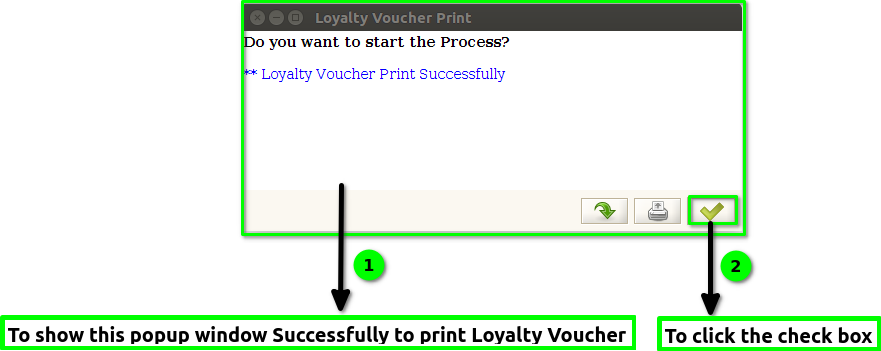
TO CREATE A LOYALTY VOUCHER PRINT
Loyalty Voucher Print means generating and printing a voucher or coupon that rewards customers for their loyalty, which they can use for discounts or special offers.
User Access
Who Can Access
- Admin
- Cashier
- Manager
- Back Office
What User Can Do
- Select eligible customers
- Generate loyalty vouchers
- Customise voucher details
- Track printed vouchers
Pre-Requisite Activities
- Define Loyalty Program Rules
- Verify Customer Eligibility
- Set Voucher Details
- Assign User Roles
Business Rules
- Customer Must Be Eligible
- One Voucher per Qualifying Action
- Unique Voucher Code Required
- Set Expiry Date
- Log All Voucher Activity
User Interface
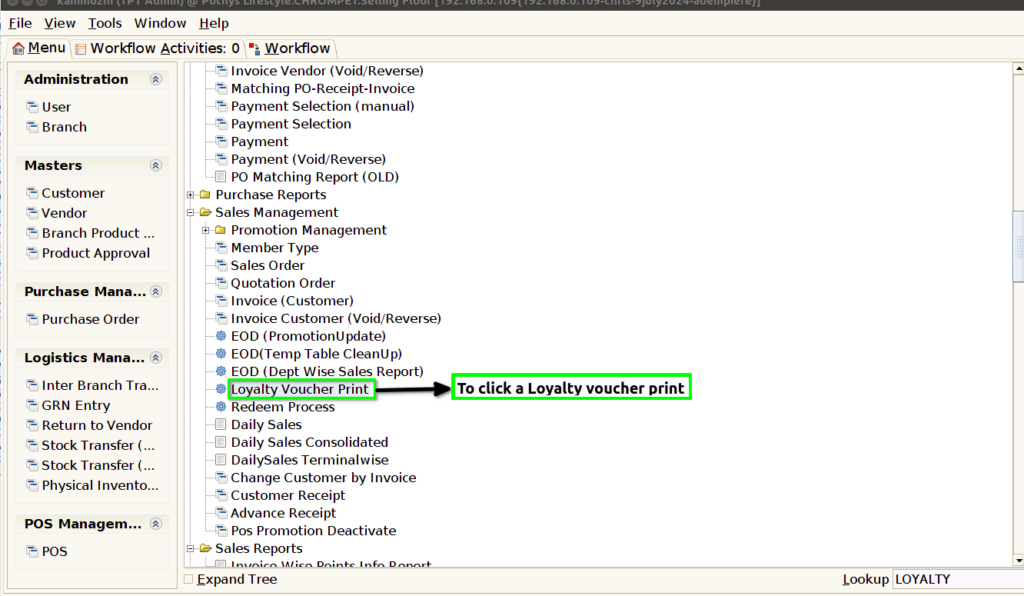
STEP 1: To select a Loyalty Voucher Print.
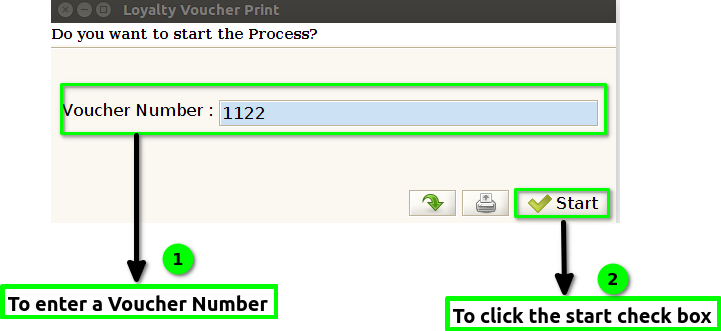
STEP 2: To enter a voucher Number and tho click start check box.To run the process.
STEP 3: Once to run the process to show the popup window Loyalty Voucher Print Successfully to print.And then to click the check box.