How to run EOD (Terminal Update) process in Adempiere Retail
EOD (End of Day) Terminal Update refers to the process of finalising and updating all sales and transaction data from a terminal (such as a POS machine) at the end of the business day.
User Access
Who Can Access
- Back Office
- Cashier
- Manager
- Admin
What User Can Do
- Review Daily Transactions
- Generate Reports
- Close Terminal
Pre-Requisite Activities
- Complete All Sales Transactions
- Ensure All Returns and Exchanges Are Processed
- Check for Pending Transactions
- Print or Review Required Reports
Business Rules
- Transaction Completion
- Report Generation
- Report Generation
- Data Sync
- One EOD per Day
User Interface
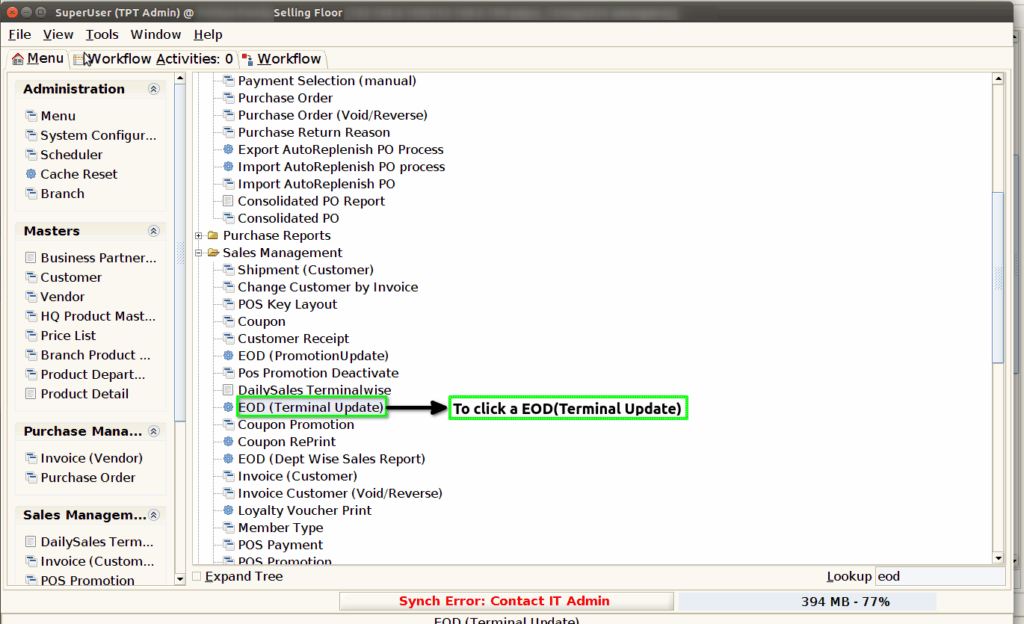
Step 1 : To Select a Branch in Menu.Then to click a EOD(terminal update).
Step 2 : To show the last EOD date.And then to click the check box.

Step 3 :Once to run the process and to show the terminal updated message.Finally to click the check box.
