How to Configure Recurring Group in iDempiere
The Recurring Group window in iDempiere is used to organize and categorize recurring business transactions that are executed on a scheduled basis. Instead of creating similar recurring transactions individually, users can group them under a common recurring group, making them easier to manage and maintain.
Business Rules
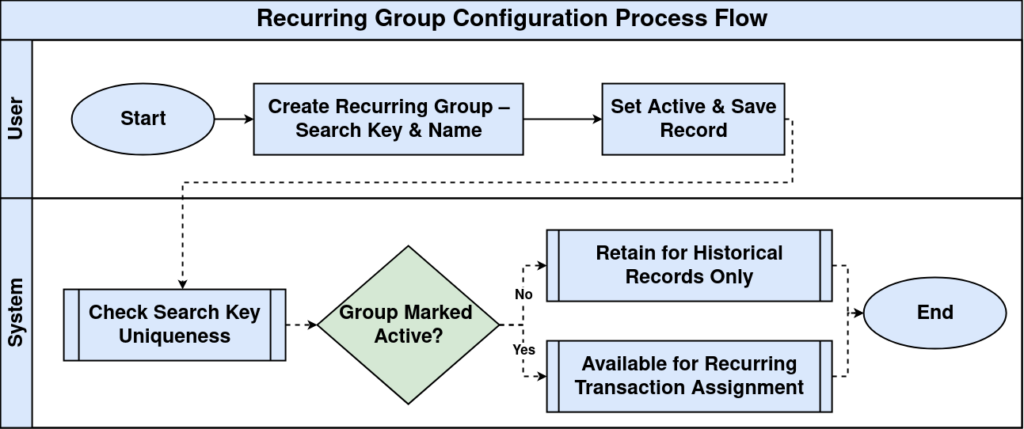
- Each Recurring Group must have a unique Search Key.
- Name is mandatory and should clearly identify the recurring business category.
- Only Active recurring groups are available for selection in recurring transaction configurations.
- Multiple recurring transactions can be assigned to the same Recurring Group.
- A Recurring Group can be used across different recurring business processes.
- Description should explain the business purpose of the recurring group.
- Comment/Help can be used to provide additional business instructions for administrators.
- Inactive Recurring Groups remain available for historical records but cannot be selected for new configurations.
Process Flow
Prerequisites
- Tenant configured.
- Organization configured.
- Configuration access available.
Navigation
Menu → System Admin → General Rules → Recurring Group
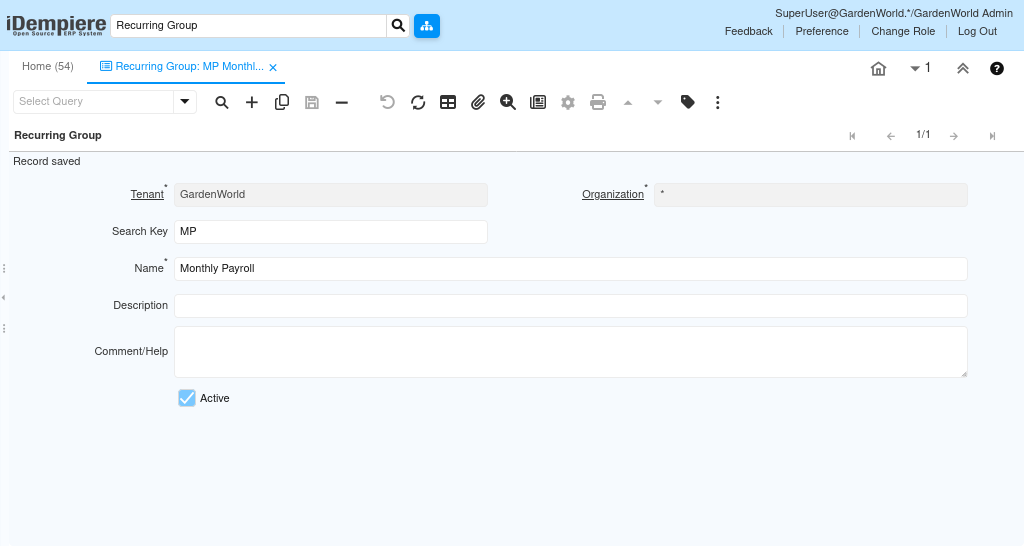
Configuration Steps
Step 1: Create Group
Complete the required fields and save.
Step 2: Enter Details
Complete the required fields and save.
Step 3: Activate Group
Complete the required fields and save.
Step 4: Save Record
Complete the required fields and save.
Common Issues and Resolutions
| Issue | Cause | Resolution |
| Duplicate key | Existing Search Key | Use unique key |
| Inactive | Active disabled | Enable Active |
| Cannot save | Mandatory fields missing | Complete fields |
| Wrong group | Incorrect selection | Update group |
| No access | Permission issue | Grant access |
Next Steps
- Configure recurring transactions.
- Assign Recurring Group.
- Test recurring process.