ODOO SOLUTIONS · EDITION COMPARISON
Odoo Community vs Enterprise: which edition actually fits your business?
A plain-English comparison for owners and finance leaders. What each edition actually costs to run, what you trade away, and a straight verdict on when each one is the right call.
- What “free” really costs once you total up ownership, not just the licence
- The feature gap that settles most decisions: accounting
- Who ends up carrying the upgrade work over the next 3–5 years
The short answer
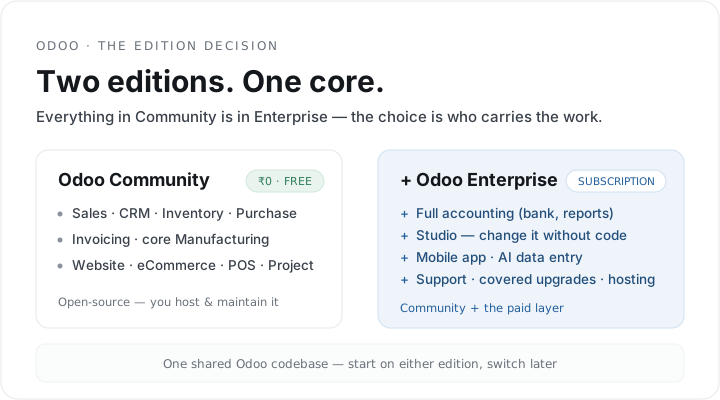
Start here: Enterprise is a paid layer on top of Community, not a separate product. Everything in Community is also in Enterprise. What the licence adds is full accounting, the no-code Studio tool, mobile apps, the advanced apps, official support, hosted options, and version upgrades that Odoo handles for you.
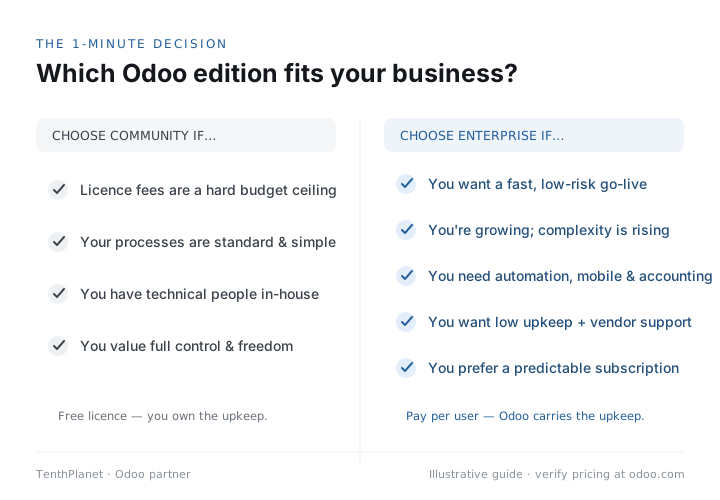
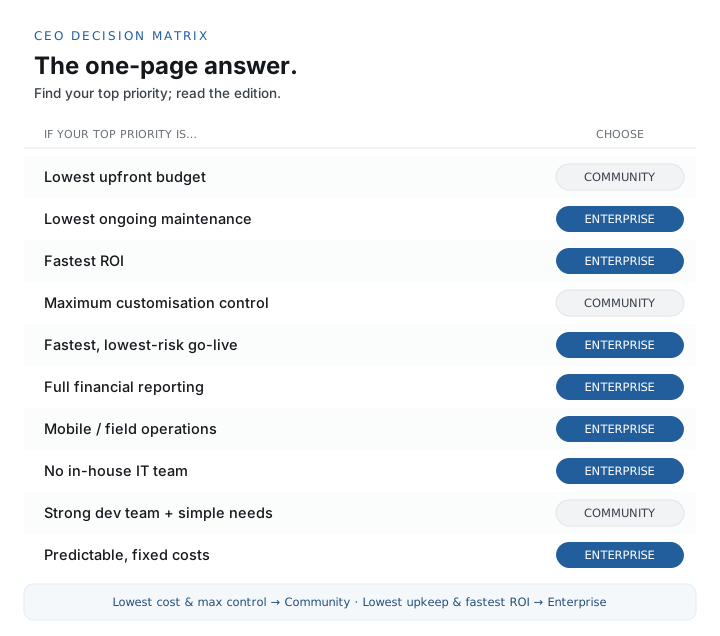
Choose Community when the licence cost is the deciding factor, your accounting is simple or your CA already handles it, and you have a team or partner to host and maintain the system. Choose Enterprise when you want to run full accounting in-house, change the system without calling a developer every time, and would rather pay per user than carry the hosting, support, and upgrade work yourself.
In most scoping conversations it comes down to three questions: how complex your accounting is, who maintains the system day to day, and who you want carrying the upgrades over the next few years.
Pricing and version details here were checked in June 2026, against Odoo 19. Per-user pricing changes by country and India runs on its own price list, so confirm the current figure for your country at odoo.com/pricing. Any scenario numbers below are illustrative — they show the shape of the decision, not a quote.
THE FOUNDATION
Community is the engine; Enterprise adds to it
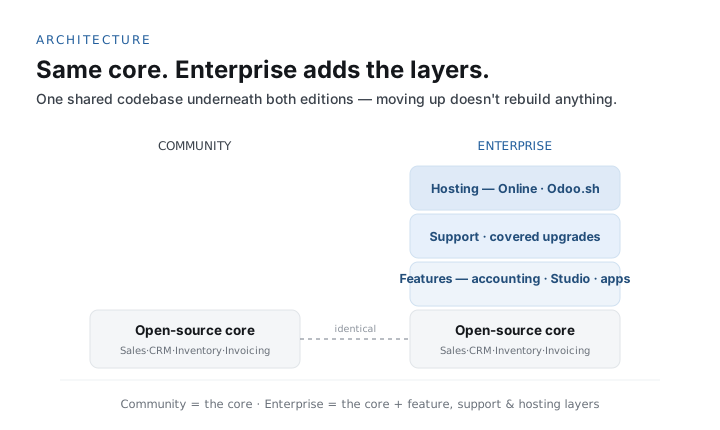
Community is not a stripped-back trial. It's the open-source core the whole product is built on.
FEATURES & APPS
What Enterprise switches on
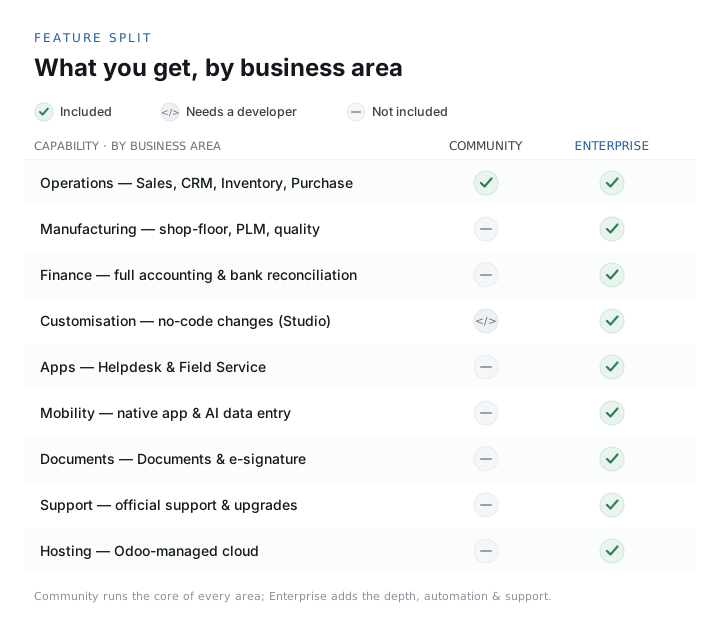
The paid layer is essentially a bundle of apps and conveniences. These are the ones that actually move a buying decision.
PRICING & TOTAL COST OF OWNERSHIP
``Free`` is a licence price, not a running cost
The only fair comparison runs on three-to-five-year total cost of ownership, not the sticker price.
Community’s licence really is zero — it’s open-source under the LGPLv3 licence, and you can run it indefinitely without paying Odoo a fee. Enterprise is priced per user, per month, billed annually, across three plans:
- One App Free — a single app, unlimited users, free (dependencies included).
- Standard — full Enterprise for a single company using Odoo’s apps as delivered.
- Custom — adds multiple companies on one database, Odoo Studio, custom developments, and API access; costs more per user.
Per-user pricing swings widely by country, and India runs on its own, generally lower, price list. Those numbers move, so treat any figure you see — including one a consultant quotes you — as indicative until you’ve checked it at odoo.com/pricing for your country.
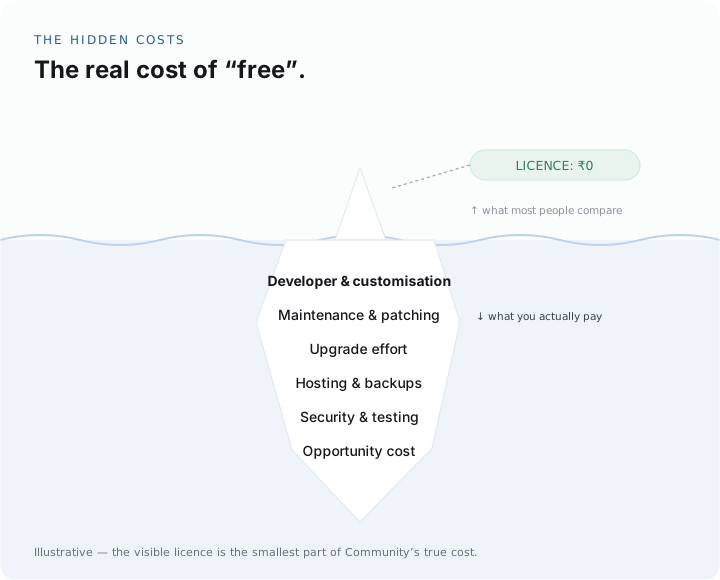
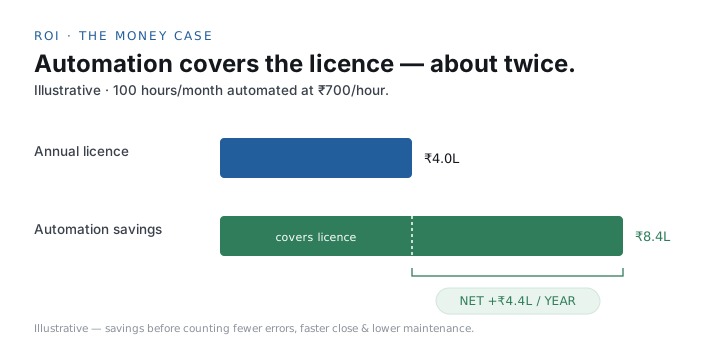
So which comes out cheaper? For a small team with a capable partner, simple accounting, and the appetite to manage their own upgrades, Community usually wins on total cost. For a finance-heavy or fast-moving business, Enterprise tends to win once full accounting and covered upgrades are in the maths. Either way, model it against your own headcount and needs instead of assuming.
Try the ROI calculator with your own figures, or read the full breakdown in Odoo Enterprise pricing & TCO explained.
VERSION UPGRADES
The recurring cost most comparisons forget
Odoo ships a major version roughly once a year. Over 3–5 years, the question of who handles that turns into a real number.
A new major version lands about once a year — Odoo 19 arrived in October 2025, and Odoo 20 is expected in October 2026. Each upgrade means migrating the database, re-testing every customisation and third-party module, checking that reports and integrations still work, and retraining people on what changed.
On Enterprise, Odoo handles this through its covered upgrades service for the life of your subscription — low, predictable effort on your side. On Community, that work is yours or your partner’s, it comes round with every version, and it grows in step with how much custom code you’re carrying.
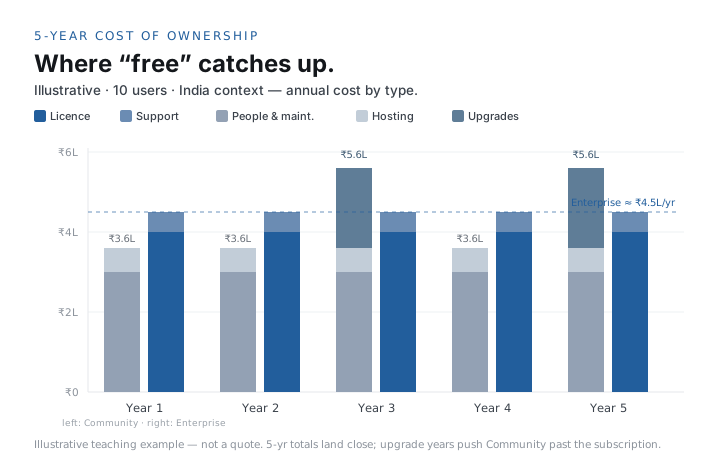
Why this often flips the maths: the quick version is “Community is free, Enterprise costs per user.” But once you put a number on three to five years of self-managed upgrades — plus the risk of getting stuck on an unsupported version — Enterprise’s covered upgrades close a lot of that gap. Price it in before you decide, not after. See Odoo upgrades and the TCO maths.
SECURITY & DATA OWNERSHIP
You own your data on both editions
The difference is who's responsible for keeping it safe.
Odoo is built on open source, so on either edition your data is yours and exportable. There’s no proprietary lock-in — a genuine advantage over closed ERP systems when renewal time comes around. Where the data physically lives comes down to your hosting choice, and on-premise hosting (available on both editions) is the route to take when you have strict data-residency requirements.
Both editions give you role-based access control, record-level rules, multi-company isolation, two-factor authentication, and audit logging. The responsibility split follows the hosting: on Odoo Online and Odoo.sh, backups and patching are handled for you; on self-hosted Community, securing the server, applying updates, and running backups fall to you. That’s a real task to budget for, and one more reason to stay on a supported, patched version. There’s more in Odoo data security and ownership.
THE VERDICT
When each edition wins
There's no edition that's better in the abstract — only the one that fits your situation. Here's how it usually breaks down.
A few representative profiles, illustrative rather than exact:
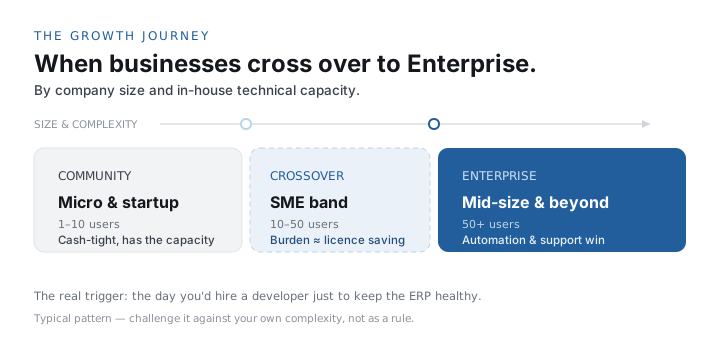
- A 10-person trading firm with an external CA, tight budget, and a partner on call — usually Community.
- A 40-person manufacturer doing its own costing, QC, and statutory accounting — usually Enterprise, for full accounting, Quality, and covered upgrades.
- A fast-growing services business that changes process monthly and has no IT team — usually Enterprise, for Studio and hosted, hands-off operation.
- A multi-location retailer standardising on one system with in-house developers — either can work; the decision turns on accounting depth and who owns upgrades.
Because it’s situational, the quickest way to be certain is a short fit assessment — an hour spent mapping your accounting, your in-house capacity, and your customisation needs takes the guesswork out. Book a fit assessment and we’ll tell you plainly which edition we’d put you on. We implement both, so the recommendation follows your business case, not a licence margin.
QUESTIONS OWNERS ASK
Frequently asked questions
The questions that come up most often when businesses weigh the two editions, grouped so you can jump to yours.
General & Editions
Is Odoo Community really free?
Yes. Odoo Community is open-source under the LGPLv3 licence and carries no software licence fee. You can run it forever at no licence cost. But “free licence” is not “free to run” — you still pay for hosting, implementation, any customisation, maintenance, and the effort of managing your own version upgrades. Count those in your total cost of ownership before concluding Community is cheaper.
What is the main difference between Odoo Community and Enterprise?
Enterprise is a paid layer on top of Community. Everything in Community is in Enterprise. Enterprise adds full accounting, the no-code Studio customisation tool, mobile apps, a set of advanced apps (Subscriptions, Helpdesk, Field Service, Quality, and more), official Odoo support, hosted options, and — crucially — covered version upgrades. Community is the open-source foundation you host and maintain yourself.
Can I start on Community and move to Enterprise later?
Yes, and many businesses do. Community and Enterprise share the same database structure, so moving up is a supported path: you add the Enterprise licence and switch on the Enterprise apps. It is common to start on Community to control cost, then move to Enterprise when full accounting, no-code customisation, or hands-off upgrades become worth paying for.
Is Odoo Community open source and Enterprise proprietary?
Yes. Community is open-source under the LGPLv3 licence. Enterprise is a commercial licence layered on top: the extra Enterprise apps and services are proprietary, but they run on the same open Community core, and your business data remains yours and exportable on either edition.
Does Odoo 19 add anything that affects the edition decision?
Odoo 19 (October 2025) introduced AI agents that can create and update records, more industry packages, ESG reporting, offline-first mobile, and UI improvements. Most of the headline Enterprise capabilities — full accounting, Studio, advanced apps, AI features, and support — continue to sit in Enterprise, so the core Community-versus-Enterprise trade-offs still hold. Confirm exactly which features are in which edition for your version.
How do I decide between Community and Enterprise?
Work through five questions: How complex is your accounting? Do you have in-house or partner capacity to host and maintain the system? How often will you customise, and do you want to do it without code? Do you want Odoo to handle version upgrades? And what does the three-to-five-year total cost of ownership look like for each option? The honest answer is situational — a short fit assessment with a partner removes the guesswork.
Pricing & Cost
How much does Odoo Enterprise cost?
Enterprise is priced per user, per month, billed annually, across three plans: One App Free (a single app, unlimited users, free), Standard, and Custom (which adds multi-company, Odoo Studio, and API access). Per-user pricing varies significantly by country, and India has its own price list. Always confirm the current figure for your country on odoo.com/pricing — do not rely on a number quoted second-hand.
What is the One App Free plan?
One App Free gives you unlimited users on a single Odoo app at no cost. If that app depends on others (for example eCommerce needs Website and Invoicing), the dependencies are included free too. It is a genuine entry point if your need is truly one app, but most growing businesses use more than one, at which point you move to a paid Enterprise plan or run Community.
Is Community cheaper than Enterprise overall?
It depends on your team and needs. Community removes the licence fee but shifts hosting, maintenance, and upgrade effort onto you (or your partner). Enterprise’s per-user fee buys those back plus covered upgrades. For a small team with a capable partner and simple accounting, Community can be cheaper over three to five years. For a finance-heavy or fast-changing business, Enterprise often wins once upgrades and full accounting are counted. Model your own total cost of ownership rather than assuming.
What is the difference between the Standard and Custom Enterprise plans?
Both are full Enterprise. Standard suits a single company using Odoo’s apps as delivered. Custom is for businesses that need to run multiple companies on one database, customise with Odoo Studio, add custom developments, or use the external API. Custom costs more per user. Confirm current inclusions on odoo.com/pricing, as plan details change between versions.
What are the hidden costs of Odoo?
The costs owners often forget are implementation and data migration, training and change management, customisation, integrations, hosting and backups, ongoing support or AMC, and — especially on Community — the recurring effort of version upgrades. A licence price alone never tells you the true cost; build a three-to-five-year total cost of ownership instead.
Features & Accounting
Does Odoo Community include accounting?
Community includes Invoicing — create and send customer invoices and record vendor bills — but not full Accounting. Bank synchronisation and reconciliation, automated payment follow-ups, asset and budget management, and the deeper localised tax/financial reports are Enterprise features. If your finance team needs to run the books inside the system, that usually points to Enterprise.
What is Odoo Studio and do I need Enterprise for it?
Studio is Odoo’s no-code customisation tool — add fields, screens, reports, and automations without a developer. It is an Enterprise feature (included in the Custom plan). On Community, the same changes need a developer. If your processes change often and you want your own team to adapt the system, Studio is a strong reason to choose Enterprise.
Can I customise Odoo Community?
Yes — fully. Community is open-source, so a developer can build any custom module. You simply do not get the no-code Studio tool. The trade-off to manage is upgrade cost: every piece of custom code has to be re-tested when you move to a new Odoo version, so disciplined, configuration-first customisation keeps long-term cost down on either edition.
Which edition is better for manufacturing?
Both run Manufacturing (MRP), but manufacturers usually need full accounting for true product costing, plus Enterprise apps like Quality, PLM, Barcode, and IoT for shop-floor accuracy. That combination, and covered upgrades for a system you depend on daily, tends to favour Enterprise for serious manufacturing operations. Lighter or single-line operations can still run well on Community with the right partner.
Which edition is better for a small business?
If your accounting is simple or handled by an external accountant, your budget is tight, and you have a partner to host and maintain the system, Community can be an excellent fit. If you want full in-house accounting, mobile apps, no-code customisation, and Odoo to host and upgrade everything, a small Enterprise subscription is often worth it. The deciding factors are accounting needs, in-house technical capacity, and appetite for managing upgrades.
Hosting, Support & Upgrades
Can Odoo Community be hosted by Odoo?
No. Odoo Online and Odoo.sh are for Enterprise. Community is self-hosted only — on your own server or cloud. If you want Odoo to host and manage the platform for you, you need an Enterprise subscription. With Community you (or your implementation partner) own hosting, backups, and monitoring.
What hosting options does Odoo Enterprise have?
Three: Odoo Online (Odoo’s managed cloud, fastest to start, no custom code), Odoo.sh (a managed platform that supports custom code with development and staging branches), and on-premise or your own private cloud (full control). Choose Online for standard processes, Odoo.sh when you need customisation plus managed hosting, and on-premise for data-residency or full-control requirements.
Can I run Odoo Enterprise on my own servers?
Yes. Enterprise can be self-hosted on-premise or in your own private cloud, in addition to Odoo Online and Odoo.sh. This suits businesses that want Enterprise’s apps and support but must keep data on their own infrastructure for compliance or control reasons.
Who provides support for Odoo Community?
There is no official Odoo support for Community — you rely on the open-source community, the documentation, and your implementation partner. Enterprise includes official Odoo support and bug fixes for the licence duration. TenthPlanet provides partner-led support and AMC for both editions, so Community users are not left on their own.
Does Enterprise include version upgrades?
Yes. For the duration of your subscription, Odoo provides covered upgrades to new major versions through its upgrade service. This is one of Enterprise’s biggest long-term advantages, because upgrades are otherwise a recurring effort. On Community, you (or your partner) manage upgrades yourself each version.
How often does Odoo release a new version?
Roughly once a year. Odoo 19 was released in October 2025 and Odoo 20 is expected in October 2026, with minor updates (such as 19.1, 19.2, 19.3) in between. Staying on a supported version matters for security fixes and support, which is why who carries the upgrade effort is part of the edition decision.
What happens if I stay on an old version of Odoo Community?
Older versions eventually fall out of support, meaning no more fixes or security patches, and it becomes harder to find partners and talent who work on them. Running an unsupported version is a real operational and security risk. Enterprise’s covered upgrades keep you current with low effort; on Community, staying current is your responsibility and should be budgeted.
Security, Compliance & Migration
Who owns the data in Odoo?
You do, on both editions. Odoo is built on open source and your data is yours to export. There is no proprietary lock-in. Your hosting choice controls where the data physically lives: Odoo’s cloud, Odoo.sh, or your own servers (the only option for Community). On-premise hosting is the route for strict data-residency requirements.
Is Odoo secure?
Odoo provides role-based access control, record-level rules, multi-company isolation, two-factor authentication, and audit logging. On Odoo Online and Odoo.sh, backups and patching are handled for you. On self-hosted Community, securing the server, applying updates, and running backups are your responsibility — a point to budget for. Security also depends on staying on a supported, patched version.
Does Odoo support Indian GST and e-invoicing?
Odoo offers Indian localisation covering GST, e-invoicing (IRN) and e-way bills, and TDS, with the deeper accounting and tax reporting living in Enterprise’s full Accounting. Exact module coverage varies by version, so confirm the current Indian localisation features for your chosen version and edition before you commit.
Can I migrate from Tally to Odoo?
Yes. Moving from Tally to Odoo is one of the most common migrations in India. Masters, opening balances, and history (as scoped) are brought across, your ledgers are mapped to Odoo’s chart of accounts, and the numbers are reconciled against Tally before go-live. Done properly, you keep your history and reporting continuity while gaining multi-user control, inventory, and manufacturing.
Will I lose my data history if I switch to Odoo?
No, when migration is done properly. A good migration preserves your masters and the transaction history you need, verifies it against the source so the numbers tie out, and keeps the old system available until you have signed off on the new one — so nothing is destroyed on day one. Losing history is the most common fear about switching, and it is avoidable.
Do I need a partner to implement Odoo?
Not strictly for Enterprise’s hosted, standard setup — Odoo can be self-serviced. But for industry-specific configuration, data migration from Tally or a legacy system, integrations, and change management, a partner materially improves the odds of adoption (where ERP value is actually won or lost). Community in particular benefits from a partner for hosting and maintenance.
How long does an Odoo implementation take?
It depends on scope. A small, standard rollout can be a few weeks; a mid-market project with industry configuration and data migration is typically a couple of months; complex, multi-entity or deeply vertical projects run longer and are phased. The edition you choose changes licensing and hosting, not the fundamental implementation effort.