Odoo AI Features Explained (2026): Generative AI, Automation & Smart Business Workflows
Introduction
Odoo integrates Artificial Intelligence across its business applications to automate repetitive work, generate content, analyze documents, predict outcomes and improve operational efficiency. From AI-powered CRM recommendations and automated accounting workflows to intelligent inventory forecasting and document understanding, Odoo delivers practical AI capabilities directly inside everyday business processes.
This guide explains every AI feature available in Odoo and how each module uses AI to increase productivity and support smarter decision-making.
Key Features
- Multi-LLM support (OpenAI, Google Gemini, and others)
- AI Chatbot
- AI Agents for task automation
- AI-Generated Fields (Auto-populate data)
- AI Button for instant actions
- Voice Transcription & Meeting Summaries
- AI Web Page & Content Generation
- Business Card Scanning (Mobile App Only)
- AI Document Processing (OCR)
- AI Email & Marketing Content Generation
- Natural Language Search (Ask AI)
- AI Chatbot & Live Chat Intelligence
What AI Features Are Available in Odoo?
AI Configuration & Setup
AI Agent:
Configurable chat assistants trained on your company data. They don’t just answer — they act: creating tasks, updating fields, sending emails
Document Training:
Upload your own company PDFs, policies and knowledge articles. Your AI agents learn from your proprietary data
Ask AI – Always on:
A persistent AI button in the top-right corner of every screen for instant assistance
Multi-Provider LLM:
Connect OpenAI or Google Gemini via your own API key. Choose providers by use case, compliance needs or data residency requirements.
Screenshot Reference:
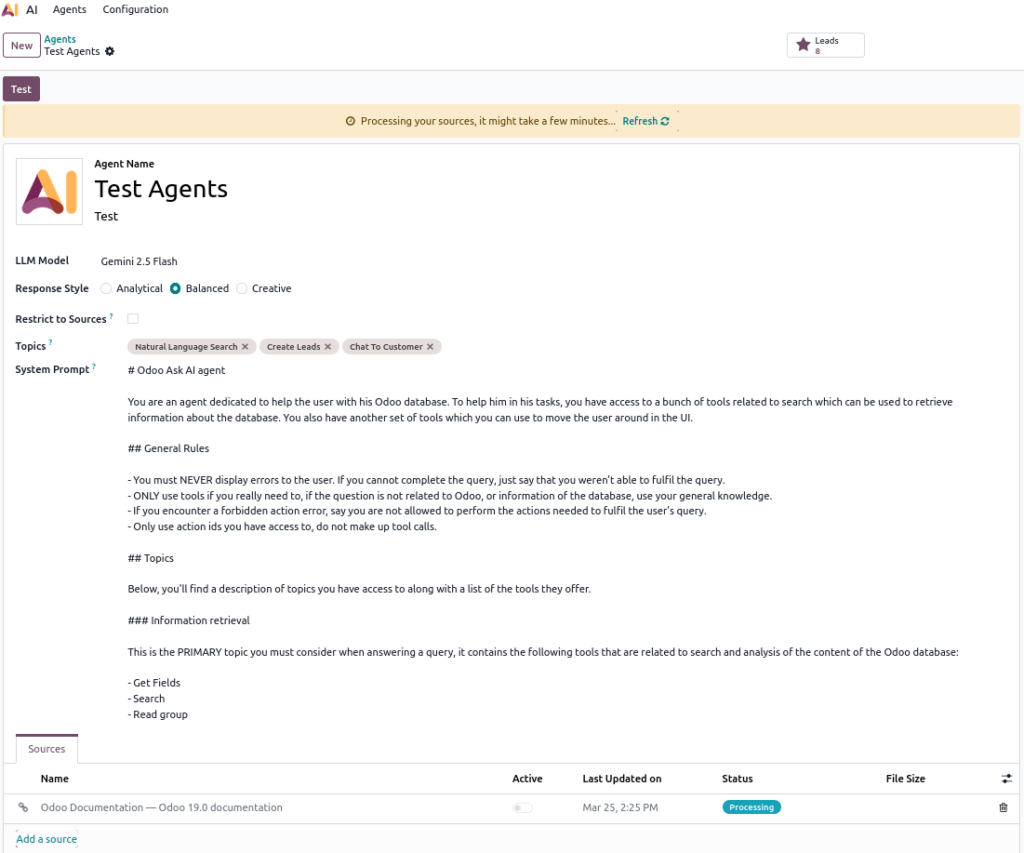
AI ChatBot
The AI chatbot is an intelligent assistant that uses natural language processing to interact with users and automate tasks.
Key Features
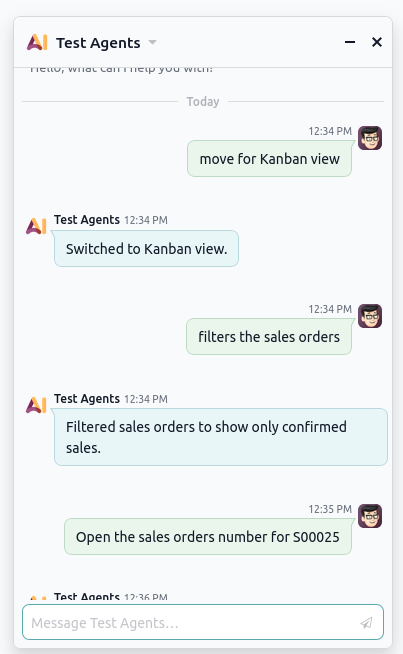
- Navigate Odoo modules and menus directly from the chatbot interface
- Apply filters and group records by fields to quickly access information
- Switch between list, kanban, form, calendar and pivot views from the chatbot
- Use predefined buttons for quick access to common actions
- Ask questions about records, workflows or reports and receive instant AI-generated answers
- Send answers as messages, add log notes and reuse chatbot content
- Open and view reports directly from the chatbot
- Website Live chat integration
- AI Content Generation (Text, Email, Marketing)
- Natural Language Search (Ask AI Search)
Screenshot Reference:
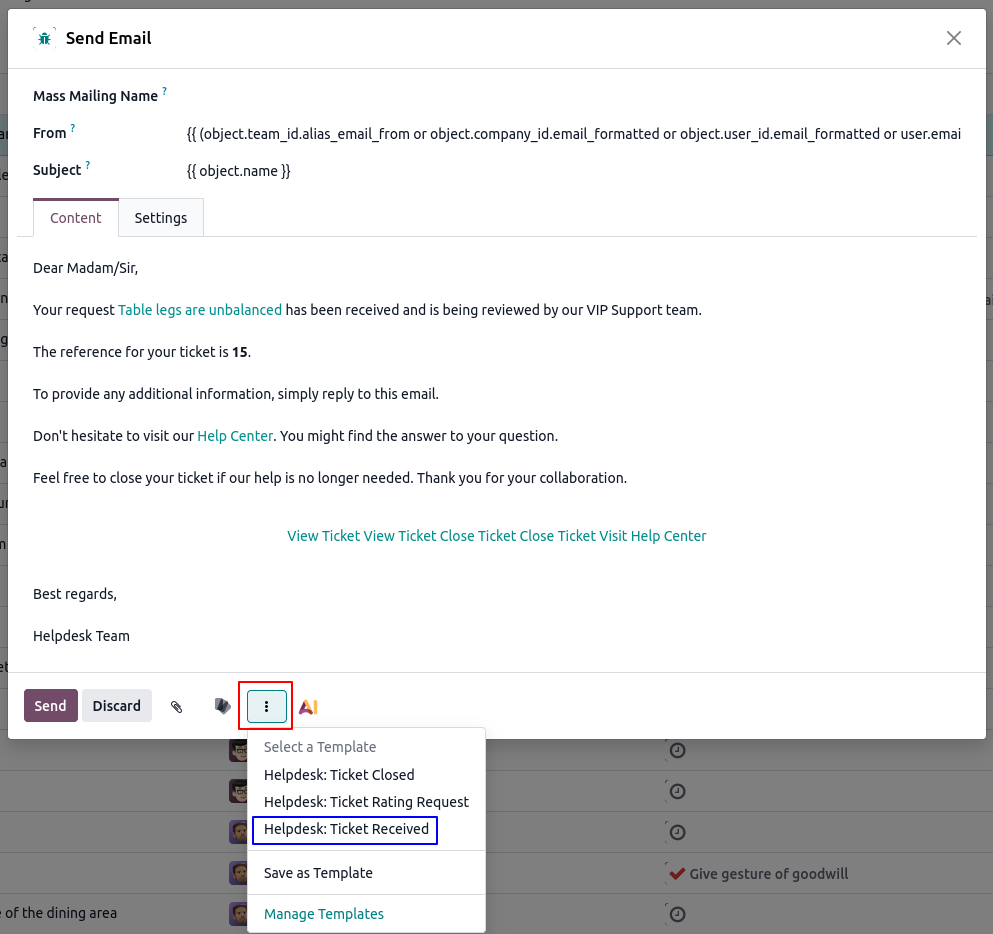
Predefined Email Templates
You can send emails quickly using ready-made templates for consistent communication
Screenshot Reference:
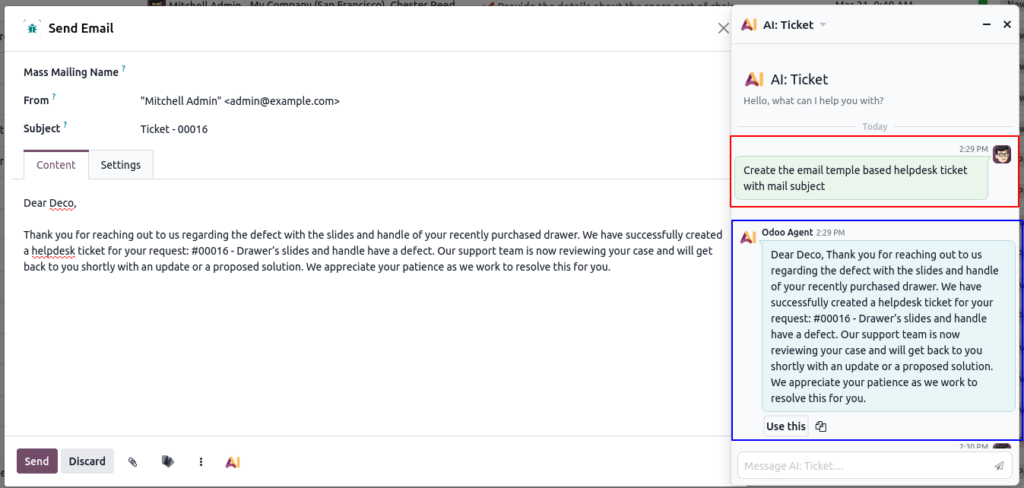
AI Generation Email Template
Generate professional emails instantly using AI prompts. Review and edit before sending.
Screenshot Reference:
AI Voice Transcription & Meeting Summaries
AI can automatically generate meeting notes, saving time and effort. It can also convert recorded calls into text and provide concise summaries, making it easier to review conversations quickly
Screenshot Reference:

Studio & Customization
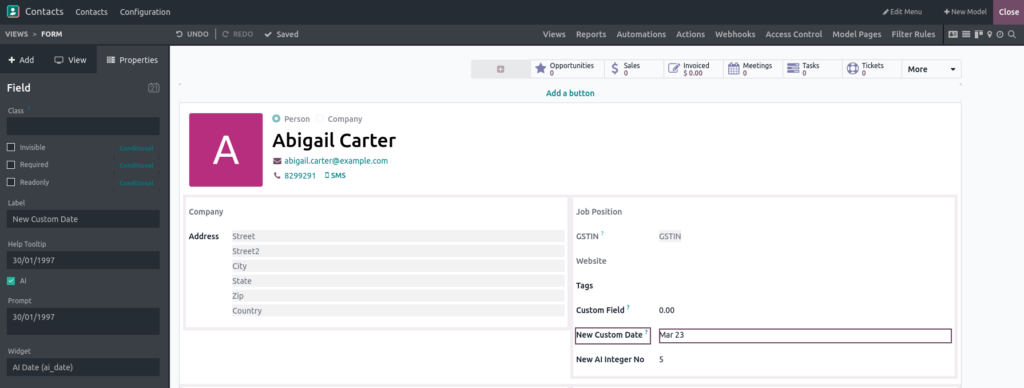
AI integrates with Odoo Studio to help you customize your apps. You can add AI fields that support multiple data types. AI can generate descriptions and notes automatically, making customization faster and easier.
Key Features
- Add intelligent AI fields
- Auto-generate descriptions and notes
- Speed up app customization
Screenshot Reference:
Module-Wise Odoo AI Features
CRM — Smarter Leads, Fewer Lost Deals
Key Features
- AI Lead Scoring (probability prediction)
- Meeting summaries
- Voice-to-text conversion
- AI email generation
- Smart filters and search
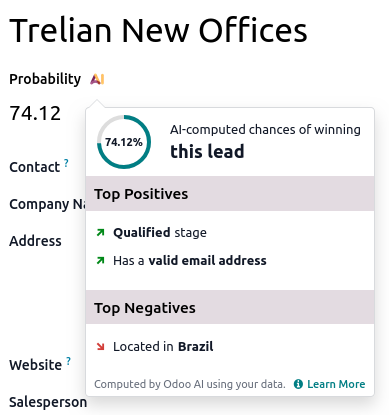
AI Lead Scoring
AI Lead Scoring evaluates every lead on company size, industry, behavior patterns and interaction history, producing a win probability score and prioritization recommendation. Sales reps spend less time guessing and more time closing.
Screenshot Reference:
Business Card Scanning (This feature is available only on the Odoo Mobile App)
Business card scanning is a standout feature: point your camera at a card, and Odoo instantly creates a fully populated lead with name, company, role, phone and email — no manual entry. Combined with live chat AI agents, website visitors can be converted into leads without any human intervention.
Accounting AI Features
AI-Powered OCR Processing
The advanced OCR engine scans bills, receipts and bank documents, automatically extracting key details such as vendor names, amounts, taxes and line items with near-perfect precision.
Intelligent Document Routing
AI automatically classifies and routes documents to the appropriate workflows, such as employee expenses, insurance records or vendor bills, ensuring proper organization without manual effort.
Smart Financial Automation
Finance teams traditionally spend enormous hours on data entry, matching and reconciliation. Odoo ‘s accounting AI targets all three with precision.
Key Features
AI Invoice Digitization – OCR reads bulk invoices and creates draft vendor bills with extracted line items, taxes, and amounts.
Odoo Helpdesk AI Features
Customer support is where AI’s 24/7 availability matters most. Odoo 19’s Helpdesk module deploys AI chatbots that handle initial customer inquiries with full context of past conversations — and when escalation is needed, AI-driven ticket routing ensures the right agent gets the right ticket instantly.
Key Features
- AI Suggested Reply – AI generates context-aware reply suggestions, helping support teams respond quickly, accurately and consistently to customer queries.
- Automatic Ticket Creation – AI automatically creates a support ticket when a customer sends a request via email chat or form.
1. AI Helpdesk Ticket Routing :
- Auto Ticket Classification and Smart Ticket Assignment (Auto Routing)
- Click studio button after click automations button
- Create Automated Action (Assign Helpdesk Team Tickets Based on Description) and add actions
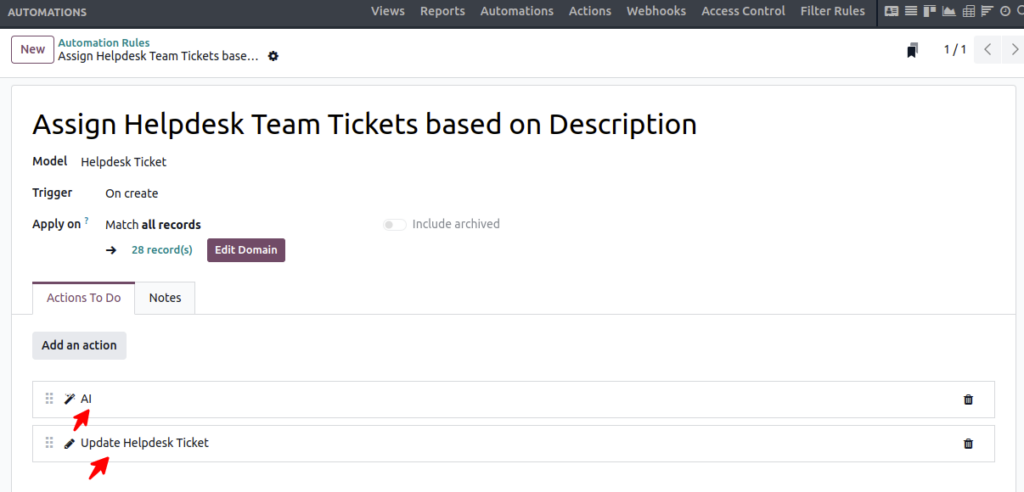
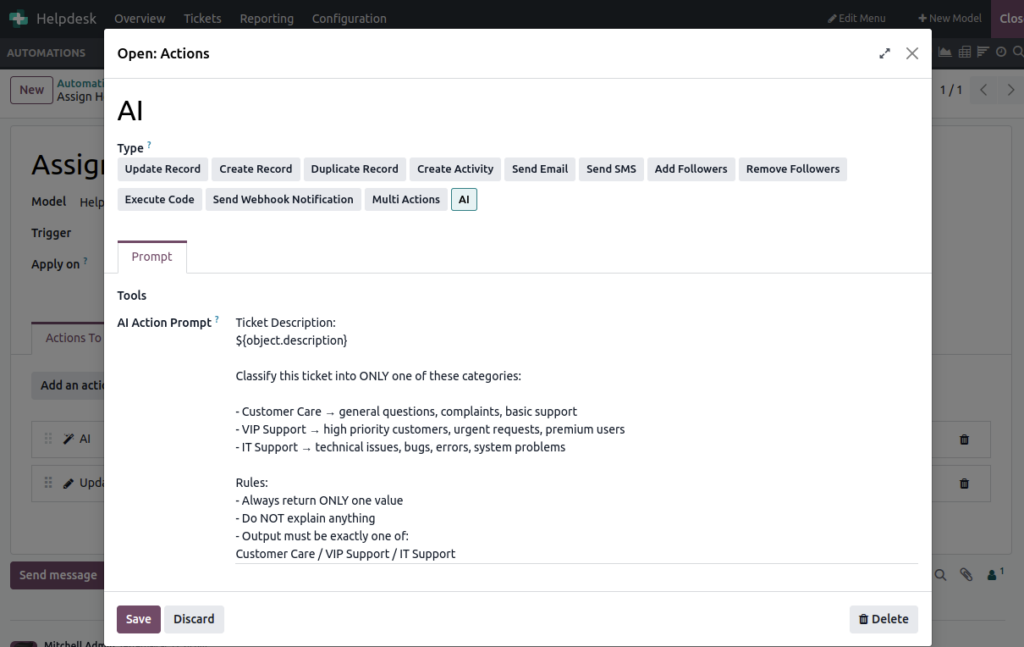
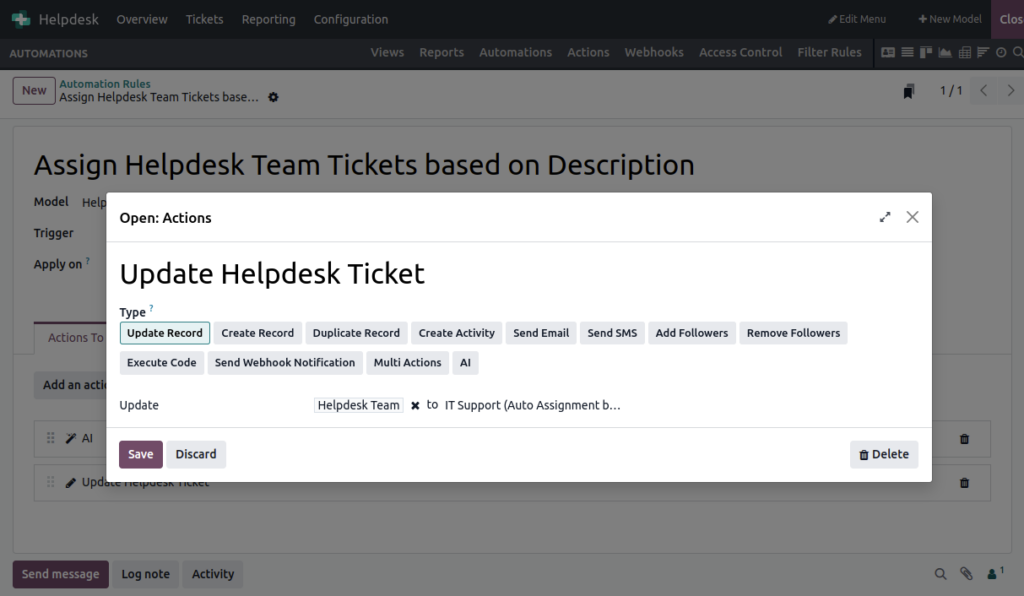
Action 1 – AI Action
The AI Action is responsible for analyzing the helpdesk ticket description and identifying the correct support category based on the issue mentioned by the customer. When a ticket is created, the AI reads the ticket content, understands the keywords and problem type, and returns only one category such as Customer Care, VIP Support, or IT Support. For example, if the ticket contains words like “error,” “technical issue,” or “website problem,” the AI classifies the ticket as IT Support. This action only performs the intelligent analysis and classification process; it does not update or modify the ticket in Odoo.
Action 2 – Update Record Action
The Update Record Action is responsible for applying the actual changes to the helpdesk ticket after the AI classification is completed. Once the AI returns a result such as “IT Support,” this action automatically updates the Helpdesk Team field in the ticket and assigns it to the corresponding support team. For example, if the AI output is IT Support, Odoo automatically changes the Helpdesk Team to the IT Support Team and routes the ticket to the correct department. This action handles the database update and completes the automation workflow.
2. AI Priority Detection :
AI Priority Detection automatically analyzes the ticket subject and description, then sets the ticket priority level such as:
- Low
- Medium
- High
- Urgent
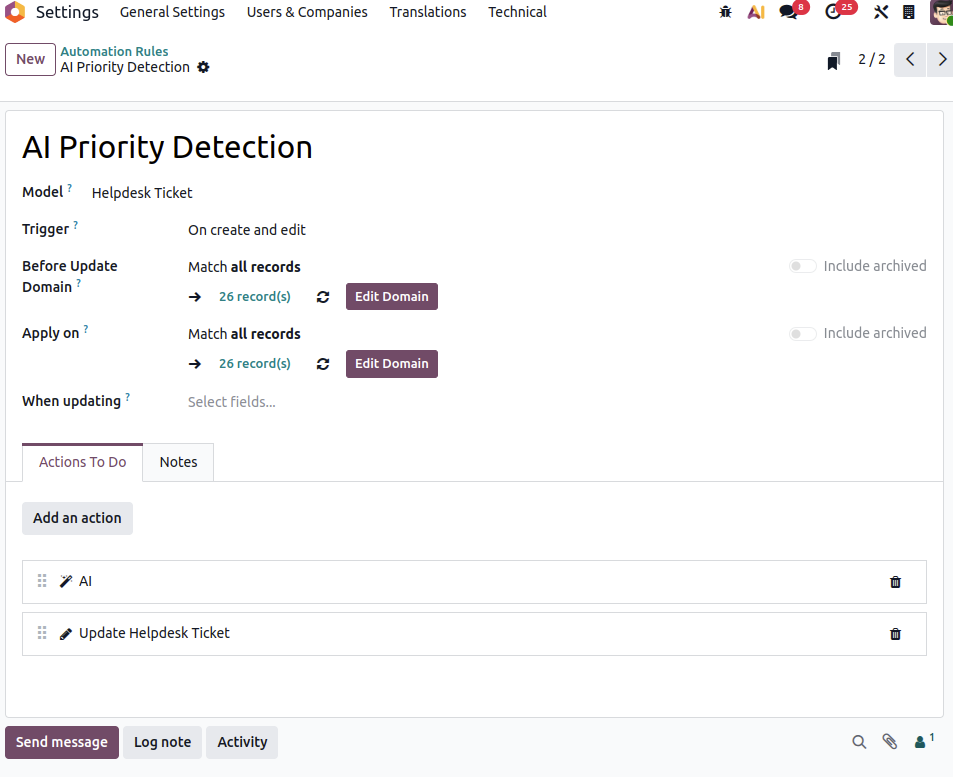
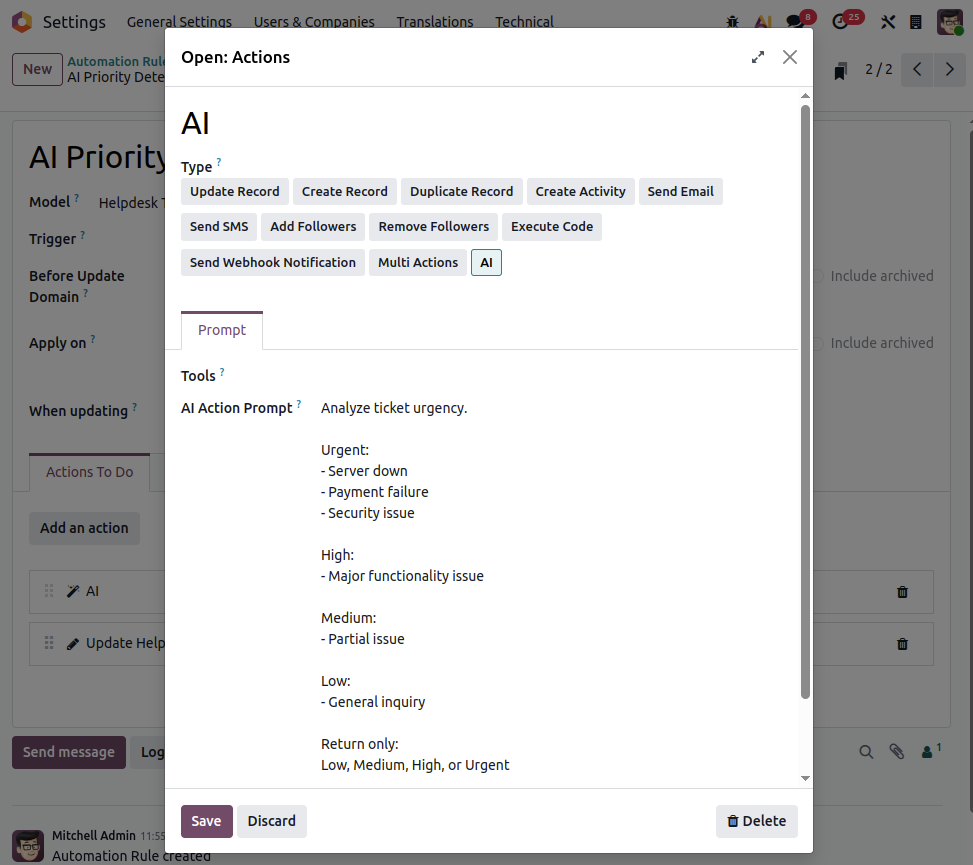
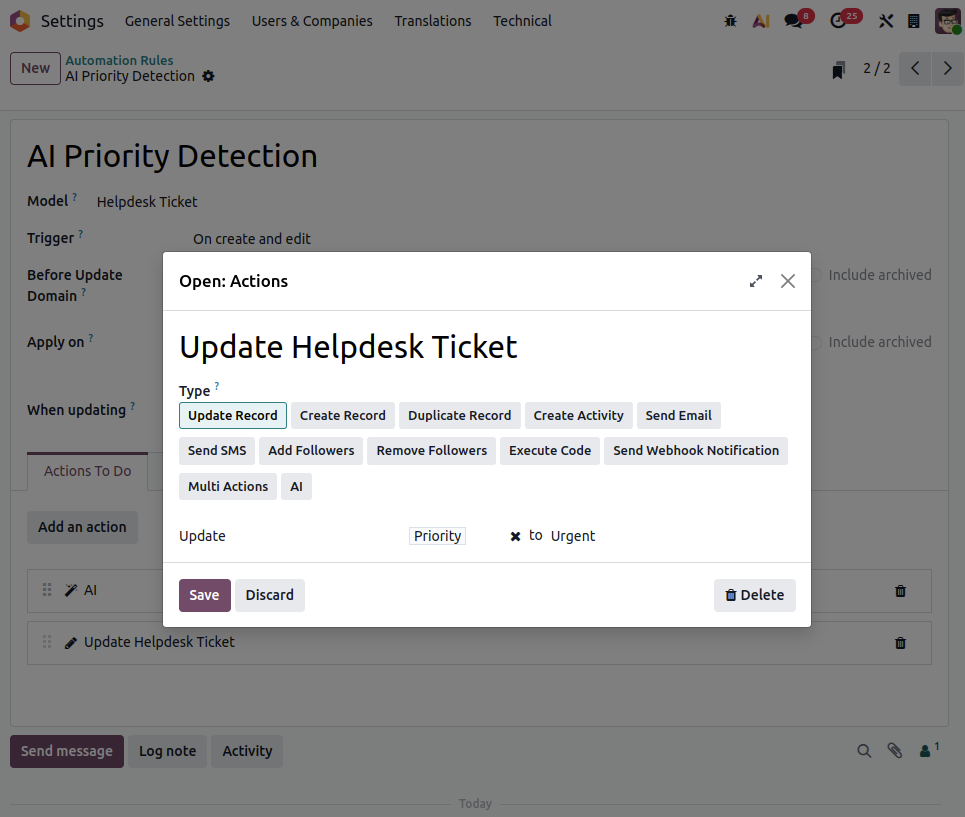
AI Action
The above image shows the AI Action setup in Odoo Helpdesk automation. In this configuration, an AI prompt is created to analyze the ticket description and determine the urgency level automatically. The prompt contains predefined conditions for different priorities such as Urgent, High, Medium, and Low. Using the dynamic value {{record.description}}, the AI reads the customer’s ticket content in real time and returns only one result: Low, Medium, High, or Urgent. This AI-based analysis helps automate ticket evaluation, reduces manual work for support agents, and improves the accuracy of ticket prioritization.
Update Record Action
The above image displays the “Update Record” automated action used after the AI analysis. Once the AI returns a priority result such as “Urgent,” this action automatically updates the Helpdesk ticket’s Priority field to the corresponding value. For example, if the AI detects keywords related to server downtime or payment failure, the automation updates the ticket priority to “Urgent.” This workflow ensures faster response handling, proper SLA management, and efficient ticket processing without requiring manual intervention from support teams.
Odoo HR & Recruitment AI Features
Key Features
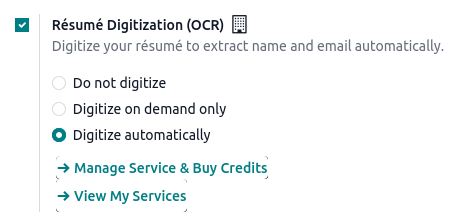
- AI Resume Generation
- AI Candidate Profile Summaries
Screenshot Reference:
Odoo Website & eCommerce AI Features
Odoo brings AI tools to your website and knowledge management. These features help you engage visitors, provide support and create content faster. With AI, your website becomes smarter and more interactive.
Key Features
- AI web page generator
- eCommerce Product description generation
- Campaign & marketing content creation
- AI Chat for website visitors
AI Chat Integration with CRM
Odoo allows you to chat with leads in real time using AI-assisted suggestions. Navigate to Website → Chat Bot to start interacting. The AI can provide helpful responses and guide visitors efficiently. You can even schedule meetings directly through the AI chat, making lead management faster and easier.
24/7 AI Chat Support
AI ensures that your website can provide support anytime, even outside working hours. Visitors can get instant assistance whenever they need it. This improves customer experience and ensures no opportunity is missed.
Integration with CRM
Website AI features are fully integrated with your CRM. Leads generated from chat conversations are automatically created and updated in the CRM module. This keeps your sales and marketing teams aligned and saves manual work.
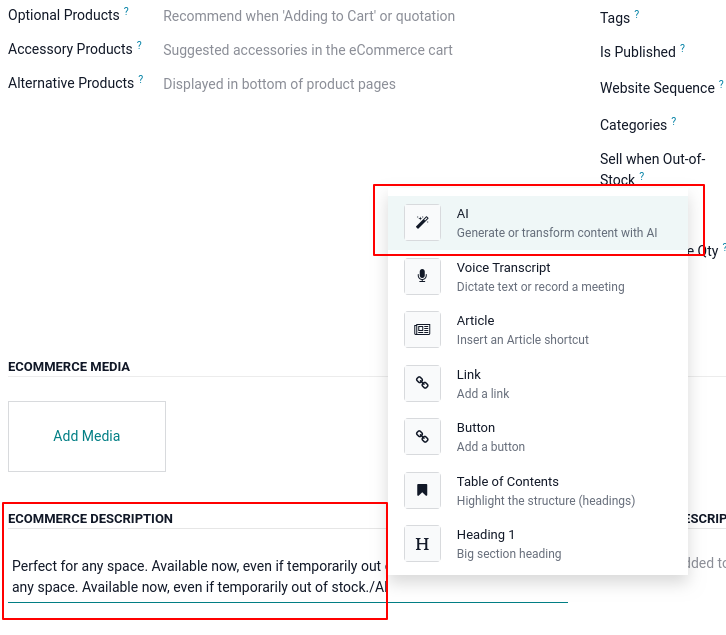
eCommerce Product Description
Odoo can automatically generate eCommerce product descriptions using AI, helping you create high-quality content quickly and consistently.
Screenshot Reference:
Odoo Knowledge AI Features
Odoo AI improves knowledge management by simplifying content creation and analysis. It helps users understand and refine information quickly.
Key Features
- AI content summarization
- AI text rewriting
Smart Content Handling
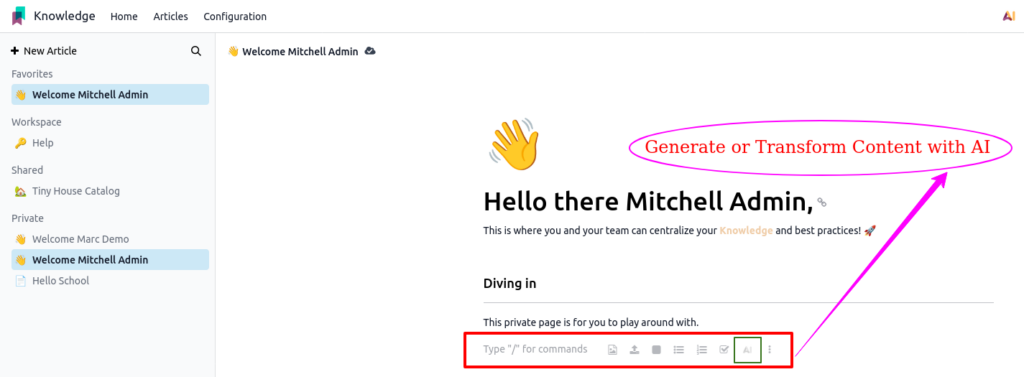
- AI generates summaries for long documents. Users can quickly understand key points without reading full content. AI can also rewrite text to improve clarity and tone.
- You can also rewrite selected text using AI. With these AI tools, managing and creating knowledge becomes easier, faster, and more efficient.
Screenshot Reference:
Odoo AI Document Sorting Features
Odoo uses AI to make document management faster and more organized. These features help you sort, upload and manage files automatically.
Key Features
- AI Auto-Sorting of documents
- Smart classification (HR, Finance, Sales, etc.)
- OCR-based uploads and processing
Screenshot Reference:

