Odoo Customization Best Practices: The 5S Framework for Developers
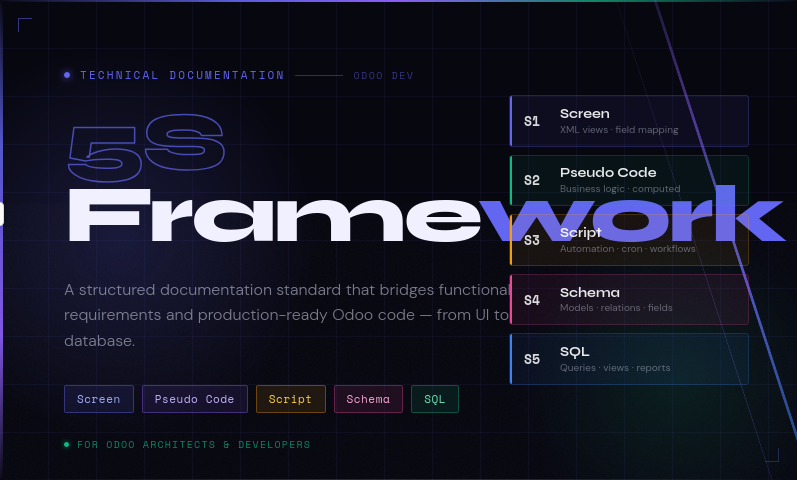
5S Framework is a technical documentation standard used for Odoo Architects and Developers to bridge the gap between functional requirements and high-quality code. This framework ensures that every customization is documented with precision, covering the UI, logic, automation, database structure, and data retrieval.
Each layer answers one core question:
| Layer | Answers | Output |
|---|---|---|
| Screen | What does the user see? | XML views, fields, layouts |
| Pseudo Code | What does the system think? | Logic in plain English before Python |
| Script | What runs automatically? | Automations, cron jobs, workflows |
| Schema | How is data stored? | Python models, field types, relations |
| SQL | How is data retrieved? | Raw queries, reports, dashboards |
5S Framework for Odoo
Here’s a clean visual overview of the 5S Framework, followed by a breakdown of each layer.
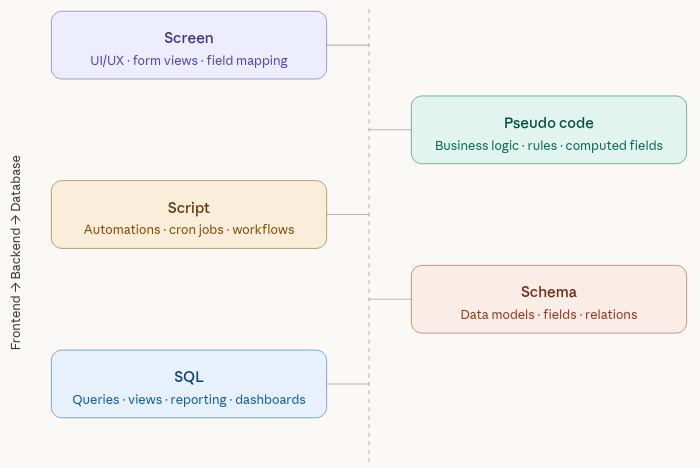
The golden rule of 5S is that you work top-to-bottom, never jumping ahead. You don’t write Python until the Screen is documented. You don’t write SQL until the Schema is defined. This prevents the most common Odoo mistake — developers writing code before they’ve agreed on what the field is called or where it lives.
Here’s how each layer maps to actual files inside your custom Odoo module:
| Layer | Name | Focus | Output | Odoo Artifact |
| S1 | Screen | UI/UX | XML views | ir.ui.view |
| S2 | Pseudo Code | Logic | Python code | models.Model |
| S3 | Script | Automation | Cron / triggers | ir.cron / ir.actions |
| S4 | Schema | Database | Model definition | models.Model (_name) |
| S5 | SQL | Reporting | PostgreSQL view | SQL + read-only model |
What is Screen?
The Screen phase defines how the user interacts with the system. In Odoo, this translates directly to XML view definitions. Before writing a single line of Python, the developer documents which fields exist, where they appear in the UI, and who can see or edit them.
Key decisions in Screen
| Decision | What to document |
| View type | Form (edit one record), Tree/List (browse many), Kanban (card layout), Pivot (reports) |
| Field type | Char, Float, Many2one, Selection, Boolean, Monetary, Html, Date |
| Inheritance | Which existing Odoo view ID is being inherited (use xpath expressions) |
| Visibility | attrs=invisible / readonly per user group or field value |
| Permissions | Which groups (Sales Manager, Inventory User) see or edit the field |
Example — adding commission fields to sale.order form
Scenario: Add a Commission Rate and Commission Total field to the Sales Order form view.
| Technical name | Label |
| x_comm_rate | Commission % |
| x_comm_total | Total Commission |
What is Pseudo Code?
Before writing actual Python, every developer must document the logic in plain, structured English. This ensures that business rules are agreed upon before implementation begins — preventing costly rewrites when requirements are misunderstood.
Logic types
| Type | When to use |
| Computed field (@api.depends) | Auto-recalculates a field value when a source field changes. Use store=True to save to DB. |
| Constraint (@api.constrains) | Raises a ValidationError to block saving invalid data (e.g. credit limit exceeded). |
| Onchange (@api.onchange) | Updates the UI instantly before saving (useful for live feedback to the user). |
| Override (super()) | Extend Odoo built-in methods like action_confirm or write to inject custom logic. |
| UserError | Raise a user-facing error message to halt an operation with a clear explanation. |
Example — commission total computed field
Pseudo logic: If the order is in state ‘sale’ or ‘done’, calculate commission as untaxed amount × rate. If no rate is set, default to 10%. Otherwise set commission to zero.
What is Script?
Script refers to automated actions and background processes that keep the ERP running without manual intervention. The focus is: who does what, in what order. This covers scheduled jobs, event-based triggers (on create / on update / on delete), server actions tied to buttons, and external API integrations.
Script types
| Type | Description |
| Automated Action | Triggers on record creation, update, or deletion. Configured in Settings → Technical → Automation. |
| Scheduled Action (Cron) | Runs at a fixed interval (hourly, daily, monthly). Ideal for reports, syncs, and digest emails. |
| Server Action | Multi-step process triggered by a button click (e.g. Batch Validate, Send Reminders). |
| External API Script | Maps the data flow for third-party integrations (Shopify, WooCommerce, payment gateways). |
Workflow example — sales order lifecycle
| Step | Actor & Action |
| 1 | Sales Executive creates quotation |
| 2 | Customer confirms quotation (portal or email) |
| 3 | Sales Executive converts to Sales Order |
| 4 | System automatically checks stock availability |
| 5a (stock available) | System creates Delivery Order → Warehouse validates |
| 5b (stock unavailable) | System creates backorder, notifies warehouse |
| 6 | Invoice generated after delivery confirmation |
| 7 | Accounts records payment → order marked as paid |
| Exception | If payment overdue → block new orders for that customer |
What is Schema?
Schema is the blueprint of the data layer. In Odoo, this means Python model class definitions — which become real PostgreSQL tables via the ORM. Field types, relationships between models, and deletion rules all need to be thought through before writing code.
_inherit vs _name — the most important distinction
| Keyword | Behaviour |
| _inherit = ‘sale.order’ | Adds fields/methods to an existing model and its table. No new table is created. |
| _name = ‘commission.history’ | Creates a brand new model with its own PostgreSQL table. |
| Both together | Copies the existing model into a new one (prototype inheritance — rarely used). |
Relation types
| Type | Meaning & Example |
| Many2one | Many records link to one parent. e.g. sale.order → res.partner (customer). |
| One2many | One parent has many children. e.g. sale.order → sale.order.line (order lines). |
| Many2many | Cross-links between two models. e.g. product.template ↔ product.tag. |
What is SQL?
While Odoo uses an ORM (Object-Relational Mapper) for most operations, complex reporting often requires raw SQL for performance. The SQL layer is used to build management dashboards by creating PostgreSQL VIEWs and exposing them as read-only Odoo models accessible via pivot and graph views.
When to use raw SQL
| Scenario | Reason |
| Cross-module reports | Join Sales + Accounting + Inventory in a single query — ORM can’t do this cleanly. |
| Aggregation at scale | SUM, COUNT, AVG across thousands of records is far faster in native SQL. |
| Management dashboards | Read-only model backed by a PostgreSQL VIEW for pivot/graph views. |
| Performance tuning | Bypass ORM overhead for high-volume analytics queries. |
Example
Let’s look at how all 5 layers connect in a real Odoo customization project — the complete flow from requirement to deployed feature
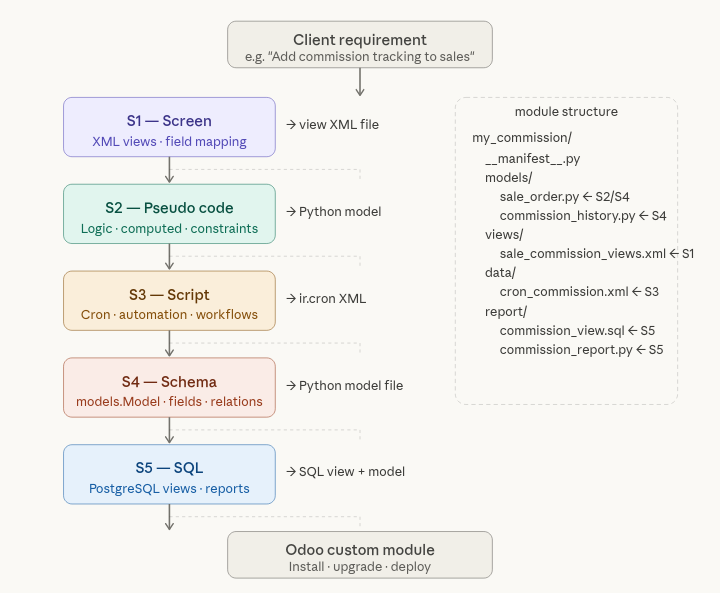
Putting It All Together — Module Structure
| File / Folder | 5S Layer & Purpose |
|---|---|
| __manifest__.py | Module metadata — name, version, depends, data file list |
| models/sale_order.py | S2 Pseudo Code + S4 Schema — extends sale.order with commission fields and computed logic |
| models/commission_history.py | S4 Schema — new commission.history model with its own table |
| views/sale_commission_views.xml | S1 Screen — XML view inheriting sale.order form, adding commission fields |
| views/commission_report_views.xml | S5 SQL — pivot and graph views for the commission analysis report |
| data/cron_commission.xml | S3 Script — scheduled action for monthly commission digest email |
| data/automated_action.xml | S3 Script — event-based trigger (e.g. on order confirmation) |
| report/commission_analysis.py | S5 SQL — read-only Odoo model backed by PostgreSQL view |
| report/commission_analysis.sql | S5 SQL — raw SQL for the PostgreSQL VIEW (optional separate file) |
| security/ir.model.access.csv | Access rights — which user groups can read/write each model |
