How to Create Cash Rounding in Odoo Invoicing
Cash Rounding is mainly used to round off the total bill amount, especially for cash payments. For example, if the total amount of a product is 5.55 Rs, the bill can be rounded off to 6 Rs.
Navigate to Invoicing → Configuration → Cash Rounding, and click New to create a new cash rounding method.
Create a Cash Rounding
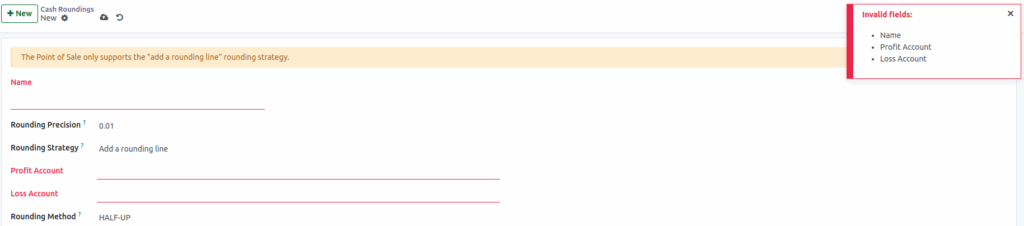
When you click the New button, start by entering the name of the cash rounding method. The Rounding Precision field allows you to select the smallest non-zero currency unit to which the invoice total will be rounded. Under Rounding Strategy, you can choose how the system should round the invoice amount to the selected precision. There are two types: Add a Rounding Line and Modify Tax Amount.
Profit Account: This is used when the rounding increases the invoice total.
Example: If the amount is rounded from 5.54 rupees to 6 rupees, the difference is a gain, and it is posted to the Profit Account. Select the appropriate profit account from the drop down.
Loss Account:This is used when the rounding decreases the invoice total.
Example: If the amount is rounded from 5.48 rupees to 5 rupees, the difference is a loss, and it is posted to the Loss Account. Select the appropriate loss account from the drop down.
Note: Name, Profit Account and Loss Account are mandatory field
Rounding Method in Odoo
The Rounding Method in Odoo determines how the rounding difference is applied or calculated when the invoice total is adjusted based on the rounding precision.
Type of Rouding Method
- UP: Rounds the amount up to the nearest value according to the rounding precision.
- Down: Round the amount down according to the rounding precision.
- HALF-UP: This method rounds values with fractional components below 0.5 down and values of 0.5 or above up.

