How to configure Quotations, Shipping, and Invoicing in Odoo Sales Settings.
Odoo Sales Settings help control and secure sales orders after confirmation, set clear deadlines for how long quotations remain valid, and automatically add and calculate shipping costs for orders. They also align invoicing with actual order delivery to ensure accurate billing.
click on Sales. Once you are in the Sales section, navigate to Configuration. Within the Configuration area, click on Settings, where you will be able to review and adjust various options according to your preferences. This path allows you to customize your sales-related settings efficiently from a single location.
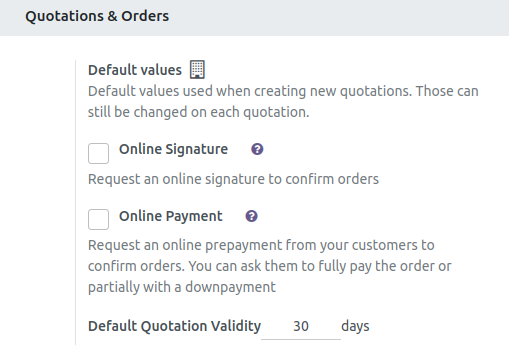
Default Quotation Validity
The Default Quotation Validity setting in Sales allows you to define how long a quotation remains valid, for example, 30 days. When enabled, this automatically applies an expiration date to every new quote, helping to ensure that customers respond within the specified timeframe. This not only encourages timely customer decisions but also assists sales teams in managing offer deadlines more effectively, keeping the sales process organized and predictable.
Lock Confirmed Sales
Enabling “Lock Confirmed Sales” in Sales settings prevents any editing of a sales order once it has been confirmed. This feature helps maintain clean and accurate sales records by avoiding accidental changes, and it ensures that order details remain fixed, which is crucial for accurate delivery and invoicing.

Delivery Methods
Enabling Delivery Methods under Shipping settings allows you to add various shipping options, such as Standard Delivery. You can set Standard Delivery as the default method to streamline order processing. Additionally, shipping fees are automatically added to sales orders and invoices, ensuring accurate and efficient handling of shipping costs.

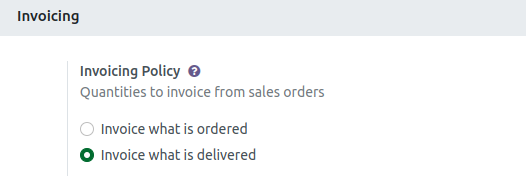
Invoicing Policy
In Sales settings, you can set your Invoicing Policy by choosing between “Invoice what is ordered” or “Invoice what is delivered.” Selecting “Invoice what is ordered” bills the customer for the full order at the time of confirmation, while “Invoice what is delivered” bills only for the quantities that have actually been delivered. This setting helps ensure that your billing process aligns accurately with your delivery workflow.