How to view Customer’s current Loyalty Points Balance in POS in ADempiere Retail
ALT+P (Get Loyalty Points) allows the user to view the loyalty points earned for the current bill before or after selecting the customer. It helps both customer and cashier know how many points will be added based on the current purchase.
User Access
Who Can Access
- Cashier
- Head Cashier
- Pothys Admin
What User Can Do
- Inform customer of points being earned.
- Confirm if customer wants to use existing points (if redemption is enabled).
- View point breakup (base points + bonus points, if applicable).
Pre-Requisite Activities
- Loyalty system must be enabled in the POS.
- Point calculation rules must be defined:
- Per ₹100 spent
- Product-wise or department-wise rules
- Customer loyalty ID or mobile number must be registered to view actual point allocation.
- Bonus schemes (like “No Carry Bag” or “High Value Purchase”) must be configured.
Business Rules
- Resumption of connection with CRM, system should show points in CRM not In local
- Due to network issues or stability it display a Pop-up message
- Points will be credited only after billing is completed and payment is made.
User Interface
Step 1 : Select ‘POS’ in Menu -> POS Management -> POS or Search POS in Lookup.

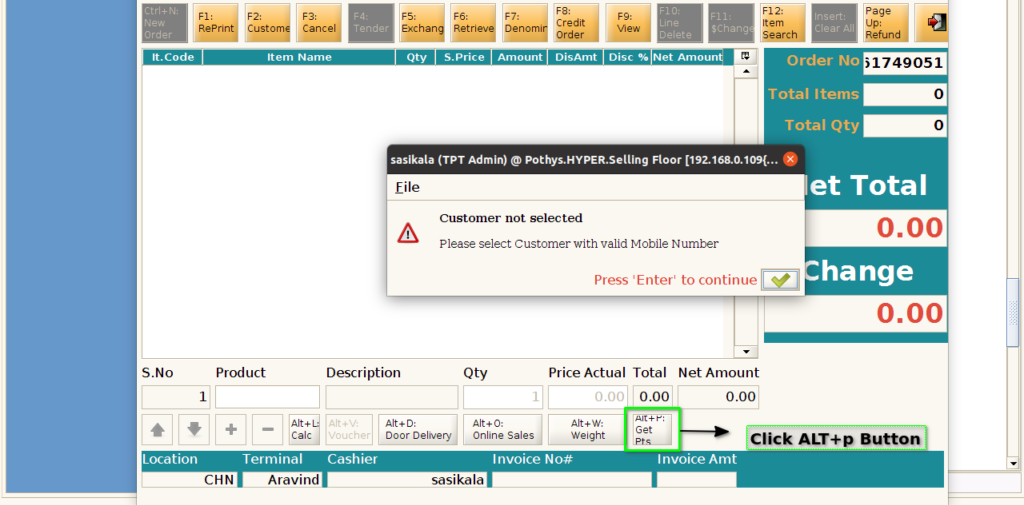
BEFORE CUSTOMER IS SELECTED
Step 2: Click Alt+p Button to get the loyalty points. User can’t able to get the loyalty points customer not selected
AFTER CUSTOMER IS SELECTED
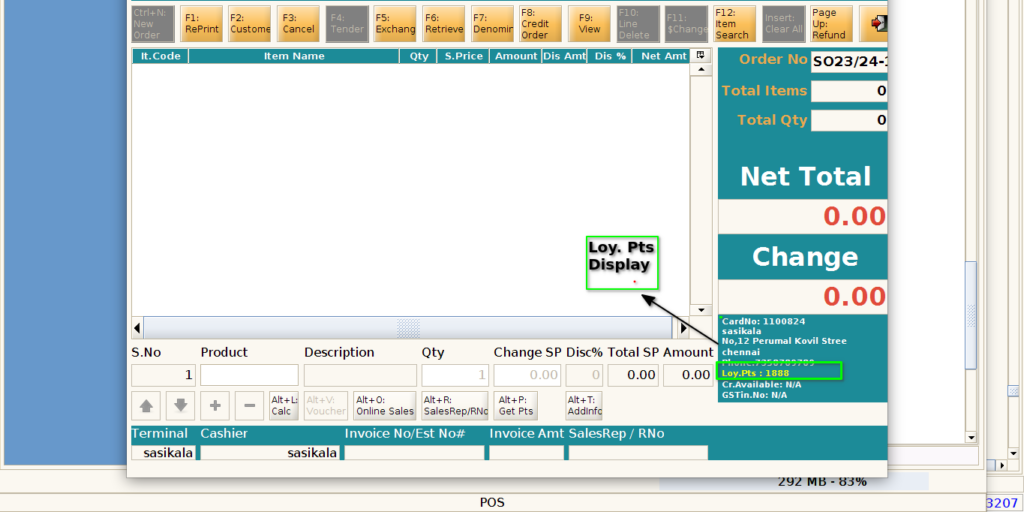
Step 3: Click F2 button to choose the customer

Step 4: Click Alt+p Button to get the loyalty points. Select customer display

Step 5: Loyalty points display. User can able to view the points
Step 6: If any network issues or stability it display a Pop- Up Message
