How to make a Customer Active or Inactive in ADempiere?
User can able to active or inactive the customer based on the needs in the customer screen. In Advanced user can able to identify active or Inactive in customer search itself.
User Access
Who Can Access
- Admin
- Cashier
What User Can Do
- Active/in active the customer
Pre-Requisite Activities
- Customer master should be properly created
- Only authorized users should be allowed to change status
- Make sure all pending transactions are closed before inactivation
Business Rule
- Inactive customers cannot be used in new transactions
- System should show a warning or block if user tries to use an inactive customer
- Reports should allow filtering by Active or Inactive
- If customer is inactive, auto-scheduler, reminders, or SMS must also stop
- Inactive customers are still available for historical reports and audits
User Interface
Step 1: Select ‘Customer’ in Menu-> Business Partner Rules -> Customer or Search Customer in Lookup.

Step 2: Enable the Active Checkbox. Active customer textbox will be editable in the customer screen and able to buy the product.
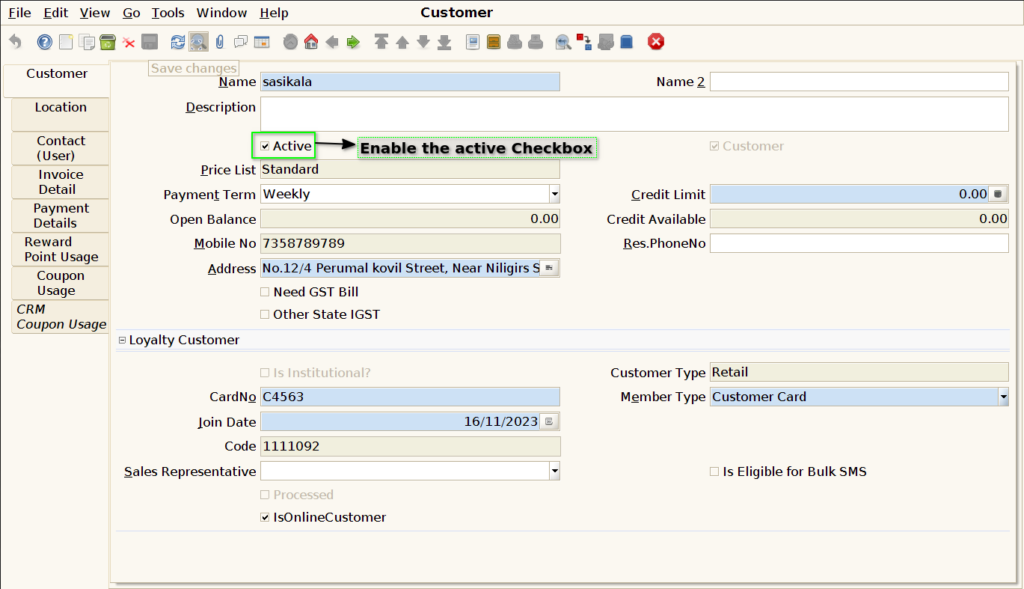
Step 3: Disable the Active Checkbox. De-active customer text box will be non editable in the customer screen.
