How to validate a New Session opening in Superstore POS in ADempiere Retail
This is the feature which is used to verify that the previous date’s EOD is completed or not. Without completing previous date (sales date) EOD, user cannot open POS screen to continue the POS sales for current date.
User Access
Who can Access
- Admin
- Head cashier
- Cashier
What user can do
- Cashier will open POS
- Head cashier or admin will complete the previous date EOD
Pre-requisite activities
- Confirm the previous date which is not completed EOD process.
- Confirm the system date
Business rules
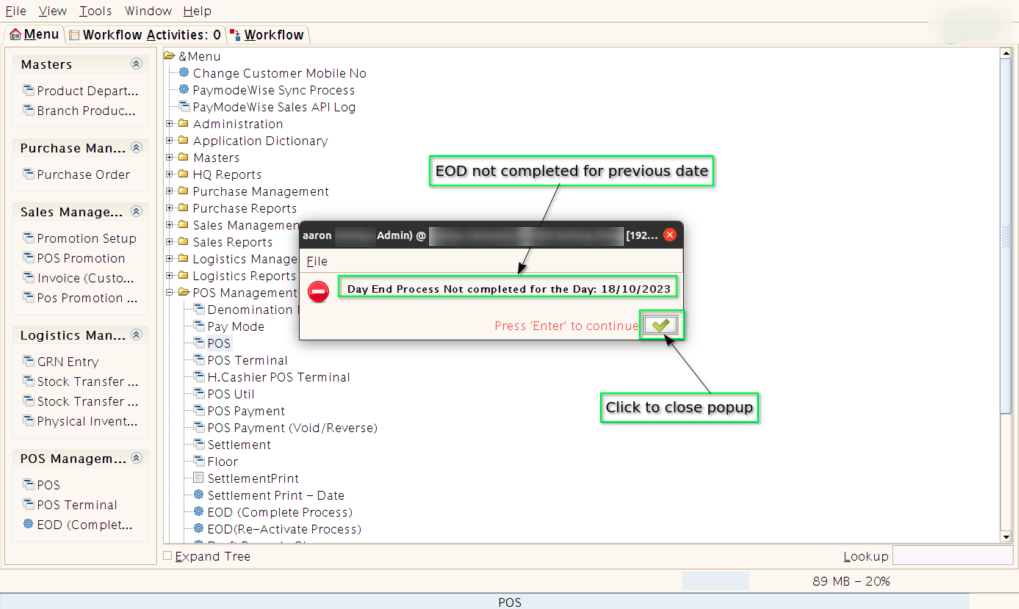
- Cashier or any other will open POS screen, but POS will not open and show the popup message like “EOD is not completed for specific previous date (Ex:18/10/2023 )”.
- Then head cashier or admin will open application in server machine and start and complete the “EOD (complete process) for required date.
- Once EOD (complete process) is completed, POS screen will open to start the sales process for current date.
User interface
- Step 1 : When cashier or other users open POS, system will throw the following message if the previous date EOD is not completed.
- Step 2 : Inform admin (IT admin) or head cashier user to complete the EOD for previous date.
- Step 3 : Admin (IT admin) or head cashier user will complete the EOD (complete process) for previous date.