How to capture Redeem Coupon CRM API Log in ADempiere Retail
This process involves logging the API communication between the POS system and the CRM during the coupon redemption process, ensuring that all coupon-related transactions are tracked, validated, and traceable.
User Access
Who Can Access
- IT ADMIN
What User Can Do
- Verify whether a coupon redemption request was successfully sent to CRM.
- View response messages such as “Valid Coupon”, “Invalid Coupon”, “Coupon Expired”, etc.
- Retry the request in case of failure or timeout.
- Use logs for troubleshooting, validation, or audit purposes.
Pre-Requisite Activities
- CRM integration for coupon validation and redemption must be active.
- POS system should be able to send coupon codes to the CRM via API.
- Coupon must be entered during billing before invoice completion.
- Logging should be enabled in POS or middleware.
Business Rules
- System must log each CRM API call made for coupon redemption
- If coupon is valid:
- Apply corresponding discount to the bill.
- Update status in the log as Success.
- If coupon is invalid or fails due to API issues:
- Status should be Failed.
- Show an appropriate message to the cashier.
- Allow manual retry of redemption before final billing.
- Redeemed coupons must be marked as used and not reused in other transactions.
User Interface
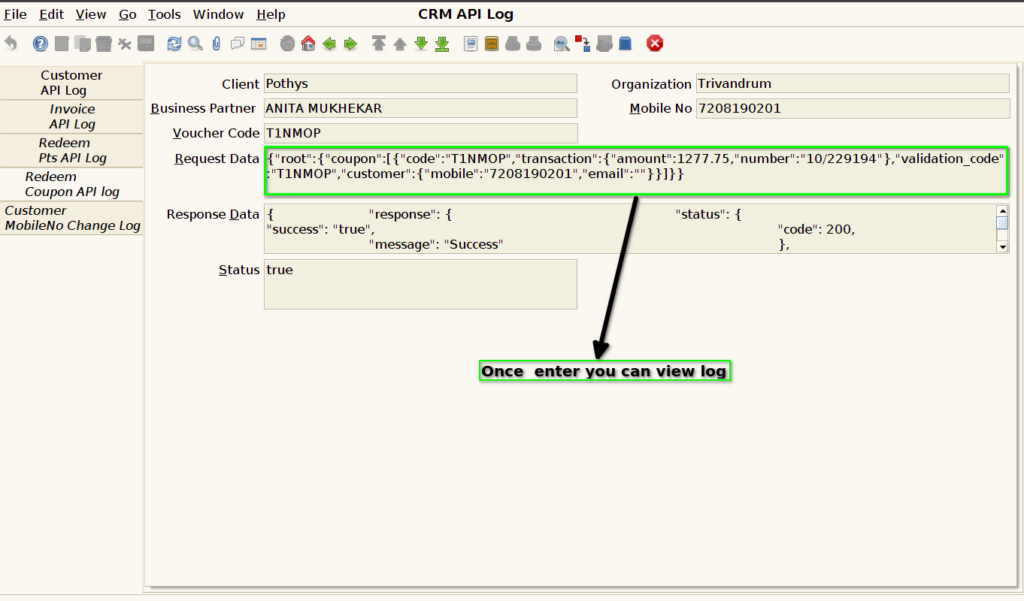
STEP 1: Enter into the screen CRM API LOG

STEP 2: you can view the log file once enter it into the API log screen redeemed Coupon in an API LOG