How configure GST Bill Preference for Customer in ADempiere Retail?
This means the system should generate a GST- bill (invoice) when a transaction is done for a customer who has a valid GST number. The GST bill must include all required tax details as per government standards.
User Access
Who Can Access
- Admin
- Cashier
- Manager
- Back office
What User Can Do
- Enter or update Customer GST number in the Customer Master
- Ensure “GST Bill Required” is enabled for that customer
Pre-Requisite Activities
- Customer must have a valid GST number entered in the system
- Product must have HSN and tax rate defined
- Company GST setup must be completed
- Invoice template should be GST-enabled
Business Rules
- GST invoice is generated only if Customer has GSTIN
- Tax calculation should follow place of supply rules
- CGST/SGST for intra-state
- IGST for inter-state
- GSTIN should be validated (format check or API)
- Once invoice is generated, tax values cannot be edited
- GST bills must be serially numbered and audit-ready
- Non-GST customers should get non-GST (retail) bills only
User Interface
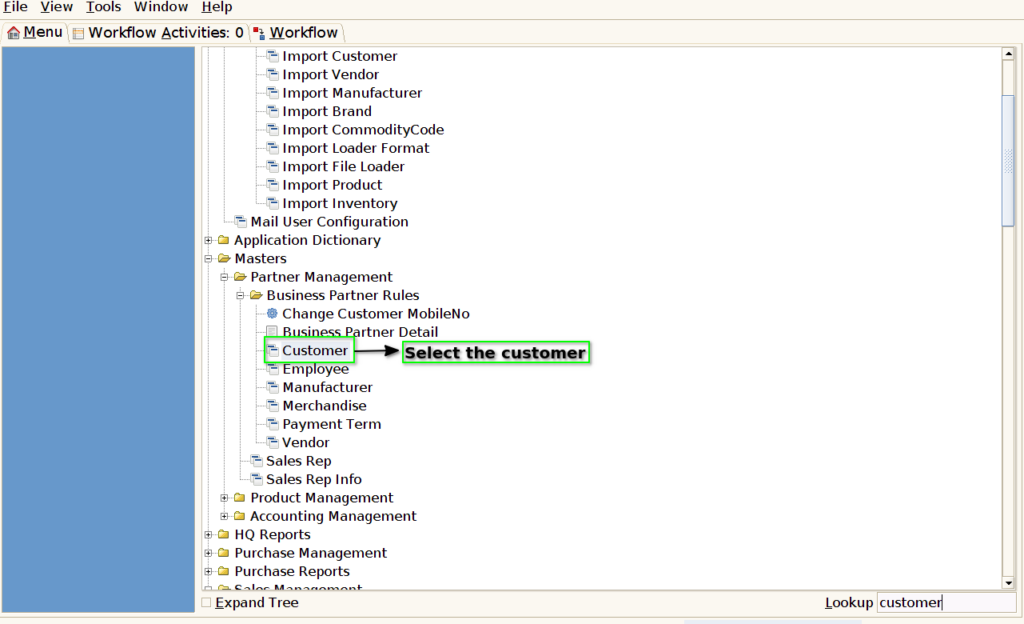
Step 1: Select ‘Customer’ in Menu-> Business Partner Rules -> Customer or Search Customer in Lookup.
Step 2: Enable the Need GST Bill checkbox in the customer screen.

Step 3: Enter the GST No. and save it.
