How to capture CRM API Log For Customer data synch in ADempiere Retail
The CRM API Log for Customer allows system administrators or support staff to track and troubleshoot the flow of customer-related data (creation, update, sync) between the POS/ERP system and CRM, via API calls.
User Access
Who Can Access
- IT Admin
What User Can Do
- view the log file of CRM (customer)
- See request and response JSON payloads for each API call.
- Identify and resolve errors or sync issues (e.g., duplicate mobile, missing data).
- Re-trigger failed syncs (if system allows).
Pre-Requisite Activities
- CRM integration must be active and API services must be enabled.
- Logging configuration should be enabled in:
- POS/ERP → API gateway / Integration module
- CRM system (for incoming requests)
- API authentication tokens or credentials must be valid and not expired.
Business Rules
- Only authorized users (Admin/IT Support) can access API logs.
- API logs are typically stored for a defined period (e.g., 30 or 90 days).
- Personal data (e.g., mobile, email) in logs must follow data protection policies.
- Each API log must capture:
- Timestamp
- Customer identifier (mobile/ID)
- API endpoint
- Request & response details
- HTTP status code
- System/user initiating the request
User Interface
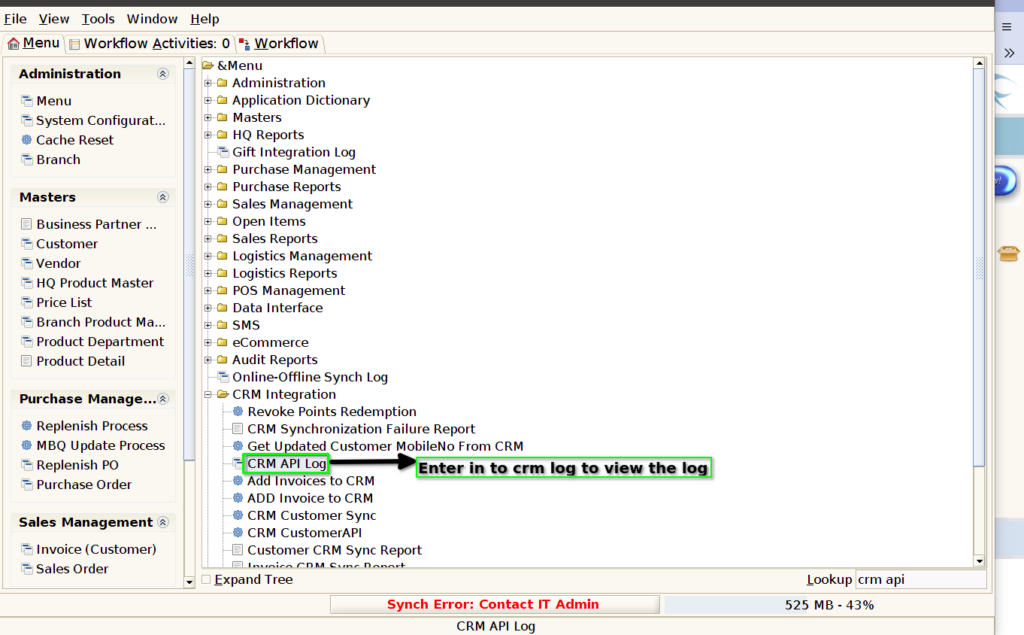
STEP 1: Enter into the screen CRM API LOG
STEP 2: you can view the log file once enter it into API log screen
