How to capture Card Payment Sales in ADempiere Retail POS?
Card Payment allows a customer to pay the bill using a debit card, credit card, or prepaid card via a payment terminal integrated with the POS system.
User Access
Who Can Access
- Cashier
- Head Cashier
What User Can Do
- Select Card as the payment mode during checkout.
- Swipe/insert/tap the card on the payment terminal (POS machine).
- Enter PIN or OTP as required.
- Get payment confirmation on POS screen.
- Print receipt with card payment details.
Pre-Requisite Activities
- POS must be integrated with a card payment gateway or swipe machine.
- Each card terminal should be mapped to the terminal or cashier ID.
- Payment mode “Card” must be enabled in the Pay Mode Master.
- Card fee configuration (if any) must be predefined.
Business Rules
- Excess amount cannot be entered for card payments
- Card Number not mandatory
- Decimal value is accepted through card payments
User Interface
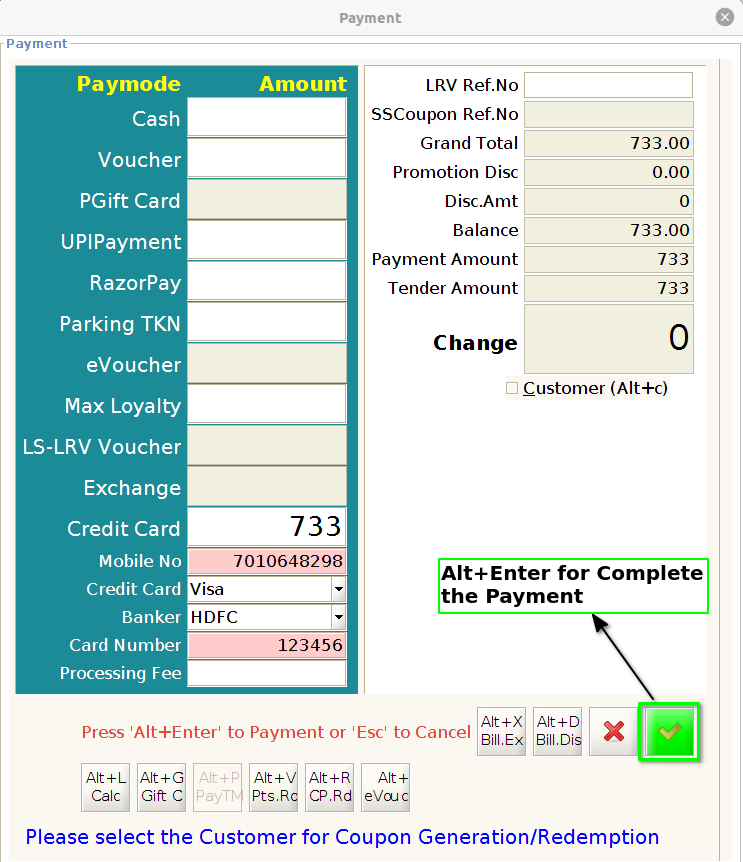
Step 1 : Press the F4 button to open the Tender screen

Step 2 : Enter the card details for payment

Step 3 : Finally press the Alt+Enter for Complete the Payment