How to Capture CRM API Log For Mobile No Change in ADempiere Retail
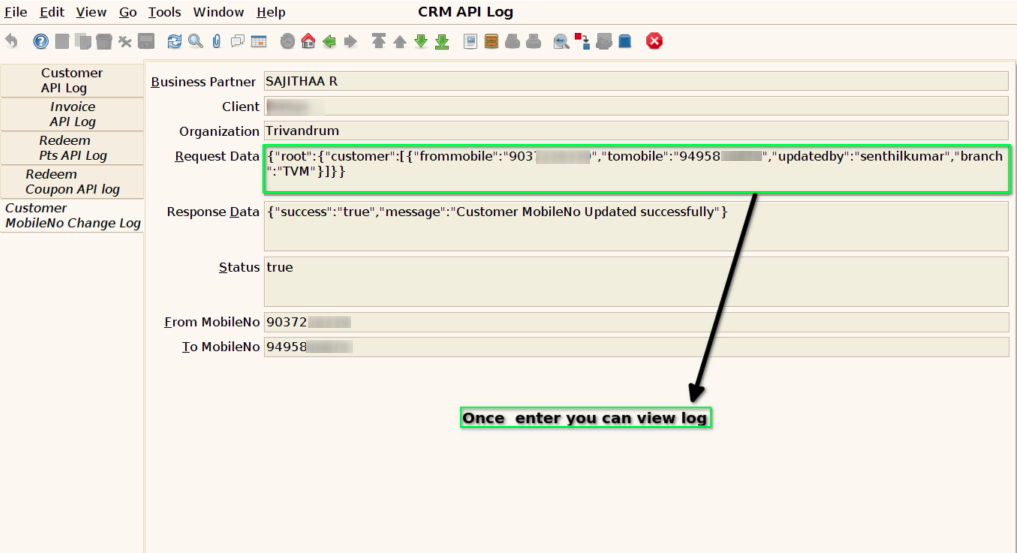
This log captures and tracks the API call made when a customer’s mobile number is updated in the POS or ERP and the change is synchronised to the CRM system via an API.
User Access
Who Can Access
- IT Admin
What User Can Do
- Trace and verify whether the mobile number update was successfully sent to CRM.
- View API logs specific to mobile number changes
- Identify and troubleshoot failures
- Re-trigger the failed API sync
Pre-Requisite Activities
- CRM integration should support mobile number update through an API
- POS/ERP must be configured to log API activity for all customer syncs.
- Logging must capture both request and response payloads with metadata.
Business Rules
- System must verify uniqueness of the new mobile number before pushing to CRM.
- If the number already exists in CRM for another customer, the request must fail with appropriate error (
409 Conflict). - For compliance, logs must not expose PII (Personally Identifiable Information) without masking, depending on policy.
User Interface
STEP 1: Enter into the screen CRM API LOG

STEP 2: you can view the log file once enter it into the API log screen as a mobile number change API LOG