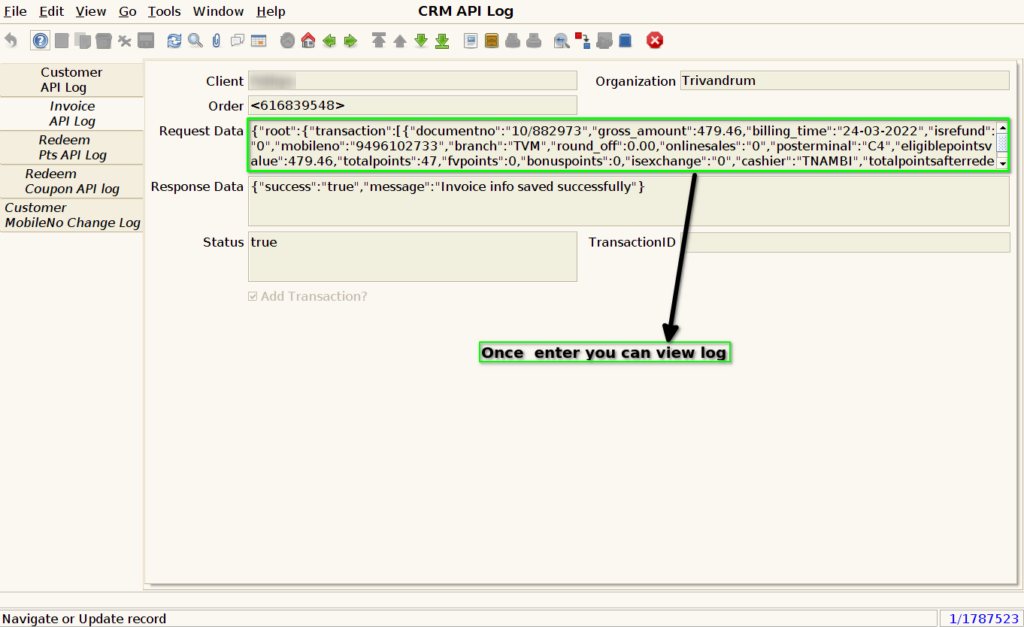
How to capture Redeem Points CRM API Log in ADempiere Retail
This feature logs the CRM API interaction that happens when a customer redeems loyalty points during billing. It helps track whether the redemption request was successfully communicated to the CRM and what response was received.
User Access
Who Can Access
- IT Admin
What User Can Do
- Check if the redeem request was successfully sent to CRM.
- View API response from CRM (e.g., success, insufficient points, invalid mobile).
- Retry the API call in case of failure.
Pre-Requisite Activities
- CRM loyalty redemption API should be configured and enabled.
- Customer must be selected before redemption.
- Points balance must be validated before sending redeem request.
- POS or middle ware must have logging capability for CRM calls.
Business Rules
- System must log all redeem point API calls, whether success or failure.
- Each log must include:
- Mobile number or customer ID
- Redeemed amount and equivalent points
- Invoice number (if already created)
- Request timestamp
- API endpoint called
- CRM response (success/fail + message)
- If the CRM API call fails:
- Show an alert to the cashier with the reason
- Allow retry only before invoice is completed
- CRM log entries should be read-only and retained for a fixed duration (e.g., 30–90 days).
- Reuse or rollback of failed redemption should follow business validation logic.
User Interface
STEP 1: Enter into the screen CRM API LOG

STEP 2: you can view the log file once enter it into the API log screen as a Redeem pts API LOG