How to Configure Order Source in iDempiere
Order Source is a master configuration in iDempiere used to classify the origin of a sales order, identifying whether it came from manual entry, phone, email, a customer portal, or a POS terminal.
In retail operations, it is assigned to a Sales Order to give finance and operations teams visibility into how orders are being received across channels.
It is a reference field used for sales analysis and reporting and does not affect pricing, inventory, fulfillment, invoicing, or accounting.
Process Flow
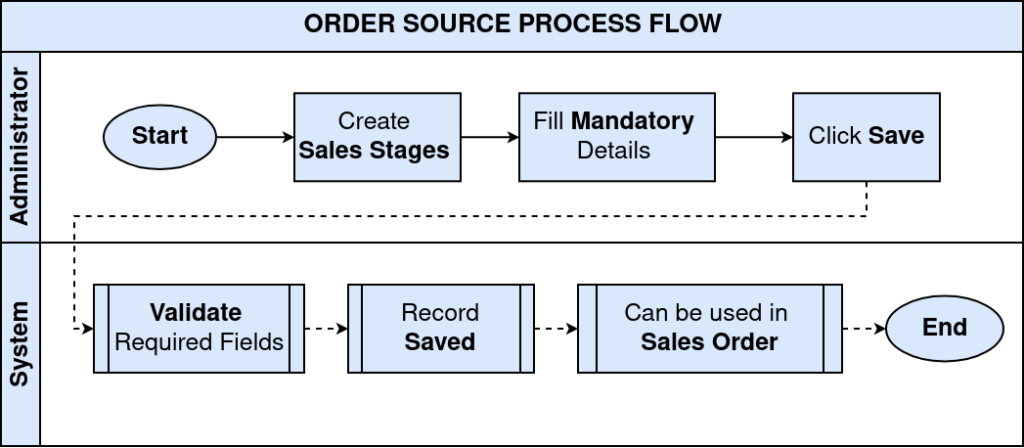
Business Rules
- Search Key and Name are mandatory for each Order Source record.
- Only Active Order Source records are available for selection on Sales Orders.
- Multiple Order Source records can be maintained within the same tenant.
- Order Source assigned at the tenant (*) level is shared across all organizations.
- Deactivating an Order Source prevents future selection without affecting existing orders.
- Order Source does not control order processing, fulfillment, invoicing, or accounting.
- Order Source can be assigned manually during Sales Order creation.
Configuration Steps
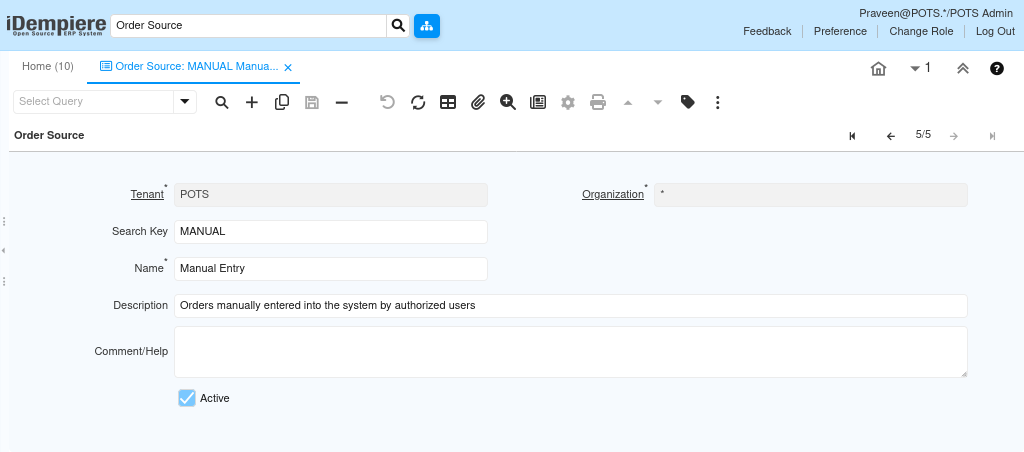
Step 1: Create the Order Source Record
Each sales channel or order intake method requires its own Order Source record so orders can be classified and tracked accurately.
- Open the Order Source window and click New Record.
- Enter Organization, Search Key, Name, and Description. Enable Active and save the record.
| Field | Sample Value | Mandatory | Description |
| Organization | * | Yes | Tenant-level record shared across all organizations |
| Search Key | MANUAL | Yes | Unique identifier for the Order Source |
| Name | Manual Entry | Yes | Display name shown on the Sales Order |
| Description | Orders manually entered into the system by authorized users | No | Purpose of the Order Source |
| Comment/Help | Blank | No | Additional guidance notes for users |
| Active | Checked | Yes | Makes the record available for Sales Order selection |
Step 2: Configure All Required Order Source Types
All sales channels used by the retail business must have dedicated records so each order can be correctly classified.
- Repeat the creation process for each order intake channel.
- Use consistent Search Key conventions to make records easy to identify in reports.
| Search Key | Name | Description |
| MANUAL | Manual Entry | Orders manually entered into the system by authorized users |
| PHONE | Phone Order | Orders received through customer phone calls and entered by staff |
| Email Order | Orders received through email communication and recorded in the system | |
| PORTAL | Customer Portal | Orders submitted directly through a customer self-service portal |
| POS | Point of Sale | Orders created through a point-of-sale transaction |

Step 3: Assign Order Source to a Sales Order
Assigning the correct Order Source at the time of order entry ensures accurate channel tracking and sales analysis.
- Open the Sales Order window and create or edit a record.
- Locate the Order Source field in the header and select the appropriate channel from the configured list.
| Field | Sample Value | Mandatory | Description |
| Order Source | POS | No | Classifies the origin of the sales order |
| Order Source | Phone Order | No | Used when the order was received by phone |
| Order Source | Manual Entry | No | Used for orders entered directly by staff |

Common Issues and Resolutions
| Issue | Cause | Resolution |
| Order Source not visible on Sales Order | Record is inactive | Enable the Active flag on the Order Source record. |
| Duplicate Search Key error | Search Key already exists in the tenant | Use a unique Search Key for each Order Source. |
| Order Source missing from selection list | Record not yet created | Create the required Order Source record in the setup window. |
| Order Source not shared across organizations | Record created at org level instead of tenant level | Set Organization to * when the source should be shared across all orgs. |
| Existing orders affected after deactivation | Order Source deactivated while still in use | Deactivation prevents future use only; existing order records retain the value. |
Next Steps
- Assign Order Source records to Sales Orders during order entry.
- Use Order Source as a filter in Sales Order reports for channel analysis.
- Review Order Source distribution periodically to assess channel performance.