How to create POS Payment (Void/Reverse) document in Adempiere Retail
Void a payment means to cancel a payment before it is fully processed or settled, as if it never happened.
Reverse a payment means to undo or refund a payment after it has been completed, correcting the transaction.
User Access
Who Can Access
- Back Office
- Cashier
- Manager
- Admin
What User Can Do
- Void a payment
- Request or initiate a payment reversal/refund
- View payment status and history
Pre-Requisite Activities
- Verify Payment Status
- Check Linked Transactions
- Document Reason
Business Rules
- Payments can only be voided if they have not been fully processed or settled.
- Payment reversals can only be performed after full settlement and require proper authorization.
- Only authorized users (e.g., supervisors or managers) can perform void or reversal actions.
- Payments linked to finalized orders, shipments, or returns cannot be voided without additional approvals.
- Customers must be notified when their payment is voided or reversed.
User Interface
Step 1 : To Select a Branch in Menu.Then to click a POS Payment(Void/Reverse).
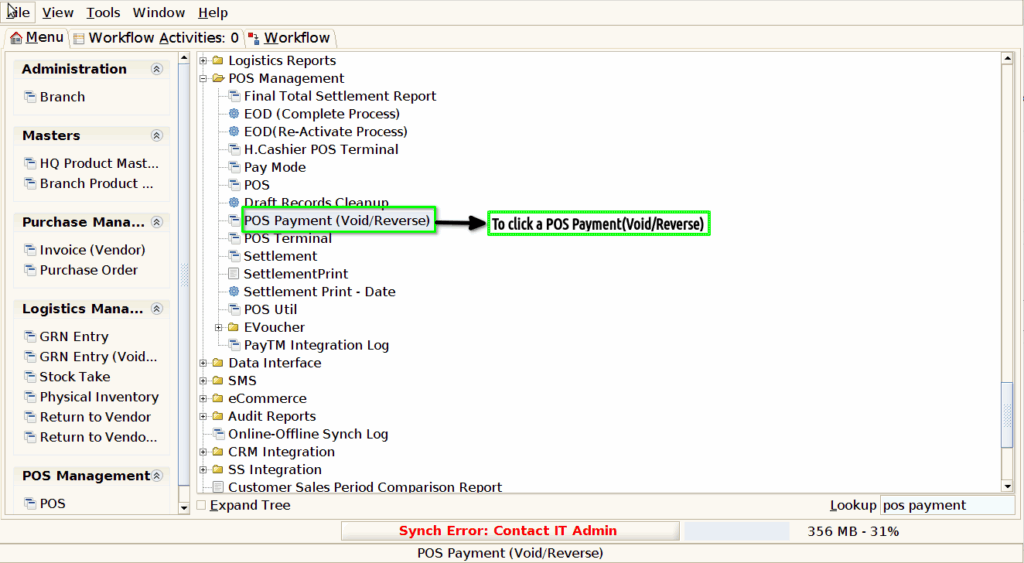
Step 2 :Once to void the payment for POS Payment screen and to click the POS Payment(Void/Reverse) screen in this screen only to show the document status couldn’t create,edit,delete options.
