How to change Customer Mobile Number in Adempiere Retail?
This feature allows the user to update or correct the customer’s registered mobile number in the system, often used for loyalty programs, billing, or SMS alerts.
User Access
Who Can Access
- It Admins
- Head Cashier
- Admin
What User Can Do
- Search customer
- Update to the new mobile number
- Save and validate the new mobile number
Pre-Requisite Activities
- User must have access rights to edit customer master or profile.
- Customer record must already exist in the system.
- New mobile number must be valid and unique (not used by another customer).
- OTP validation may be required (if enabled in settings).
Business Rules
- Valid Mobile Number should be entered
- Mobile number change should be logged for audit trail.
- System may block duplicate mobile numbers across different customers.
- For loyalty-linked customers, data integrity must be preserved (points, purchase history, etc.).
- Optionally, a confirmation SMS or OTP may be sent to the new number.
User Interface
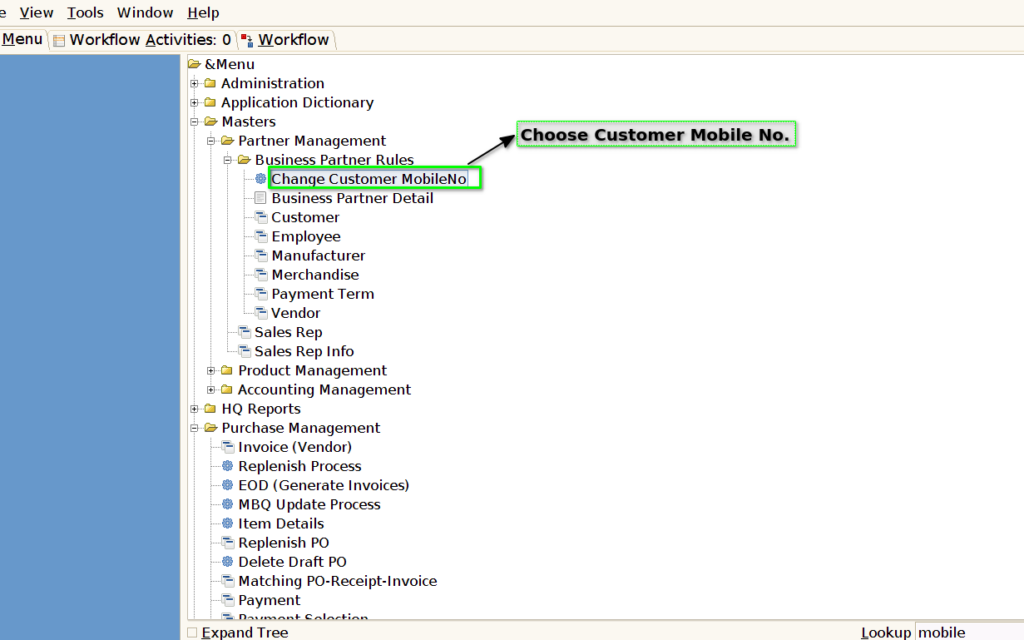
Step 1 : Select ‘Change Customer MobileNo.’ in Menu -> Business Partner Rules-> Change Customer MobileNo. or Search Change Customer MobileNo in Lookup.
Step 2 : Choose the customer Old & New Mobile No.
