Stock Adjustment Lines for unscanned Product Lots during Stock Take in Odoo
Accurate inventory management is crucial for any business, and stock takes are an important part of keeping records reliable. During a stock take, it’s common for some products or lots to be missed while counting. Odoo makes this easier by automatically creating stock adjustment lines for any unscanned products and lots, ensuring that every product with existing stock is accounted for.
Managing Stock Take in Odoo
A stock take begins by selecting the location and product category to be counted. Users then physically count or scan each product along with its lot or serial number. As items are scanned, Odoo records the counted quantities in real time, helping maintain an accurate record of what has been checked.
Once the physical counting is complete, the stock take is submitted for review and validation. During this process, Odoo consolidates all the scanned entries and generates a Stock Adjustment document number.

Accessing Stock Adjustment Lines for Unscanned Products in Odoo Inventory
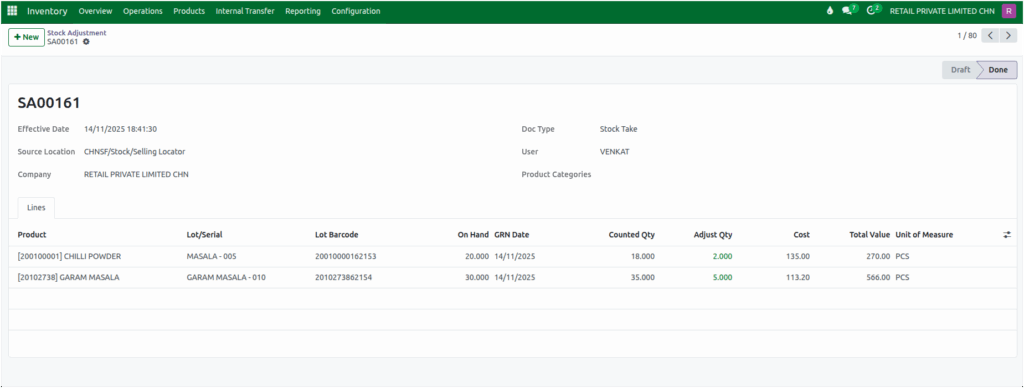
In the Stock Adjustment screen, search the generated Stock Adjustment Document Number which is automatically generated during the consolidation of the stock take. You can open it to view all the stock adjustment lines, including both scanned and unscanned lots.
If a product or lot was not scanned but still has a positive on-hand quantity under the Product Category which is selected during Stock Take, then the system automatically includes it in the document. For these unscanned lots, the counted quantity is initially 0, ensuring no stock is overlooked.

Users can update the counted quantities for these unscanned lots as needed. Once the stock adjustment is validated, Odoo updates the lot quantities in the system to reflect the actual stock levels, helping businesses maintain accurate inventory records even if some items were missed during the physical count.