How Lot values are updated after Completing the Off Claim Invoice in Odoo Inventory
Managing additional charges in Off claim Invoices is an important part of accurate inventory and accounting in Odoo. When costs such as freight charges or cash discounts are applied to an Off claim Invoice, these cost adjustments are automatically reflected in the valuation of the associated product lots.
Creating an Off claim Invoice in Odoo Inventory
To create an new Off claim Invoice, go to the Inventory module from your dashboard. Then click on Operations and under Adjustments choose Additional Cost . Click +New to create a new Offclaim Invoice document.
The Date field defaults to the current date. In the Apply On field, select Off claim Invoice to specify the type of cost adjustment. Before saving, you must fill in two mandatory fields: Vendor Name and Products. Enter the vendor name in the Vendor field and select the correct vendor from the drop down list. Only products associated with the selected vendor will appear. You can add products using the Product Code, Name or Lot Barcode.

Once the products are added, the corresponding product lots will appear in the Product Lots field. You can select multiple lots for a single product . After selecting the vendor, products and lots, click Save to generate the document number and store the invoice.
Applying Cash Discount in Off Claim Invoice
To account any cash discounts then under the Additional Costs section, click Add a Line and select the product called [CD] CASH DISCOUNT , enter the cost as a negative value (for example, -₹100). As configured in the service product, the split method is set to By Current Cost. These charges are now linked to the selected lots. Click Validate to finalize the Off claim Invoice.

Applying Freight Charges in Off Claim Invoice
To account any freight charges then under the Additional Costs section, click Add a Line and select the product called [FREIGHT] FREIGHT CHARGES 0% and enter the cost as a positive value, (for example, ₹1500). As configured in the service product, the split method is set to By Current Cost. These charges are now linked to the selected lots. Click Validate to finalize the Off claim Invoice.
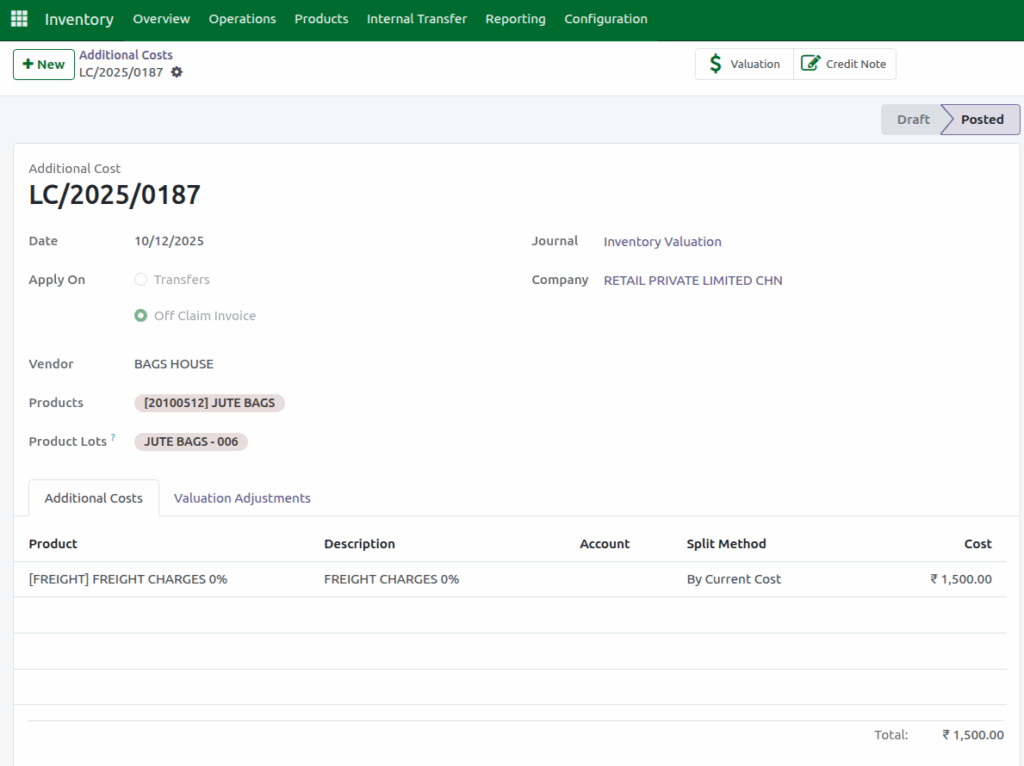
Total Value Recalculation under Valuation Adjustment tab
Once the Off claim Invoice is validated, In the Valuation Adjustment tab, the system displays key details that show how the cost has been adjusted for each lot. The Original Value represents the existing Total Value for the lot before any adjustments, while the Additional Cost field shows the exact charge entered in the Off claim Invoice such as freight charges(positive value) or cash discount (negative value). The Quantity displays the current On Hand Qty of the lot.
The New Value is then calculated by using the formula:
New Value = Original Value ± Additional CostViewing the Updated Lot Values in Odoo Inventory
After validation, the updated values are immediately reflected in the Lot Master. The Total Value field in the lot displays the newly calculated New Value and the Additional Cost per unit is calculated by dividing the total additional cost by the On Hand Quantity of the lot. This ensures that every unit within the lot carries the correct adjusted cost.
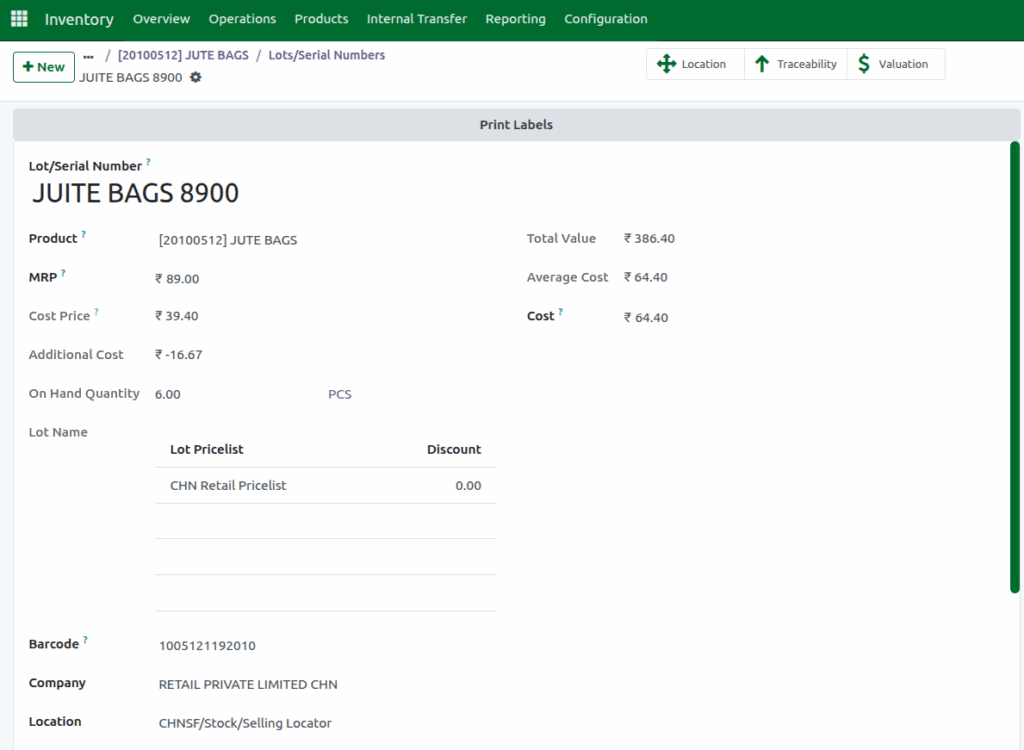
Impact of Cash Discount on Lot Values
When you open the Lot or Serial Number Master for a lot where a cash discount was applied, the Add Cost field appears as a negative amount, indicating that the lot’s cost has been reduced. Odoo recalculates the Total Value using the formula:
New Value = Original Value – Additional CostThe updated New Value is then displayed in the Total Value field of the lot.
Additionally, the Add Cost per unit is automatically calculated using:
Add Cost per Unit = Total Additional Cost ÷ On Hand QuantityBased on this updated Total Value, the Average Cost is also recalculated to ensure that the inventory valuation accurately reflects the impact of the cash discount.
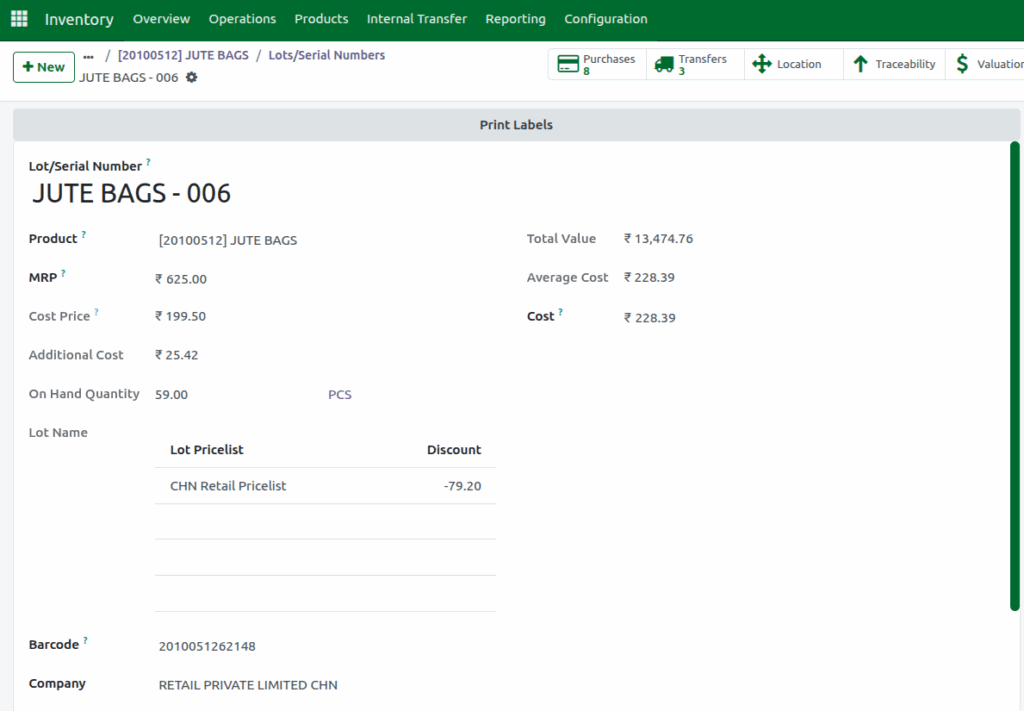
Impact of Freight Charges on Lot Values
When you open the Lot or Serial Number Master for a lot where a freight charges was applied, the Add Cost field appears as a positive amount, indicating that the lot’s cost has been increased. Odoo recalculates the Total Value using the formula:
New Value = Original Value + Additional CostThe updated New Value is then displayed in the Total Value field of the lot.
Additionally, the Add Cost per unit is automatically calculated using:
Add Cost per Unit = Total Additional Cost ÷ On Hand QuantityBased on this updated Total Value, the Average Cost is also recalculated to ensure that the inventory valuation accurately reflects the impact of the cash discount.
In the Price Info tab, both the Purchase Cost and Selling Price sections are updated based on the new costs. This ensures that any changes from freight charges, cash discounts, or other adjustments are reflected immediately, keeping the product’s pricing accurate without any manual updates.
