How Mark Down % and Mark Up % are Calculated in an Odoo GR Bill
When using Odoo, the GR Bill plays a central role in linking procurement, inventory and accounting. Understanding how Markdown % and Markup % are calculated within a GR Bill is crucial for businesses to monitor profit margins effectively.
Generating the GR Bill in Odoo
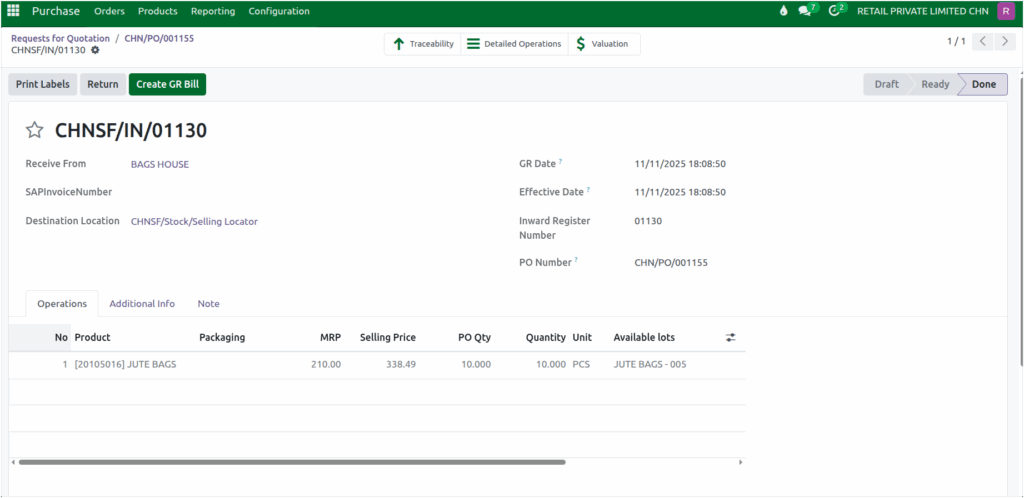
The GR Bill is generated after a Purchase Order (PO) is approved and the products are received. The process begins with creating a Purchase Order and receiving the products, while ensuring that all mandatory details, including the Inward Register Number (IRN), are entered.
Once the Goods Receipt (GR) is completed, Odoo allows the creation of the GR Bill, linking the received products to the GR Bill.
Mark Up and Mark Down Calculation in GR Bill
The system automatically calculates and displays the markdown and markup values for each product and displayed in the corresponding fields.
For example, Product: 20105016 has MRP: 210 , MRP (Taxable) : 177.96, Final Gross Cost: 160
Markdown represents the percentage reduction from the MRP and is calculated using the formula:
Markdown = ((MRP (Taxable) – Final Gross Cost) / MRP (Taxable)) × 100
MarkDown = ((177.96 – 160) / 177.96 ) * 100
MarkDown = 10.09
Markup, on the other hand, measures the profit margin relative to the FGC and is calculated as:
Markup = ((MRP (Taxable) – Final Gross Cost) / Final Gross Cost) × 100
MarkUp = ((177.96 – 160) / 160 ) * 100
MarkUp  = 11.23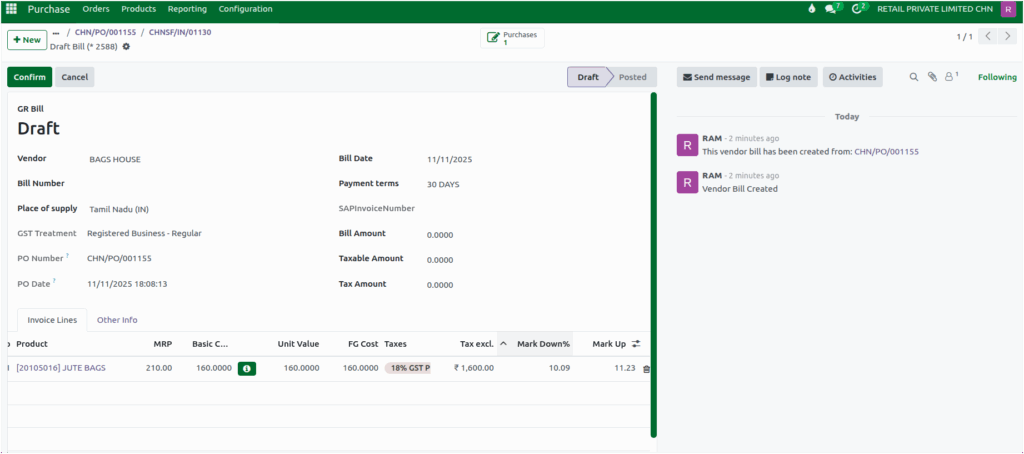
Once all the necessary details are entered—such as the bill amount, taxable value, and tax amount and simply confirm the GR Bill to complete the process.
