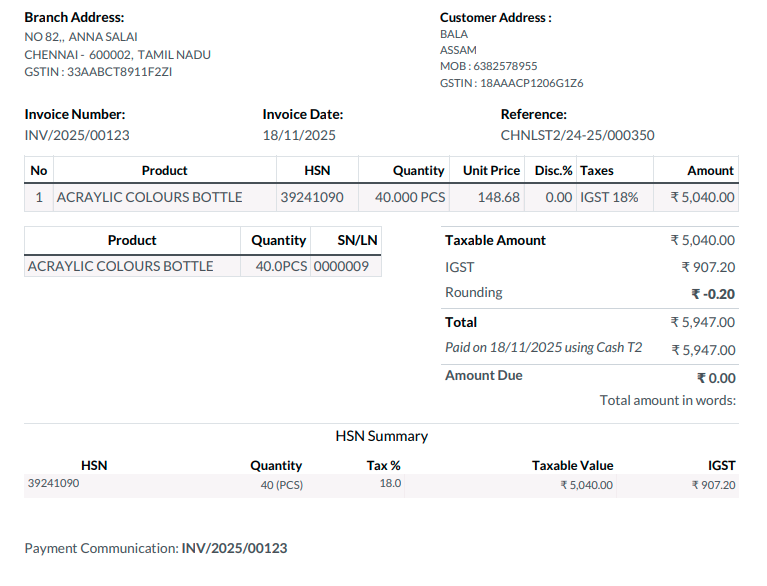
How to Manage and Generate GST Invoices in Odoo POS
A GST invoice in Odoo POS is one of the most important documents in any business that deals with taxable goods or services. It not only ensures compliance with government tax laws but also gives buyers the ability to claim Input Tax Credit (ITC), reducing their overall tax burden.
A properly generated GST invoice brings clarity and transparency by displaying all tax components clearly, giving customers confidence in the transaction. It also acts as a legally valid proof of sale and becomes a vital document for audits, accounting processes, and filing accurate GST returns. By issuing a GST-compliant invoice, businesses strengthen their credibility and assure customers that the transaction fully adheres to legal tax standards.
Prerequisites for GST Invoice
Before a GST invoice can be generated in the Point of Sale module, certain conditions must be met to ensure compliance. The user needs to open the POS module, access the Orders section, and verify customer details under the Customers menu. The GST invoice can only be created if the selected customer has their GST Treatment configured as “Regular Business – Regular” and also has a valid Tax ID associated with their profile. These prerequisites form the foundation for generating a valid GST invoice during billing.

Enable “Display Invoice Number”
For businesses that want the invoice number printed directly on the POS receipt, Odoo POS provides a simple configuration option. By navigating to the Point of Sale menu, opening Configuration, and accessing Settings, the user can choose the appropriate POS terminal from the dropdown.
Under the POS Extended Receipt section, enabling the “Display Invoice Number” setting ensures that the invoice number becomes visible on the final printed POS receipt. This helps maintain clear records and makes it easier for both the business and the customer to reference the invoice at any time.

Adding Products to the POS Cart
Once the POS system is launched, the billing process begins by adding products to the cart. Odoo POS supports efficient product entry through multiple methods such as typing the product code, scanning the lot barcode, or scanning any of the available multi-barcodes. As soon as the product is entered, it appears automatically in the POS cart, and the cashier can adjust the quantity as needed
Select Customer in POS Cart
To generate a GST-compliant invoice, it is essential to link the correct customer to the POS order. This is done by clicking the Customer Profile button in the POS cart. The system opens the customer selection screen, allowing the cashier to search for the customer using their name, mobile number, or address. After the GST-registered customer is selected, the POS order is associated with their profile so that the tax invoice reflects the correct customer details.
Finalize the Transaction
When all details in the cart are verified, the cashier proceeds to payment by clicking the payment mode button. The GST invoice option is selected at this stage, followed by choosing the preferred payment method. Once the transaction details are confirmed, clicking the Validate button completes the sale. This action officially triggers the GST invoice generation in Odoo POS.
GST Invoice Validation
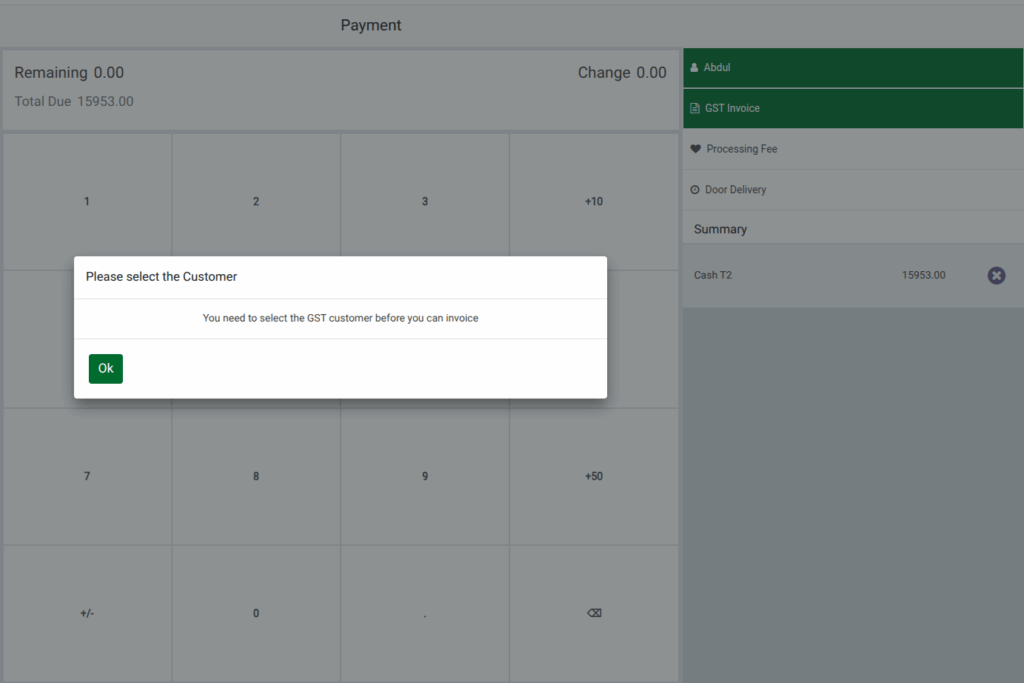
Odoo POS includes built-in validation to prevent invoice errors. If the cashier attempts to generate a GST invoice for a customer who does not have a valid GST ID, the system stops the process and displays a warning message saying, “You need to select the GST customer before you can invoice.” This ensures that GST invoices are only issued to eligible customers. The transaction cannot continue with GST billing unless an appropriate GST-registered customer is selected.

Bill Receipt and GST Invoice Generation
Once the order is validated, Odoo POS automatically creates both the bill receipt and the GST invoice. These documents are instantly available for printing and review. The cashier should confirm that all details—particularly the unique invoice number—are correctly displayed on both the printed receipt and the GST invoice. This step ensures complete compliance with GST requirements and provides the customer with accurate documentation for tax and purchase records.