How to Create a Vendor Return in Odoo
Vendor Return allows a business to send back defective, damaged, or incorrect products to the supplier, ensuring that only quantity items are kept in stock. Returning unwanted or excess inventory helps manage storage space efficiently and reduces holding costs.
Navigation to Vendor Return
- Navigate to Inventory → Operations → Vendor Return.
- Click on the + New button to start creating a new vendor return.
Select the Mandatory Fields in Vendor Return
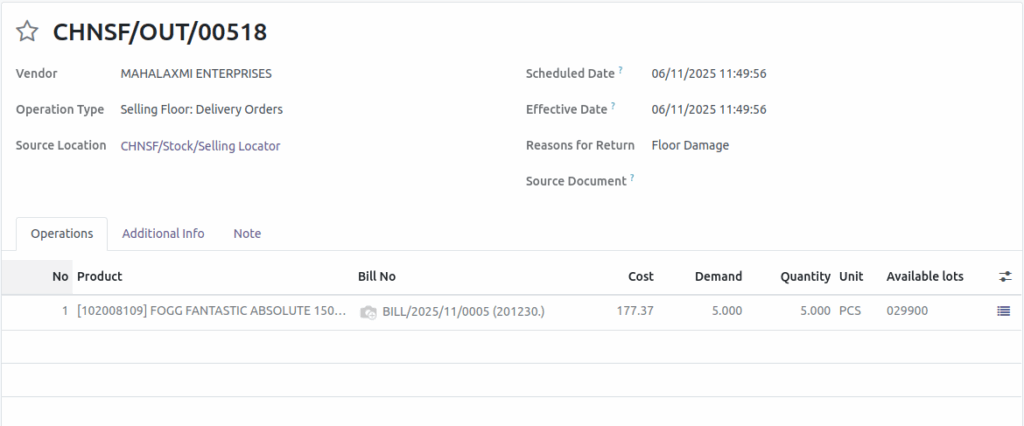
- Select the Vendor in the respective field.
- The Return for Return field is a mandatory; please enter a value.
Select the Basic Field
- You can change the Operation type and source location
- Enter the Source Document is Optional

Note: Once you save a vendor return, a reference id is generated.
GR Bill Validation Occur in Vendor Return
- Selecting the GR Bill is mandatory.
- If the user attempts to proceed without choosing a GR Bill number, the system will trigger an invalid field validation error.

Select the GR Bill in Vendor Return
Then choose the corresponding product based on the vendor. The corresponding GR Bill will automatically be displayed in the Bill No. drop-down list. Enter the return quantity in the Demand field. The Unit of Measure for the product will also be displayed.

Once you click Mark as Todo, the status will change from Draft to Ready.
Validate the Vendor Return
Check the Product Availability field. If the product is available, proceed with the vendor return. If it is not available, we cannot validate the vendor return. Once you check, the demand and quanity must be the same. Click Validate to proceed with returning the product to the vendor.
Note: If the product traceability is set to No tracking available lots is will not displayed in the vendor return.
