How to Create a Dynamic Tax in Odoo
Managing taxes can be complicated, but Odoo makes it simple with dynamic tax configuration. This feature allows tax rates to be automatically applied based on conditions such as product category, transaction amount, or custom rules.
Instead of relying on fixed rates, businesses can use flexible, rule-based tax calculations, ensuring compliance with complex tax laws. With automation handling the calculations, you save time and reduce the risk of errors, making your tax management smarter and more efficient.
Create a Dynamic Tax Configuration
Getting started with Dynamic Tax Configuration in Odoo , Navigate to the Dynamic Tax module by going to Odoo → Inventory → Dynamic Configuration. Once you’re on the Dynamic Tax Configuration screen, click the “New” button to create a tax rule and start automating your tax calculations.
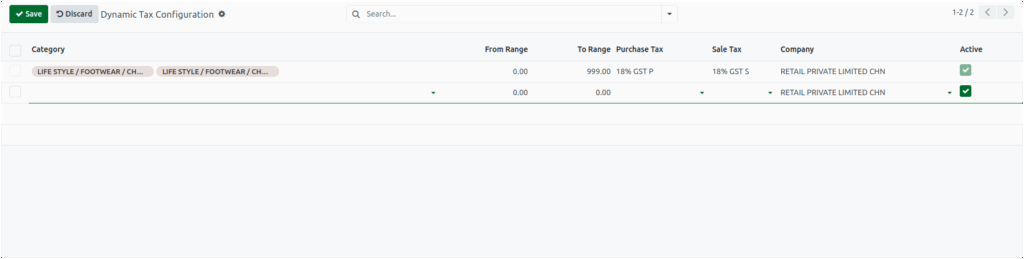
To create a dynamic tax in Odoo, it is essential to complete certain required fields to ensure proper functionality. These fields include: Category, Purchase Tax, and Sale Tax. If any of these fields are left unfilled, the system will display an alert upon clicking the Save button.
The Category field allows the selection of one or more product categories from a drop down menu, and the selected categories are automatically populated in the field.
This functionality enables the precise application of tax rules to specific product groups, ensuring that tax configurations are accurate and appropriately targeted.
Price Range Configuration in Odoo
The From Range sets the minimum price, and the To Range sets the maximum. Transactions within this range automatically follow the configured rules, enabling precise and flexible tax or discount application.
Validating Price Ranges for Dynamic Taxes in Odoo
Ensure the To Range is not lower than the From Range, or a validation error will appear. Once valid, products within the range automatically receive the Dynamic Purchase and Sales Taxes, overriding default taxes for precise, rule-based management.

Dynamic Purchase and Sales Taxes in Odoo
Odoo automates tax calculations for purchases and sales. Set the Purchase Tax for vendor bills and purchase orders, and the Sales Tax for POS transactions and customer invoices. The system automatically selects your current Company, and the Active checkbox lets you enable or disable the feature easily.
Implementation of Dynamic Tax Rules
After entering the required details, click“Save” to store the configuration. Odoo then automatically applies the correct dynamic taxes to all transactions matching the specified product category and price range, ensuring accurate, hassle-free tax management.
