How to create a Product Attribute in Odoo
Product Attribute
Attributes in Odoo are defining features or properties that describe and differentiate products from the other products Where the products have different values such as color, size, material. For example, a “Sandal”might have attributes like Color (Red, Blue, Green) and Size (6, 7, 8). Each unique combination of these attribute values creates a different product variant, such as Sandal – Red – 6 or Sandal – Blue – 8.
Purpose of Product Attribute
Attributes allow businesses to manage multiple variations of the same product efficiently, easier inventory tracking, and clearer product listings for customers. Instead of creating each variation manually, attributes help automatically generate all possible combinations, saving time and reducing errors in product management.
Components of an Attribute
Attribute Name – The name of the characteristic (e.g., Color).
Attribute Values – The possible options for the attribute (e.g., Red, Blue, Green).
Display Type – Defines how the values are shown in the interface (e.g., Radio, Select, Color).
Variants Creation Mode – Determines when variants are created:
Instantly – Created as soon as the attribute is added.
Dynamically – Created when the variant is needed.
Never – No variant created 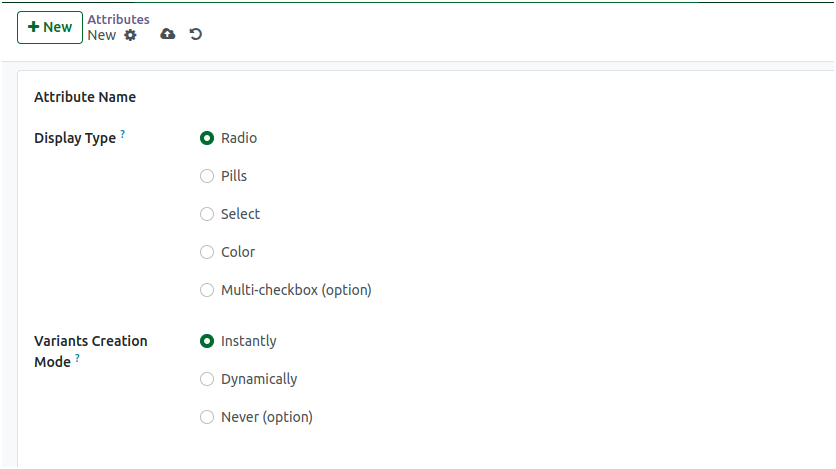
Creating a New Attribute
To create a new attribute, click the “New” button. This opens the attribute creation form where details such as the attribute name, display type, and attribute values can be entered.The “Display Type” field is preset to “Radio” by default.
The “Variants Creation Mode” field defaults to “Instantly.” Values can be added in the “Attribute Values” section.Multiple values can be added for each attribute. Attempting to enter duplicate values for the same attribute will trigger the following alert: “The operation cannot be completed: You cannot create two values with the same name for the same attribute.”
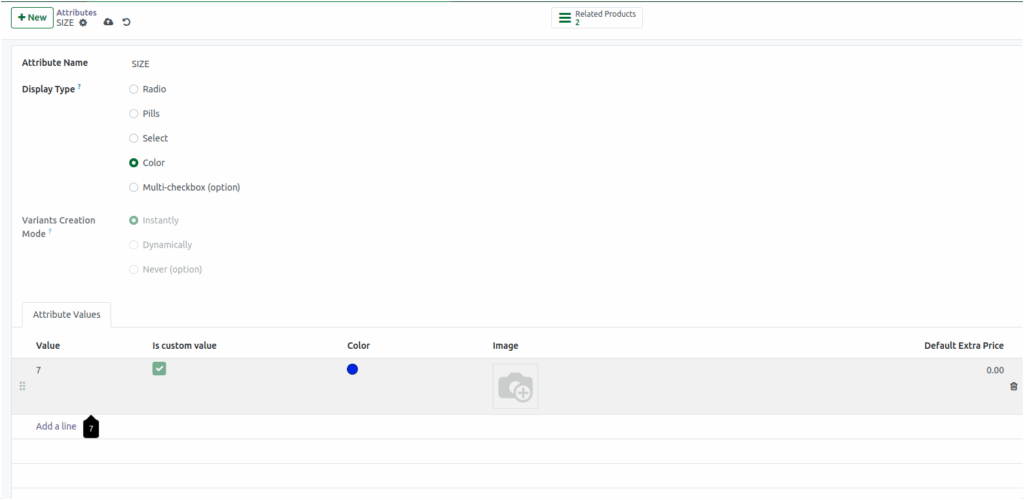
If the display type is set to ‘color’, then values can be assigned, and custom options such as a specific value, color, or image can be provided in the Odoo attribute and also related products are displayed in the attribute.
Integration with Product Master
Once you create attributes and values in Odoo, they immediately become visible in the Product Master and can be used to configure your products.
- Deleting attributes: You can only delete an attribute if it isn’t linked to any product.
- Protected attributes: If you try to delete an attribute that’s still associated with existing products, Odoo will show this message:
“You cannot delete the attribute because it is used on the following products.” - Previous associations matter: Even if you unassigned an attribute and its values from all products, deletion may still be restricted if it was previously linked to products.
Example: Product: T-Shirt

            Attributes and Values: Color: Red, Size: Small, Material: Cotton