How to View the Sales R Number Reports in Odoo POS
The Sales Representative Number Report in Odoo POS is a helpful tool that shows how each salesperson is performing. It provides a clear view of how many orders a salesperson has completed, the points they earned for each sale, the products they sold, and the total sales amount they achieved. This makes it easy for businesses to monitor performance, understand sales patterns, and reward sales achievements based on real data.
Accessing the Sales R Number Report
Open the Sales R Number Report from the POS module by navigating to Point of Sale → Reporting → Advanced Reports → Sales R Number. This report provides full access to information such as completed orders, earned points, and sales amounts for each salesperson. Viewing this data helps in managing team performance effectively and ensures transparency across all sales records.
Search, Filters, and Grouping Options
The report comes with powerful search and filtering features that help you quickly find the data you need. You can search by salesperson, order number, product name, or R Number.
Quick search filters like From Date, To Date, Salesperson, Product, and Company make it easy to narrow down records and view specific information. After choosing filters, you can apply them using the Search button or clear them with Reset.

For more detailed filtering, the search bar allows custom filters where you can select any field, apply conditions, and add multiple rules. You can also group the data based on fields such as Salesperson, Date, Product, R Number, or Order Reference. These grouping options help users analyze data by different categories. If needed, you can save search filters under Favorites and reuse them whenever required.
Details Captured in the Sales R Number Report
All the information shown in the Sales R Number Report comes directly from POS (Point of Sale) orders. Each time an order is created in the POS, the user selects the salesperson responsible for that transaction. Points are then assigned based on the sale, and these points appear in the report.
Due to this, the report gathers complete details such as the order number, salesperson name, total orders completed, points earned, and the total sales amount. This makes the Sales R Number Report a reliable tool for reviewing performance and understanding POS sales activity in a simple and organized way.

Each record in the Sales R Number Report gives a complete picture of a sales transaction. The Order No shows the unique number assigned to the sale, while the Salesperson field shows who completed that order.
The R Number represents the points the salesperson earned for that sale. Along with this, the Product Name tells you which product was sold, and the Sales Amount displays how much revenue was generated from that order. All these fields together help businesses track both sales quantity and salesperson efficiency.
Viewing and Analyzing Report Data
The Sales R Number Report provides multiple views to help users explore sales information easily. In List View, the data appears in a table where columns can be sorted or resized, making it simple to compare records. Kanban View organizes products under each salesperson using cards, making it easy to see what each salesperson sold at a glance.
The Pivot View allows deeper analysis by grouping data using drag-and-drop options, comparing totals, and reviewing sales counts, points, and amounts. Multiple measures such as Quantity, R Number, Subtotal, Discount %, Unit Price, and Points Remaining can be displayed to understand performance more clearly.
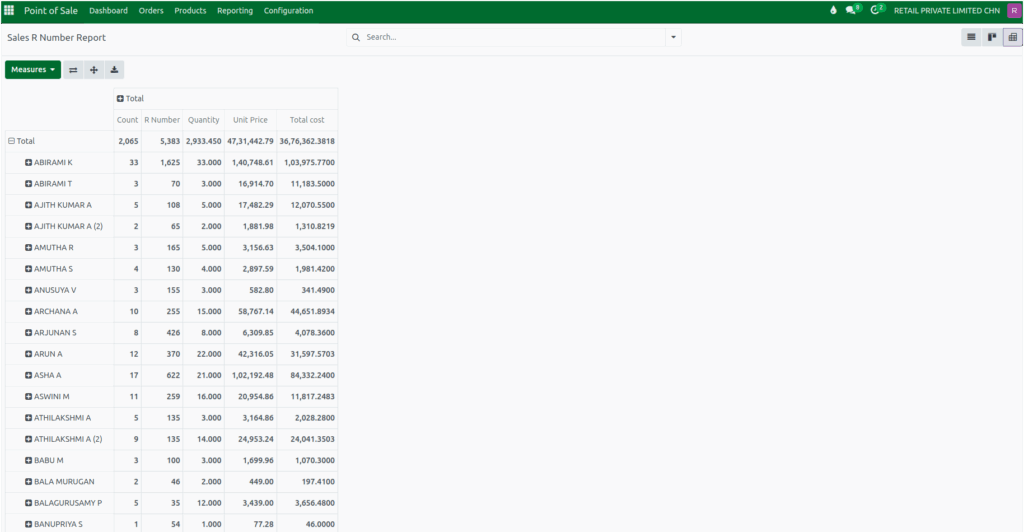
If the data needs to be used outside Odoo, the Export option allows the report to be downloaded in Excel format. This makes it simple to share, review, or analyze sales information offline. With all these tools combined, the Sales R Number Report becomes a powerful way to track sales performance, understand individual contributions, and manage POS operations smoothly.

