How to Apply a Discount to a Product in a Purchase Order in Odoo
Managing purchase orders efficiently is important for controlling costs in any business. In Odoo, applying discounts to products in a Purchase Order is simple and ensures your pricing stays accurate.
Create a Request for Quotation (RFQ)
To get started, open the Purchase module in Odoo. This will bring you to the Requests for Quotation (RFQ) page. Here, you can either select an existing draft RFQ or click + New to create a new one.
Select the vendor you want to purchase the items from. Add the required products to the order. Enter the quantity for each product.

Apply a Discount to a Product in PO
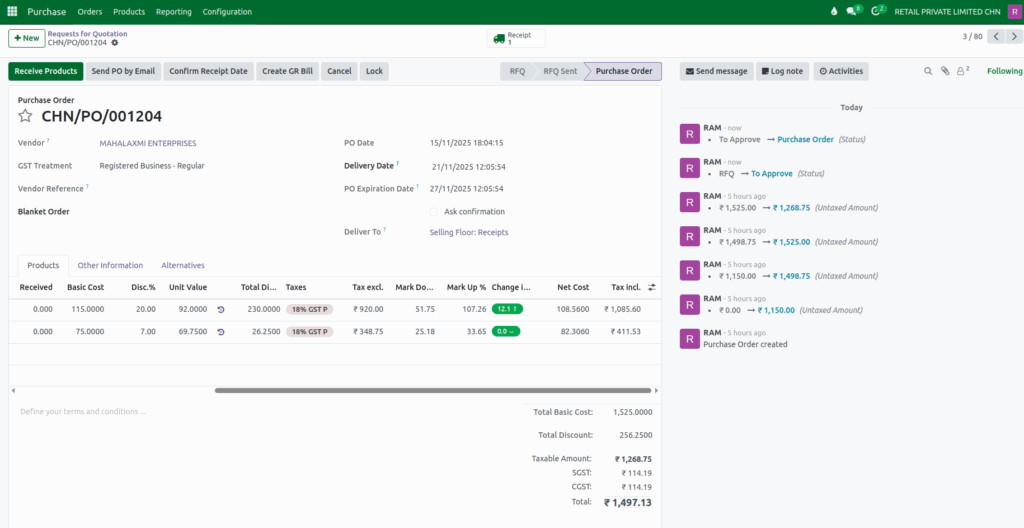
You can apply a discount to each product by entering the discount percentage in the Disc.% field on the product line.

Unit Value Calculation in a Product
When you enter a discount, Odoo automatically updates the Unit Value. The calculation uses the Basic Cost and the Discount Percentage.
Unit Value = Basic Cost – Discount %
Example:
- Basic Cost: 115
- Discount: 20%
Calculation:
Unit Value = 115 – 20% = 92
Total Discount Amount Calculation in a Product
Odoo also calculates the Total Discount Amount based on the Basic Cost, Discount %, and Total Quantity.
Total Disc Amt = (Basic Cost × Discount %) × Total Quantity
Example:
- Basic Cost: 115
- Discount: 20%
- Quantity: 10
Calculation:
Total Disc Amt = (115 × 20%) × 10 = 23 × 10 = 230
Total Discount Calculation in a Purchase order
You’ll also see the Total Discount displayed at the bottom right of the RFQ screen. Odoo also calculates the Total Discount based on the Total Discount for all the products.
Total Discount = Total Disc Amt of product 1 + Total Disc Amt of product 2
Calculation:
Total Discount = 230 + 26.25 = 256.2500
Final Calculation and Confirmation
After applying the discount, the unit price is updated, and Odoo will automatically recalculate other fields such as Net Value, Tax Excl., and Tax Incl. based on the new unit price.
Once all details are verified, click Confirm Order to confirm the Purchase Order.