How to Configure Nooru Yaru Odoo Promotion Program in POS
The Nooru Yaru promotion program in Odoo is a great way to reward loyal customers and encourage frequent visits. With this setup, every 100th bill becomes free, motivating customers to shop regularly and helping your store increase sales and build long-term loyalty. This type of reward system keeps customers engaged and creates a positive shopping experience.
Opening the Promotion Settings in POS
To configure the Nooru Yaru promotion, start by opening the Point of Sale module. From there, click the Configurations menu and select Settings. In the settings window, choose the POS terminal you want to apply the promotion to by selecting it in the Point of Sale field. Once the terminal is chosen, scroll to the POS Promotions section, where all promotion settings are available.

Setting the Promotion Details
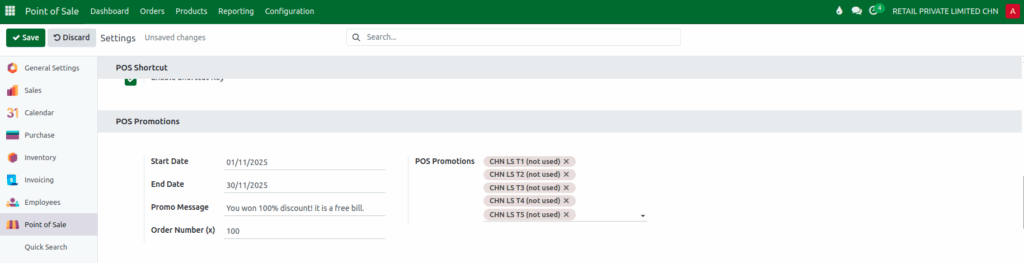
Inside the POS Promotions section, you can enter the details needed for the Nooru Yaru program. First, choose the Start Date and End Date to define how long the offer will be active. Then, enter the Promo Message, which will appear on the POS screen and on printed receipts when the promotion is triggered.
Set the Order Number (x) as 100, which determines how often the promotion applies, setting it to 100 means the promotion activates on every 100th bill. You can then select the POS terminals where this promotion should be applied.
Saving and Activating the Promotion
After entering all the required information, click the Save button to activate the promotion. The system will then begin tracking the number of orders processed at each selected POS terminal. This ensures that the promotion works correctly and triggers at the right moment.
How the Promotion Works at the POS
Once activated, the POS system automatically counts every order made on the selected terminal. When the total number of orders reaches the configured order number such as the 100th bill, the Nooru Yaru promotion is applied instantly.
The promo message, such as “It is free bill,” will show on the POS screen and will also print on the customer’s receipt. This automated process ensures the offer is applied accurately and only at the correct intervals, making it easy for both staff and customers.
