How to Configure Delivery and Expiration Dates in Odoo Purchase Order
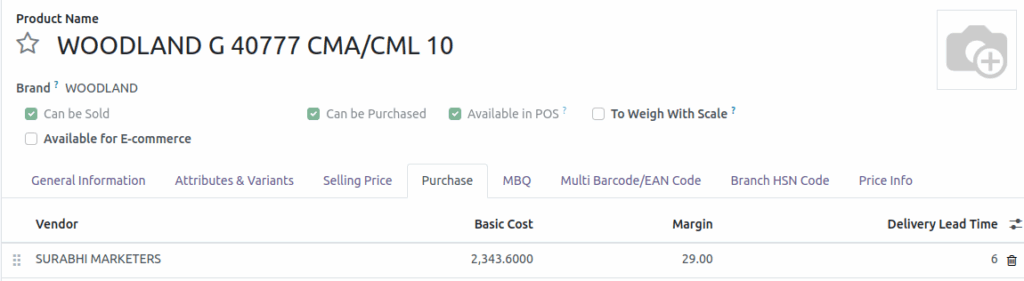
Based on the delivery lead time, the delivery date and PO expiration date will be automatically set in the purchase order. To configure the delivery date and expiration date, open the product master in the Inventory module and select the product. In the Purchase tab of the product, enter the Delivery Lead Time for the assigned vendor (by default, this is set to 6 days).
User Role and Navigation
Log in as a Purchase User. Open the Purchase module, and on the dashboard, click the New button to create a new RFQ.
Enter the Basic Details
Select the vendor from the list or search for one. Optionally, enter a vendor reference number. Select the products and specify their quantities. Verify the delivery location, then click Save.

Delivery and PO Expiration Dates Calculation
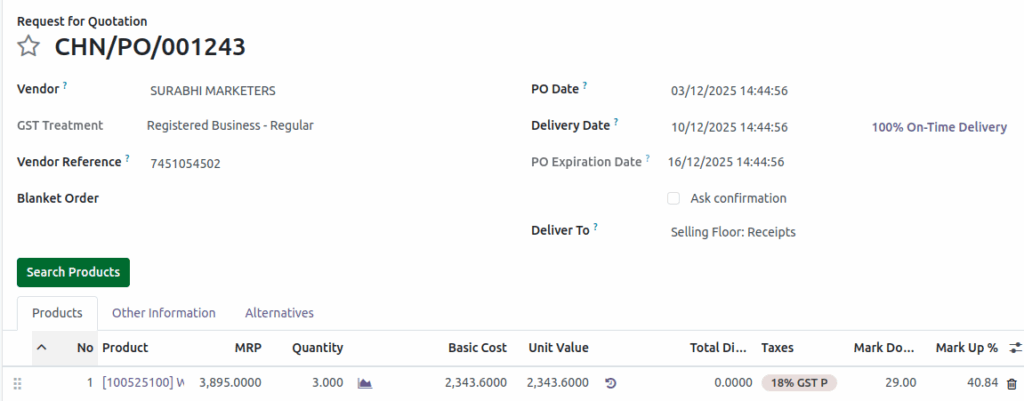
By default, the PO Date is set to the current date. Based on the product’s Delivery Lead Time, the Delivery Date is automatically calculated from the PO Date. The PO Expiration Date is also automatically set based on the Delivery Date and Delivery Lead Time.
If the selected products in the PO have different Delivery Lead Times, the system will use the maximum lead time.
Example

    • Purchase Order Date:03/12/2025
    • Delivery Lead Time: 6 days
    • The Delivery Date will be set 6 days after the PO date.
    • Delivery Date= 03/12/2025 (PO Date) +  6 days =09/12/2025
    • The Purchase Order Expiration Date will be set 6 days after the Delivery Date.
    • PO Expiration Date = 09/12/2025(delivery date) +6 days= 15/12/2025
Delivery Date Constraints
The Delivery Date cannot be earlier than the PO Date (it can be the same or a future date). Users can edit the Delivery Date, and the PO Expiration Date will update automatically based on the new Delivery Date and the lead times.