How to Configure Settings for Custom Features, Operations & Shipping in Odoo Inventory
Managing inventory efficiently is crucial for any business. Odoo Inventory allows you to customize settings to standardize operations, streamline workflows, and integrate with other systems like POS, Here’s a simple guide on configuring key inventory features, operations, and shipping methods in Odoo.
Setting Up Inventory Features
Inventory settings in Odoo help to across branches and systems. You can configure product-specific rules such as reorder points, units of measure, and categories. These settings ensure that stock transfers, receipts, and adjustments run smoothly while supporting financial tracking through cost centers and profit centers. To access these settings, go to the Inventory module, click on the Configurations menu, select Settings, and choose the features you want to configure.
Configuring Shipping Methods
Enabling shipping features in Odoo automates shipping cost calculation and invoicing. Odoo calculates shipping costs during sales orders or checkout based on the rules set for each delivery method. Shipping fees, whether fixed or rule-based, are added to the order total, and delivery charges are linked to a delivery product for accurate invoicing and accounting. If carrier integration is enabled, Odoo can fetch real-time shipping rates from carriers such as UPS or FedEx, making shipping management faster and more precise.

Configuring Inventory Operations
Odoo allows you to manage received goods efficiently. You can view the actual quantities received against purchase orders or transfers, helping verify what was delivered versus what was expected. Once items are received, they can be allocated to specific storage locations, orders, or production batches to ensure accurate stock placement. These features validate delivery accuracy, enable immediate inventory updates, support order fulfillment or production, and help identify any discrepancies that need follow-up.
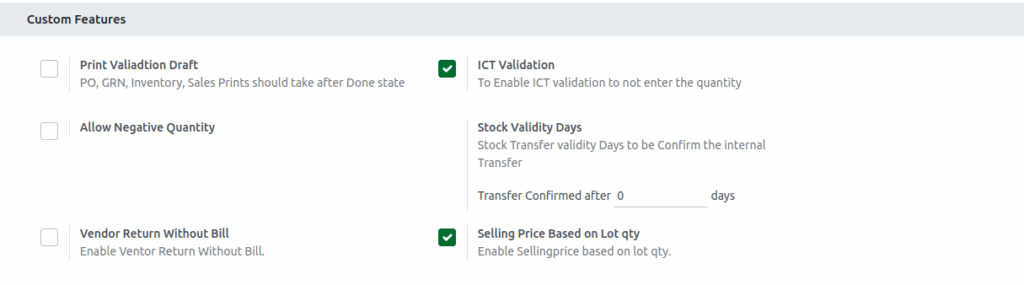
Odoo also lets you control other operational settings. You can restrict printing of purchase orders, goods receipts, inventory, or sales documents until they are in the Done state. This prevents printing incomplete drafts, maintains accuracy, and ensures compliance with audit requirements. Additionally, options like allowing negative stock can help continue sales even if items are not yet received, while enabling vendor returns without a bill allows faster processing of damaged or incorrect goods. These features should be used carefully and monitored to maintain inventory accuracy.