How to Create POS Product Categories in Odoo POS
Creating POS product categories in Odoo POS is an important step for organizing products and making the POS interface easier for cashiers to navigate. These categories help group similar items together so they can be quickly located during sales operations, improving both speed and accuracy at the counter.
Creating a New POS Product Category
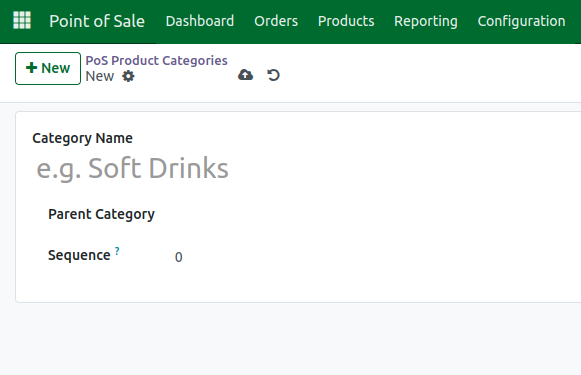
To create POS product categories, start by going to the Point of Sale module and opening the Products section. From there, select POS Product Categories and click Create. Enter a category name, choose a parent category if you want a hierarchical structure.After filling in the details, click Save to create the category.
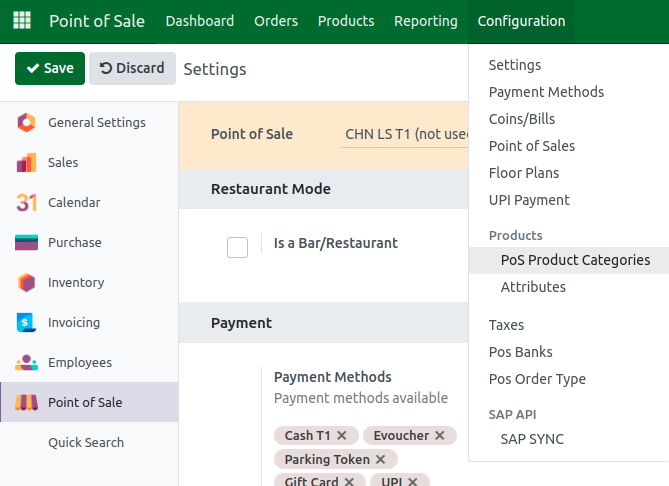
Assigning Products to a POS Category
After creating the category, you can assign products to it by opening the Products menu under Point of Sale, selecting a product, and choosing the appropriate POS Category from the available options. Once assigned, save the product.
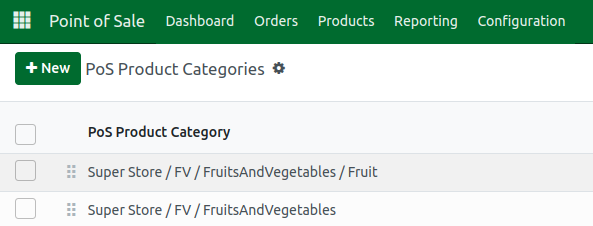
Configuration of POS Product Categories
Odoo allows additional configuration for POS product categories under the PoS Interface settings. Here you can find options such as Restrict Categories. The Restrict Categories option lets you select which product categories are available on a specific POS terminal. However, this restriction can only be enabled when the POS session is closed, meaning you need to close your current session before applying this setting.
Once enabled and configured, only the selected product categories will be visible and accessible on that terminal, helping streamline the interface for specific store locations or types of sales.


Refreshing the POS Interface
If your POS session is already open, refresh or reload the session to see the new category appear on the POS interface. All products linked to that category will now display under it, making them easy to access during sale
Setting up POS product categories makes product selection faster, improves the user experience for cashiers, and keeps your POS system organized and efficient. It also allows for better grouping of items, which can be helpful for reporting and managing large inventories.
