How to View the Paymode Summary Report in Odoo POS
The Paymode Summary Report in Odoo POS provides a clear overview of sales based on the payment methods used by customers. It shows the total sales amount and the number of transactions for each payment type. This report helps businesses understand customer preferences, verify payments, and make informed financial decisions.
Accessing the Paymode Summary Report
To view the report, go to the Point of Sale module, click on Reporting, and select Paymode Summary Report. The report will display all relevant sales data categorized by payment methods, allowing you to analyze how customers pay for their purchases. It can be accessed anytime to monitor payment trends and review sales performance.
Filtering and Grouping Payment Data
The report allows filtering by date ranges or the current day to monitor payment trends in real time. Users can also group the data by company, payment method, POS session, location, order number, or cashier. This helps in analyzing performance across different stores, sales shifts, or individual employees. Quick search options make it easy to narrow down results by date, payment method, POS location, cashier, or company, giving a more targeted view of the data.

Details Captured in the Paymode Summary Report
Odoo calculates the Paymode Summary Report by grouping all sales transactions according to the payment method. The Total Sales Amount shows how much money was collected through a particular payment method. The Transaction Count tells you how many bills or orders were processed using that mode. These numbers help identify which paymode are most commonly used and how they contribute to your revenue.
The report includes important fields that provide useful information. The Date field shows when each transaction occurred and can be used to filter or group sales by specific days or date ranges. Payment Method indicates how the customer paid, whether it was cash, credit card, UPI, voucher, or other modes, helping you analyze payment preferences and reconcile payments.
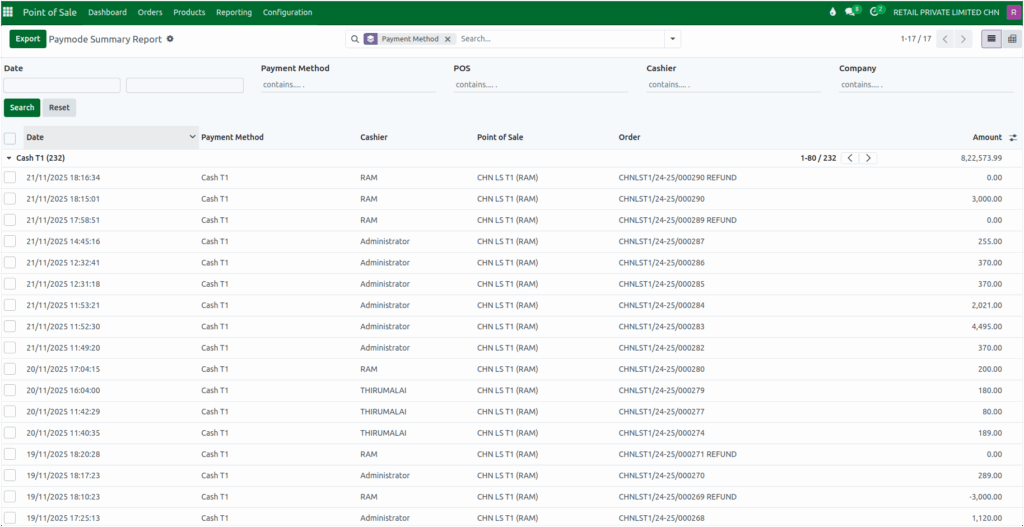
The Cashier field identifies the employee who processed the sale, which is useful for monitoring individual performance and accountability. Point of Sale (POS) shows the location or terminal where the transaction took place, helping compare sales across different stores or outlets.
Each sale is also linked to a unique Order number, making it easy to reference or audit specific transactions. Finally, the Amount field displays the total money received for each sale, giving a clear view of overall revenue.
Viewing and Exporting the Report
The report can be viewed in List View to see all transactions in a table format or in Pivot View to analyze data dynamically by grouping totals and counts across different fields.
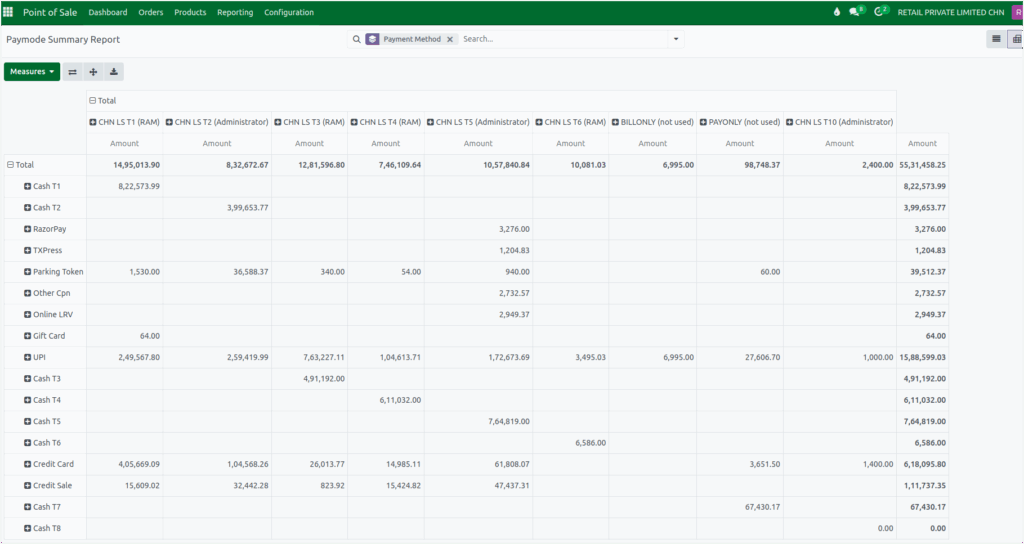
The Paymode Summary Report can be exported in Excel format so you can review the data outside Odoo or share it with your team. Before exporting, you can apply filters such as date range or payment method to ensure the exported file contains only the information you need. Simply use the Export option in the action menu to download the report.

