How to sell products with Excess Quantity in Odoo POS
Odoo’s Active Excess Quantity feature makes this process easier by allowing products to be sold in the POS even when the requested quantity is higher than what is currently available. Managing a retail environment often means dealing with situations where customers want to buy items that are low in stock or temporarily unavailable.
This helps businesses continue sales smoothly without interruptions, prevents delays at checkout, and automatically updates inventory to reflect negative stock levels when necessary.
Enable Active Excess Quantity
To activate this feature, open Odoo and go to the Point of Sale module. From there, navigate to Configuration and open Settings. Select the POS terminal you want to configure and scroll to the Custom Features section. Here, you will find the Active Excess Quantity checkbox. Once you enable it, your POS system becomes capable of processing sales that exceed the available stock.

The Active Excess Quantity option ensures that your Point of Sale system never slows down due to stock shortages. When enabled, it lets you continue selling products even if the available stock drops below zero. This gives cashiers complete freedom to process orders smoothly, even when stock levels are insufficient.
Start the POS Process
When you start using the POS interface, to add a product you can type the product code directly, scan the lot barcode, or scan any of the product’s multiple barcodes. Once a product is added, the system allows you to adjust its quantity just like any regular POS operation.
With the feature enabled, you can enter a quantity that is greater than the available stock for any product or specific lot. Instead of rejecting the sale or displaying warnings “Product having excess quantity”, Odoo POS completes the transaction and updates the On Hand Quantity accordingly. This means cashier can keep serving customers, and your system will reflect an accurate stock balance, showing negative quantities when required.

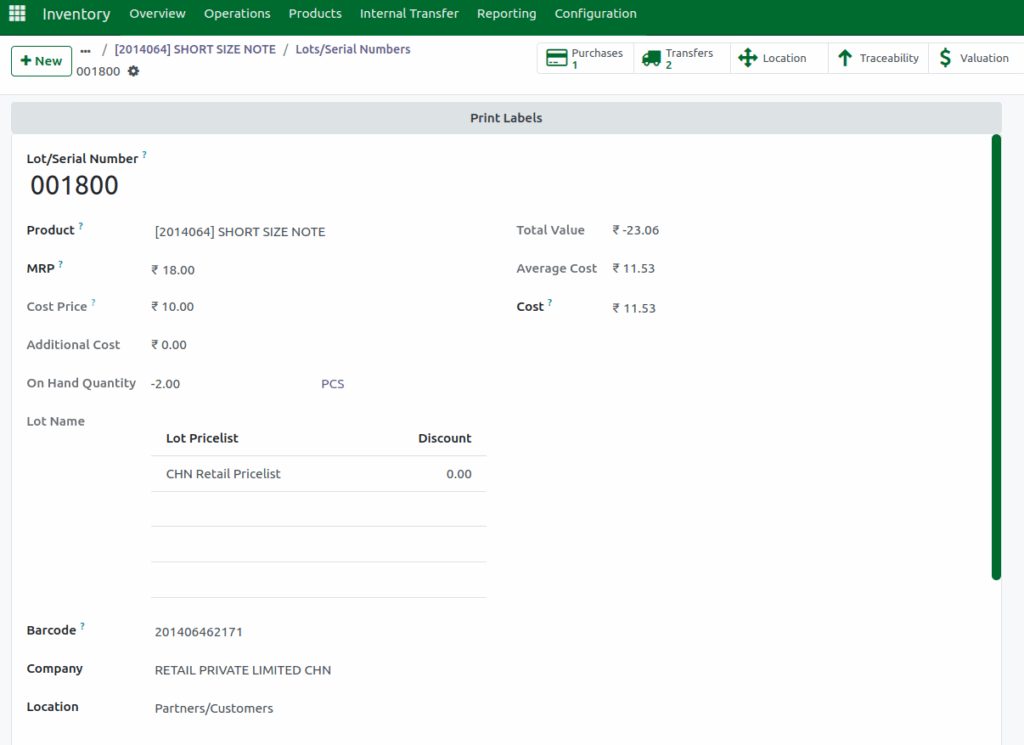
Example: You are selling a product such as a short-size note with Lot No: 001800. The lot has 8 units available in stock, but the customer wants 10 units. When the Active Excess Quantity feature is enabled in Odoo POS, the system allows you to complete the sale without any warning.
After the transaction is confirmed, Odoo updates the lot quantity automatically. Since you sold 2 more than what was available, the lot’s On Hand Quantity becomes –2, clearly showing the updated stock shortage in the system.
Completing the POS Transcation
Once the product quantity is entered, you can move to the payment screen. The POS will let you complete the transaction without any interruption. Choose the customer’s preferred payment method and click
Validate to finalize the sale. A bill receipt will be generated immediately, just like regular transactions.
Automatic Stock Adjustment in Product
After the sale is completed, Odoo automatically updates the product’s On Hand Quantity. If the sold amount exceeds the stock that was available, the system will display a negative stock level. This ensures that your inventory remains accurate and helps you plan future restocking based on real-time data.