How Lot Numbers Generated for Branded and Unbranded Products during Goods Receipt in Odoo
In GR lot numbers is generate for Branded and Unbranded product has a unique identifier for tracking and inventory. Prevents errors and ensures smooth processing of the GR by meeting system requirements for lot creation. Helps segment products for better inventory management and reporting.
Purchase Order Process
- Open the Purchase module in the Dashboard.
- Click the ‘New‘ button to create a new RFQ.
- Select the Vendor from the Vendor Field.
- Select the both Branded and Unbranded Product in the Product Field.
- After save the order, PO reference id is automatically generated.
- Click the Confirm Order to place the purchase order.

Creation Of Goods Receipt (GR)
- Click the Receive Product you will be automatically redirected to the GR page.
- Enter the Inward Register Number as required.
- After entering the Inward Register Number, save it.
- The Available Lots field will appear empty before you click Validate.

How lots number generate for Branded Product
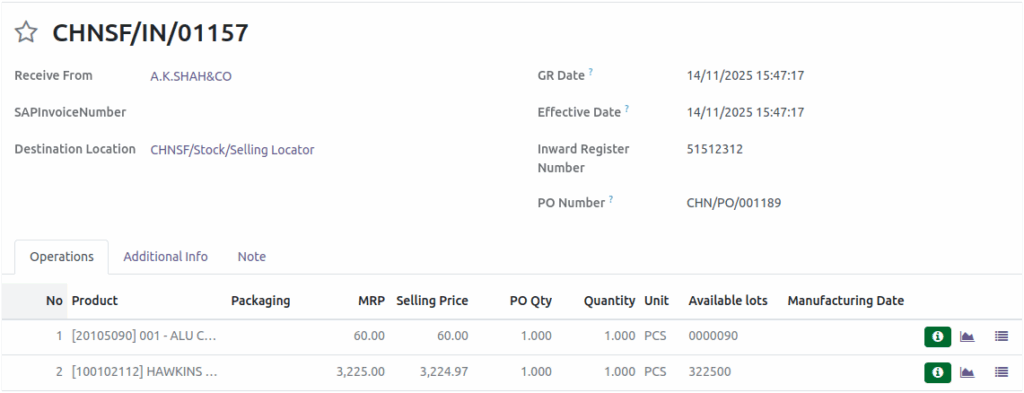
Once the Good Receipt (GR) is validate, a lot number will appear in the Available lots fields. Lot number is generate based on the MRP of the product.
For Example: when the MRP of the product is Rs. 2500, the generated lot number will be 250000.
How lots number generate for Unbranded Product
In unbranded Product, the total differ from branded product. Once validate, an error will occur:
“You need to supply a Lot/Serial number for product.”

- Create a lot mannual for the unbranded product click the Details operation.
- Click Create — a Create Lot/Serial Number pop-up screen will appear.
- Click Save and Close in the pop-up.
- Go back to the GR screen
- Click Validate to generate the lot.
- The generated lot will be displayed in the Available Lot field.