How Customer-Based Pricelists Changes Product Selling Prices in Odoo POS
Odoo’s Point of Sale system makes it easy to manage pricing dynamically by allowing businesses to assign specific pricelists to different customers. This ensures that the correct prices are automatically applied during sales, whether for retail or wholesale clients, helping streamline transactions and maintain consistent pricing across all sales channels.
Setting a Pricelist for a Customer in Odoo POS
In Odoo’s Point of Sale system, you can assign a specific pricelist to each customer so that the correct pricing is automatically applied during a sale. To do this, open the POS module and go to the Customers section from the Orders menu. Select the customer you want to configure, open the Sales tab, and choose the appropriate pricelist from the Pricelist field.

If no pricelist is assigned to the customer, the default pricelist configured in the POS settings will be used for their sales prices.
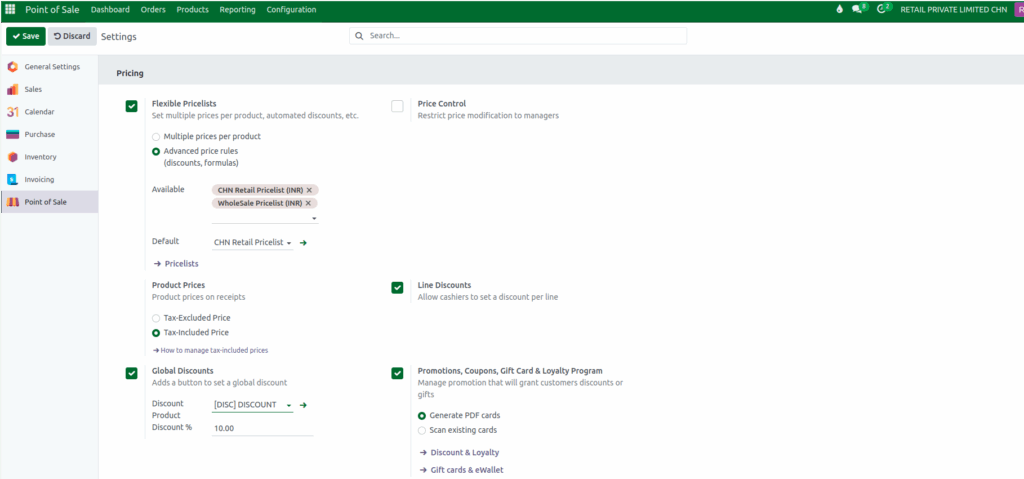
Once saved, this pricelist becomes the default for that customer whenever they make a purchase. However, for the pricelist to work inside the POS session, you must also enable it in POS → Configuration → Settings. Only the pricelists added in the POS settings pricing section will affect the selling price when that customer is selected during a transaction.
Managing Products and Customer Pricing in the POS Cart
Products can be added to the POS cart quickly and efficiently. You can type the product code, scan a lot barcode, or scan a standard EAN or multi-barcode. As soon as a product is identified, it appears instantly in the POS cart, ready for checkout.
Inside the POS cart, by clicking the customer profile button, you can search for the customer using their name, mobile number, or address. Once selected, the POS system automatically applies the pricelist configured for that customer. This means that the selling price of products in the cart will update based on the customer’s assigned pricelist. Only the products included in that pricelist will receive the adjusted pricing.
When a customer with a pricelist is selected, the system immediately updates the product prices to reflect that configuration.

For example, the product “TROLLEY SUITCASE BAYVIEW 67 BLACK” may appear as ₹12,057.50 under the retail pricelist. If you select a customer like Ravi, who has a wholesale pricelist assigned, the system automatically switches to wholesale pricing when that pricelist is configured for the product and updates the price to ₹11,262.50. This ensures accurate pricing and helps businesses manage retail and wholesale sales effortlessly.
Finalizing the POS Transaction
After reviewing the product prices and ensuring the correct customer and pricelist are applied, you can proceed with payment. Simply choose the payment mode, select the required method, and validate the order to complete the transaction. The system will then generate a bill receipt to complete the transaction.
With customer-specific pricelists, Odoo POS offers a more flexible and efficient way to manage pricing across different buyer groups, making the checkout process smoother and more accurate.

